Club Newsletter Software That Actually Fits How Clubs Work
Compare club newsletter software by privacy, ease of use, and cost. Find the right fit for HOA boards, hobby clubs, faith groups, and family lists in 2026.
Your club probably has the same problem most clubs have. The mailing list lives in somebody's personal inbox, half the members are buried in BCC, a few addresses bounce every month, and nobody can find the thread where someone answered the question everyone is now asking again.
That isn't a software shortage. It's a mismatch.
A book club, an HOA board, a church committee, and a family reunion group do not communicate the same way. Yet they keep getting pushed toward the same shiny platforms with the same feature grids. That's backward. When people ask me about club newsletter software, I don't start with features. I start with one blunt question. Does your group mostly broadcast, mostly discuss, or mostly coordinate by simple email?
Table of Contents
- Why Club Newsletter Software Feels Harder Than It Should
- The Three Main Types of Club Communication Tools
- What Actually Matters When You Compare the Options
- Matching Tool Types to Real Club Scenarios
- The Case for Simpler Email-Based Group Tools
- A Five-Minute Decision Framework for Organizers
- Choosing Your Club Newsletter Software and Common Questions
Why Club Newsletter Software Feels Harder Than It Should
Most volunteer organizers don't need more options. They need fewer bad ones.
The trouble starts when people treat every club like a tiny business. Then they recommend Mailchimp, Constant Contact, a Facebook group, a membership platform, a shared Gmail inbox, and maybe Google Groups. Technically, all of those can help. Practically, most of them solve the wrong problem.
Most clubs don't need more features
A lot of clubs run on a simple rhythm. One person sends updates. A handful of members reply. Everyone else just wants the message to arrive, stay readable, and remain easy to find later. That's not a marketing workflow. It's not a social network either. It's ordinary group coordination.
Historically, mailing lists were built for exactly this kind of communication. Early internet mailing lists grew out of the original SNDMSG email system, and major list software families like Listserv, Majordomo, and Listproc carried most mailing lists for years, which tells you this model isn't some niche workaround. It's durable infrastructure for group communication (historical overview of mailing list software).
The wrong tool creates fake complexity
If your woodworking club sends one polished monthly digest, a broadcast newsletter platform makes sense. If your HOA board needs archived back-and-forth discussion, that same platform becomes a headache. Replies go to one person, not the group. Context gets lost. Then somebody forwards a reply manually, and now you have two threads and no record.
Practical rule: If your members need to reply to each other, stop shopping like you're buying marketing software.
The oldest milestone in this space proves the point. LISTSERV, created in 1986 by Eric Thomas on BITNET, automated subscriptions, message distribution, digest mode, and archive access. Before that, list owners handled addresses manually and sent messages one by one or through rough forwarding methods (LISTSERV history and capabilities). That jump mattered because group communication breaks down fast when the organizer has to do everything by hand.
Start with communication style, not a feature checklist
When people get stuck, it's usually because they're comparing software categories as if they're interchangeable. They aren't.
You are usually choosing between:
- Broadcast tools for one-way announcements
- Two-way mailing lists for ongoing discussion
- Lightweight group-email services for simple private coordination
Once you sort your club into the right lane, the decision gets much easier.
The Three Main Types of Club Communication Tools
Here's the comparison most clubs should start with.
| Category | Communication Style | Member Effort | Best Fit | |---|---|---|---| | Broadcast platforms | One sender to many readers | Members usually just read | Clubs sending polished updates or announcements | | Two-way mailing lists | Members can reply to the whole group | Moderate, because behavior changes matter | Boards, committees, and discussion-heavy groups | | Lightweight group-email services | Simple shared group address through normal inboxes | Low, because members keep using regular email | Clubs that want private email coordination without extra logins |
Broadcast platforms
Think Mailchimp, Constant Contact, and MailerLite.
These tools are built for one-to-many sending. They shine when one person sends a newsletter and members mostly consume it. You get templates, branding, scheduling, and the kind of polished layout that makes a monthly club update look organized.
They break down when your group talks back. Replies often route to one inbox. Threads scatter. Archives are weak or secondary. If your club has committees, votes, or member discussion, a broadcast platform starts fighting your workflow.
Two-way mailing lists
Think Google Groups, Groups.io, and LISTSERV.
These are built for group conversation. Members can send to the list, and replies can reach everyone. That matters more than many organizers realize. Neutral club guidance increasingly separates one-way newsletters from two-way mailing lists because clubs often need controlled sender permissions, preserved threads, and reply-to-group discussion, not just announcements (club mailing list tools and category differences).
If you're comparing categories broadly, this overview of group communication tools is useful because it frames the options by communication behavior instead of marketing features.
Lightweight email-based services
This is the middle ground many clubs overlook.
These tools focus on a private shared email address that reaches the group, often without requiring members to create accounts, install apps, or learn a dashboard. That simplicity is a strength, not a compromise. For many neighborhood groups, family lists, and faith communities, the win is that everyone stays in Gmail, Outlook, or Yahoo and the organizer doesn't become accidental tech support.
They aren't ideal if you want newsletter design, donation forms, event registration, and a public member portal inside one system. But if your core need is reliable, private email coordination, they're often the cleanest answer.
What Actually Matters When You Compare the Options
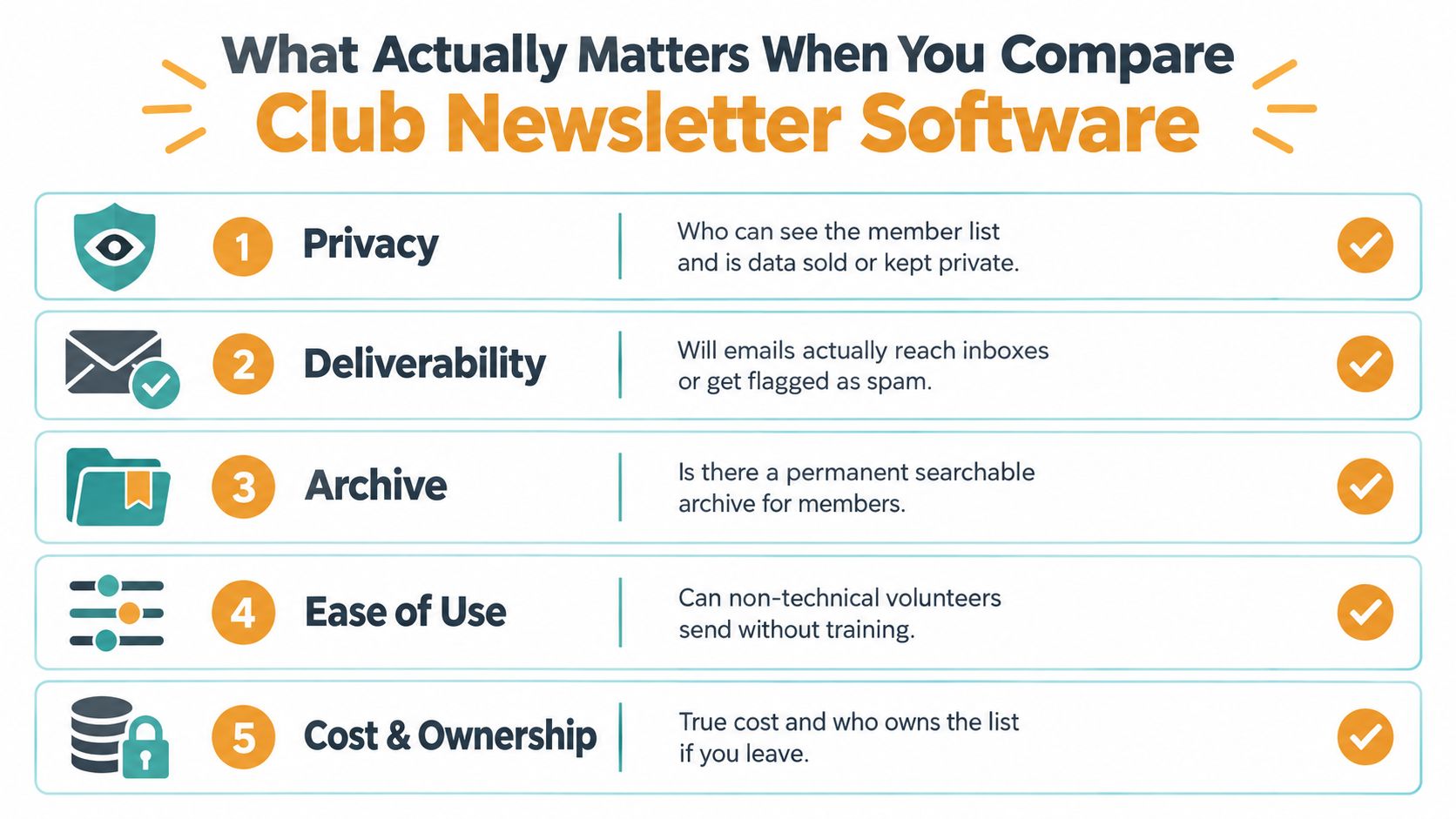
Feature lists waste time. These five factors decide whether club newsletter software will help your group or annoy it.
Here's the short version in visual form.
Privacy decides more than people admit
For HOAs, church groups, support circles, and family networks, privacy isn't a bonus feature. It's the floor.
You need to know who can see member addresses, whether members can contact the whole group without exposing everyone else's email, and whether subgroup sending is possible. Recent club guidance keeps circling back to the same practical questions: hide addresses, use a simple shared group address, test before sending, and avoid forcing people into new accounts. Organizers also keep rejecting tools that add friction through apps and logins when plain email would work better (club newsletter tool guidance focused on privacy and low-friction participation).
Ease of use has two sides
A lot of software is easy for the sender and annoying for everyone else.
If the secretary loves the dashboard but members miss messages, forget passwords, or refuse to log in, the tool failed. I care more about recipient effort than vendor polish. That's why simple email-first systems often outperform fancier platforms in actual volunteer groups.
If you're evaluating this category closely, this guide to a simple email list manager is worth reading because it focuses on what members and organizers have to do day to day.
The easiest software to administer is often not the easiest software to receive. Clubs need both.
Deliverability is not optional
Your message either lands in the inbox or it doesn't.
Independent benchmark guidance says a well-managed newsletter or group-email system should target inbox placement above 95%, keep hard bounces under about 2%, and hold spam complaints under 0.1%. The same benchmark summary notes that anything over 0.3% spam complaints is already considered serious by Gmail, which is why list hygiene and suppression handling matter so much (deliverability benchmarks for inbox placement, bounces, and complaints).
And platform choice matters more than vendors like to admit. Comparative testing found average inbox placement ranging from 94.4% for the best performer to 60.2% for the worst, with some services especially inconsistent at Microsoft-hosted inboxes (cross-provider deliverability comparison).
That gap changes the whole buying decision. Great templates mean nothing if the message never arrives.
A quick explainer helps here:
Cost and continuity separate smart choices from regrettable ones
Sticker price is rarely the price. Volunteer time counts. Training counts. Cleanup when the organizer steps down definitely counts.
Ask these before you commit:
- What are you really paying for. If all you need is a shared group address and reliable delivery, a full membership platform may be overkill.
- Who owns the list. If the mailing list lives in one person's personal inbox or private account, you've built a future handoff problem.
- Can the next volunteer run it. If the answer is no, skip it.
The best club newsletter software is the one your successor can inherit without a rescue project.
Matching Tool Types to Real Club Scenarios
Abstract advice only gets you so far. Real groups make this easier.
| Club Type | Size & Style | Top Priorities | Recommended Tool Type | |---|---|---|---| | HOA board | Small, private, discussion-heavy | Privacy, archive, continuity | Two-way mailing list | | Woodworking club | Larger, mostly monthly showcase | Design, one-way announcements, simple sending | Broadcast newsletter platform | | Faith community | Mixed announcements and replies | Privacy, accessibility, low friction | Lightweight group-email service or hybrid setup | | Extended family | Small, informal, warm conversation | Simplicity, no accounts, easy replies | Simple group alias or lightweight email-based tool |
HOA board
A board usually needs a private written record, searchable threads, controlled posting rights, and stable handoff when officers rotate out.
That points to a two-way mailing list, not a newsletter platform. An HOA board isn't doing audience marketing. It's maintaining a decision trail. The archive matters. So do permissions. If only board members should post, set it up that way from the start.
Woodworking club
A hobby club with regular project photos, meeting dates, and one monthly roundup usually doesn't need group discussion in every thread.
Use a broadcast newsletter tool. Let one or two organizers send polished updates. Keep replies directed to the organizer or a separate contact address. This is the cleanest fit when communication is mostly one-way and visual presentation matters.
If your members mostly admire, read, and maybe RSVP, don't burden them with a discussion list.
Faith community
This one sits in the messy middle. Many faith communities send weekly announcements, prayer requests, volunteer reminders, and occasional group replies. Some members are tech-comfortable. Many aren't. Privacy can be sensitive, especially with pastoral care or member support concerns.
That usually calls for a lightweight group-email setup or a hybrid model. One practical option is to use a broadcast newsletter for the polished weekly bulletin and a separate private email-based group tool for ministry teams, care circles, or leadership discussion. Tools such as Groups.io or Listava can fit the second job when the priority is private group communication through ordinary inboxes rather than heavy app adoption.
Extended family
Don't overengineer this.
An extended family spread across time zones usually needs warmth, simplicity, and continuity. Grandma shouldn't have to install anything. Cousins shouldn't have to create accounts they won't remember. Use a simple group alias, shared mailbox, or lightweight email-based list that preserves replies and keeps the address stable if one relative stops managing it.
A family list dies the moment it starts feeling like software.
The Case for Simpler Email-Based Group Tools
Most clubs should start lighter than they think.
The reflex now is to buy an all-in-one club platform before the group has proven it needs one. That sounds responsible. Usually it just creates another admin chore. Someone has to manage users, permissions, billing, onboarding, and the inevitable "How do I log in?" messages.
Tool sprawl hurts volunteers first
Volunteer-run groups pay for complexity in unpaid labor.
One more app means one more password reset. One more dashboard means one more handoff problem next year. One more feature bundle means people start paying for event modules, directories, or member portals they barely touch.
For plenty of clubs, the actual communication pattern is simple:
- One coordinator writes most messages
- Members read in their normal inbox
- Some replies should go to everyone
- Addresses should stay private
- The list should survive leadership turnover
That's an email problem, not a platform problem.
Simplicity is often the more durable choice
I like all-in-one systems when a club clearly needs dues, event registration, public pages, and structured membership workflows in one place. But clubs often buy that stack before they even have a dependable mailing process.
Start with the simplest reliable communication layer first. Run it through a real cycle of meetings, announcements, reminders, and replies. If a concrete gap appears, such as dues collection or event management, then add software for that gap.
Buy heavier software only when a real workflow breaks. Not when a sales page suggests one might.
Simple email-based group tools are boring in the best way. They work in familiar inboxes, reduce member friction, and keep the organizer from becoming a part-time systems administrator.
A Five-Minute Decision Framework for Organizers
You can sort this out quickly if you answer four questions in order.
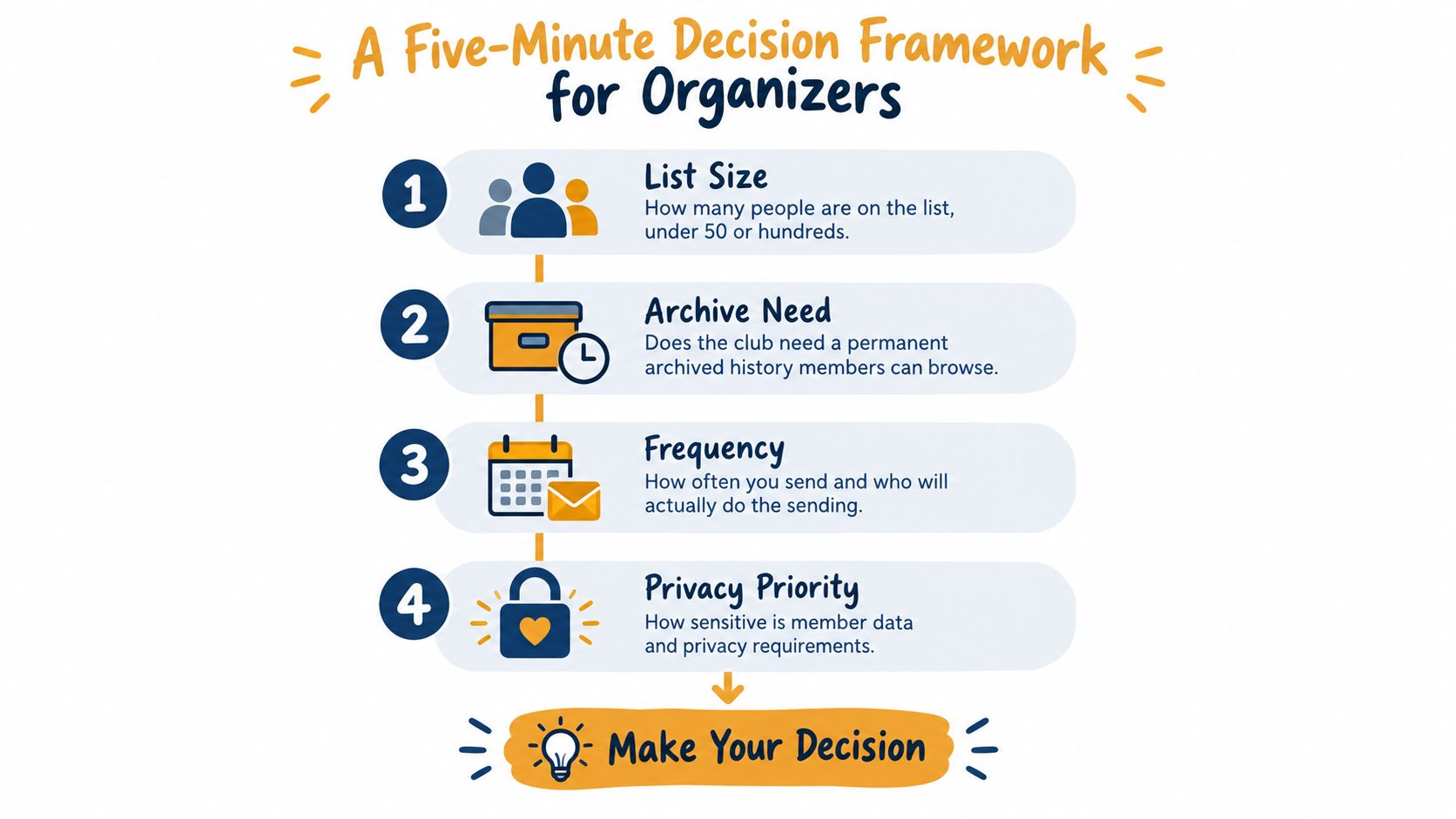
Ask these in sequence
-
How many people are on the list?
If it's a small group, plain email behavior matters more than advanced marketing features. If it's a larger audience getting polished monthly updates, a broadcast tool starts making more sense. -
Do you need a permanent archive?
If past messages need to stay searchable for future officers, board members, or committee leads, lean toward a two-way mailing list or another tool with stable shared history. -
Do members reply to each other or only to the sender?
This is the fork in the road. Group replies mean mailing list or lightweight group-email service. One-way announcements mean broadcast platform. -
Do you have budget and volunteer patience for extra software?
If nobody wants to manage another system, choose the least demanding option that still protects privacy and preserves continuity.
The fastest way to decide
Use this rule set:
- Mostly announcements. Pick a broadcast newsletter platform.
- Ongoing discussion with records. Pick a two-way mailing list.
- Private coordination through normal inboxes. Pick a lightweight email-based group tool.
- Mixed needs. Split the jobs. One tool for polished announcements, another for internal discussion.
The common mistake is obvious. Organizers pick the richest feature set before they can name the communication problem they're solving. That's how a simple club ends up trapped in software nobody wants to maintain.
Choosing Your Club Newsletter Software and Common Questions
Here's the blunt summary.
If your club behaves like a publisher, use a broadcast platform. If it behaves like a committee, use a two-way mailing list. If it behaves like a real-world group of busy people who just want email to work, use a lightweight email-based service.
For a wider look at categories and tradeoffs, this overview of email list software is a useful companion if you're still deciding where your group fits.
The practical recommendation
I would choose like this:
- Newsletter-only club updates. Mailchimp, MailerLite, or Constant Contact.
- Board, committee, or discussion-heavy groups. Google Groups, Groups.io, or LISTSERV-style mailing list tools.
- Private, low-friction group coordination. Shared aliases, simple managed email lists, or similar inbox-first services.
That last category gets underrated because it isn't flashy. It also solves a lot of real club problems.
Common questions organizers actually ask
How do I migrate from a CC or BCC list without losing people
Clean the list first. Remove dead addresses, confirm who still wants updates, and move the group under one shared address or managed list. Then send one clear transition email from the old method explaining what will change and where replies will go.
Don't switch systems and hope everyone figures it out.
What about members who don't use email much
If they don't use email much, no software will magically fix that. Pair your email system with one offline backup, such as phone trees, printed notices, or a lobby bulletin board. Keep the digital system simple so occasional email users aren't shut out by apps, passwords, or complicated portals.
Are free tiers safe for clubs
Sometimes. But free is rarely free of tradeoffs.
The question isn't whether the monthly fee is zero. It's whether the tool handles privacy properly, gives you stable ownership of the list, and won't collapse into confusion when leadership changes. If a free option traps your club inside one person's account, it's expensive in the long run.
How do we keep archives accessible to future board members
Don't let the history live in somebody's personal Gmail account. Use a shared system with an organization-owned address, a preserved archive, and documented handoff steps. Write down who controls the list, how members are added, and where old messages live. Future volunteers will thank you.
Club newsletter software isn't hard once you stop pretending all clubs communicate the same way. Match the tool to the behavior. Broadcast, discuss, or coordinate. Pick one on purpose, and half the confusion disappears.
If your club needs a private shared group address that works through ordinary email, Listava is built for that middle ground. It lets organizers manage a group email list without forcing members into accounts, apps, or dashboards, which is exactly what many HOAs, hobby clubs, faith groups, and family coordinators need. If that sounds like your situation, take a look at Listava.