Email List Hosting Explained and Compared for Organizers
Compare email list hosting options for community organizers. Learn self-hosted, hosted, and platform trade-offs and pick the right setup for your group.
Your neighborhood association has a meeting tonight, and someone asks for the member list. The spreadsheet is on a former chair's laptop. Replies are going to a mixture of personal inboxes. One resident's address is visible to everyone because the last announcement went out by CC. Nobody knows whether the archive belongs to the association or to the volunteer who set it up.
That's not a messaging problem. It's an email list hosting problem. The host determines where member addresses live, who can send, how replies work, whether conversations remain private, and whether the list survives when the current administrator moves away. For volunteer groups, those decisions matter more than marketing automation, polished dashboards, or a long feature list.
Table of Contents
- What Email List Hosting Actually Means for a Community Group
- The Three Hosting Models in Plain English
- Side-by-Side Comparison of Hosting Approaches
- Privacy, Continuity, and Deliverability Trade-offs
- Which Hosting Model Fits Which Organizer
- Evaluating Your Current Setup and Migrating Safely
- Choosing the Right Hosting Approach for Your Group
What Email List Hosting Actually Means for a Community Group
A volunteer coordinator needs one dependable group address that reaches residents without asking them to install an app or create another account. Members should reply from Gmail, Outlook, Yahoo, or another ordinary inbox, while the association keeps control of its address list after the current chair steps down.
That arrangement is email list hosting. The service or server stores member addresses, receives messages sent to the group address, distributes them, handles subscriptions and removals, and may preserve an archive. Sending an email is only the visible part. Hosting determines where the list lives and who can keep it running.
Mailing lists have been a formal Internet practice since the late 1980s. The Internet history record for mailing lists points to RFC 1118 from September 1989, while RFC 2919 later standardized the List-Id header for structured list identification. For an organizer, the practical lesson is straightforward: the list address and its history are group infrastructure, not a temporary shortcut inside one volunteer's inbox.
The questions organizers actually need answered
A volunteer does not need a customer-journey dashboard. They need clear answers:
- Who controls the list? Can the association transfer administration when the chair changes?
- Who can see member addresses? Does a group reply expose everyone's contact details?
- Who can send? Can any member post, or must an administrator approve messages?
- Where is the history? Can the group find past notices and decisions later?
- What happens during a dispute? Can a moderator stop unwanted replies without closing the whole list?
- What happens if the provider disappears? Can the group export members and archives?
Continuity depends on more than keeping the address active. The group needs documented administrator access, a recoverable member list, and an archive that does not belong solely to a departing volunteer. A community may not need a formal public archive, but it does need records the next organizer can retrieve.
Organizer's rule: If the list would stop working when one person loses access to an inbox, it isn't properly hosted.
Hosting also affects trust. Academic GDPR guidance for mailing lists recommends that recipients' names and email addresses not be visible to one another, as explained in the University of Ghent guidance on mailing-list privacy. Privacy is therefore a structural requirement, not a courtesy. A properly configured group address can distribute a message while keeping the member roster hidden, which matters for HOAs, faith communities, family groups, and volunteer organizations.
For groups that refuse app adoption, email remains the practical access point. The right hosting arrangement keeps participation inside familiar inboxes while giving the organization control over membership, moderation, records, and succession. That is the standard to apply before comparing hosting models.
The Three Hosting Models in Plain English
There are three practical ways to host a community email list. Each puts a different person in charge of the technical work.
Self-hosted means the group runs the machinery
With a self-hosted list, the organization runs mailing-list software on a server it owns or rents. Mailman and Sympa are familiar examples. The administrator controls the software, member data, sending domain, archive policy, and moderation rules.
That control comes with a job description. Someone must maintain the server, apply updates, manage backups, monitor delivery failures, protect administrator accounts, and understand enough email infrastructure to diagnose problems. A technically confident treasurer or board member may handle that work. A volunteer who only wants to add a new resident probably won't.
Self-hosting makes the group responsible for the whole chain. If the server is misconfigured or neglected, members experience the consequences as missing messages, spam-folder delivery, or unreliable moderation. The group gains ownership, but ownership requires active care.
Hosted list services focus on the list itself
A hosted list service provides mailing-list infrastructure as its main product. The provider operates the server and usually handles member storage, list address management, archives, moderation tools, bounce processing, and routine maintenance.
The organizer's job becomes operational rather than technical. They manage who belongs on the list, decide who may post, approve moderated messages, and document access for the next administrator. The provider handles the underlying service.
This model fits groups that want a durable discussion list without hiring or becoming volunteer system administrators. It also supports the traditional email workflow: members write to one address, receive group messages in their usual inbox, and don't need to adopt a separate community application.
Third-party platforms add list features to a broader product
A third-party platform treats the list as one part of a larger system. Mailchimp, HubSpot, and similar platforms may combine contact management, templates, analytics, automation, forms, and campaign tools with email distribution.
That's useful for a marketing team managing promotional campaigns. It can be unnecessary for a club announcing a meeting or an HOA sending a maintenance notice. The organizer may inherit account roles, consent settings, templates, tracking preferences, subscription categories, and a dashboard that members never use.
The platform usually manages delivery infrastructure, while the organization manages contacts and content. Member participation may remain email-based, but the administration experience is built around the platform's broader business model. That difference matters when your group needs simple continuity rather than campaign machinery.
Side-by-Side Comparison of Hosting Approaches
For a volunteer organizer, the deciding question is simple: can the group run the list reliably after the person who set it up leaves? Feature count matters less than handover, privacy, and the ability to keep using email without asking members to adopt another app.
| Criterion | Self-Hosted | Hosted List Service | Third-Party Platform | |---|---|---|---| | Setup effort | High. A capable administrator installs and configures the software. | Low to moderate. The provider runs the infrastructure. | Low for basic sending, but account and compliance settings can become involved. | | Ongoing admin burden | High. The group handles updates, backups, security, delivery, and moderation. | Moderate. Volunteers manage members, posting rules, and moderation. | Moderate. Volunteers manage contacts, permissions, campaigns, and platform settings. | | Cost predictability | Depends on the server, domain, maintenance, and person doing the work. | Usually easier to budget because the service is specialized. | May depend on contacts, sending volume, add-ons, or features. | | Member data ownership | The group has the strongest direct control, provided it maintains the server and backups. | Data sits with the provider under its privacy and export terms. | Data sits inside a broader commercial platform and connected ecosystem. | | Moderation control | Deep control, but configuration requires expertise. | Strong list-focused controls designed for group communication. | Often strong for campaigns, but discussion workflows may feel secondary. | | Deliverability reputation | The group must protect and monitor its sending reputation. | The provider handles much of the delivery operation. | Shared platform reputation and campaign policies affect sending. | | Continuity after an admin change | Good if credentials, documentation, and backups are maintained. Poor if one person holds everything. | Good when multiple administrators and exports are documented. | Variable. Continuity depends on account ownership, billing, and platform policy. | | Best fit | Organizations with technical ownership and a strong need for control. | Volunteer groups that need dependable email-native communication. | Groups that need campaigns, automation, or broader contact management. |
Self-hosting gives the group the most direct control, but it also leaves every technical failure on volunteer shoulders. A hosted list service places more responsibility with the provider and keeps the organizer focused on members, posting rules, and moderation. A third-party platform makes sense for campaigns, forms, and contact management, yet its dashboard and tracking features can distract from a straightforward group conversation.
Use this comparison of mailing-list software options to identify possible products, then judge the hosting model separately. A volunteer club may never use automation, segmentation, or visual templates. It will use member additions, group replies, moderation, archives, and administrator handover.
What deserves the most weight
Setup effort matters once. Ongoing burden matters every month. A system that takes an afternoon to configure but creates recurring technical work is a poor choice for a volunteer board.
Continuity deserves a clear test. Record the list owner, billing contact, administrator accounts, export procedure, and archive location. A service is durable only when another volunteer can recover and operate it without relying on private knowledge.
Deliverability is part of routine administration. The cited benchmark describes healthy programs as keeping hard bounce rates below 2%, with top-performing lists often between 0.5% and 1.5%, while best-in-class inbox placement reaches about 93% or higher. These figures come from the Validity Email Deliverability Benchmark. A community list does not need to chase a marketing leaderboard. It does need clean addresses, bounce handling, and sensible sending practices.
Privacy, Continuity, and Deliverability Trade-offs
Volunteer organizers feel three trade-offs immediately: who holds the addresses, whether the list survives leadership turnover, and whether messages reach inboxes instead of spam folders.
Self-hosted hosting wins on direct ownership. The group decides where member data lives and how archives are stored. It also bears responsibility for access control, backups, security, and deletion. If the only knowledgeable administrator leaves, theoretical ownership won't help unless someone else can operate the system.
Hosted list services win on practical continuity. The provider keeps the service running, while the organization can assign more than one administrator and preserve the list identity through volunteer changes. The group still needs to review the provider's privacy terms and export options, but it avoids making one volunteer responsible for server maintenance.
Third-party platforms win on campaign capability. They're often the easiest choice for newsletters, fundraising appeals, and structured outreach. Their weakness appears when a group wants a simple, persistent conversation address without dashboards, tracking, or a platform-centered member experience.
| Trade-off | Self-Hosted | Hosted List Service | Third-Party Platform | |---|---|---|---| | Address privacy | Strong control, dependent on correct configuration. | Usually suited to list privacy, subject to provider policy. | Must be checked carefully, especially where connected tools and tracking are involved. | | Leadership turnover | Fragile if one volunteer controls the server. | Manageable with shared administration and documentation. | Manageable only if account ownership and billing are institutionalized. | | Archive continuity | Strong when the group maintains portable backups. | Strong when archives and exports are supported. | Variable, and campaign archives may not represent a real discussion history. | | Deliverability work | The group owns reputation, authentication, and bounce handling. | Provider handles much of the infrastructure, while the group maintains list quality. | Provider infrastructure helps, but shared sending policies and engagement requirements still apply. | | Member friction | Low for members, higher for administrators. | Low for both members and ordinary list administration. | Low for email recipients, but higher for organizers and sometimes for signup workflows. |
List maintenance can't be treated as a once-a-year chore. The benchmark collection from BounceZero's email marketing statistics reports annual list decay around 20% to 30%, including a cited 22.5% yearly decay figure and another benchmark reporting at least 23%. It also reports that 30% of subscribers change their email address each year, while about 19.6% of addresses in submitted lists may be invalid or risky. Those figures explain why a smaller, actively maintained list can be more useful than a larger stale roster.
Mailbox providers also care about more than authentication. Guidance in the State of Email 2024 deliverability report emphasizes list hygiene, engagement, complaint control, SPF, DKIM, DMARC, and one-click unsubscribe expectations. For a community group, the operational answer is straightforward: remove dead addresses, respond to complaints, avoid sending to people who no longer participate, and choose a host that makes those tasks manageable.
Privacy rule: Never make every member pay for a convenience that exposes every member's address.
For privacy-focused selection criteria, this guide to private email lists is more relevant to a community organizer than a campaign feature matrix.
Which Hosting Model Fits Which Organizer
Start with the people who'll administer the list, not the people who'll receive it. Members usually want the same thing across all groups: a message arrives in the inbox they already use, and replies behave predictably.
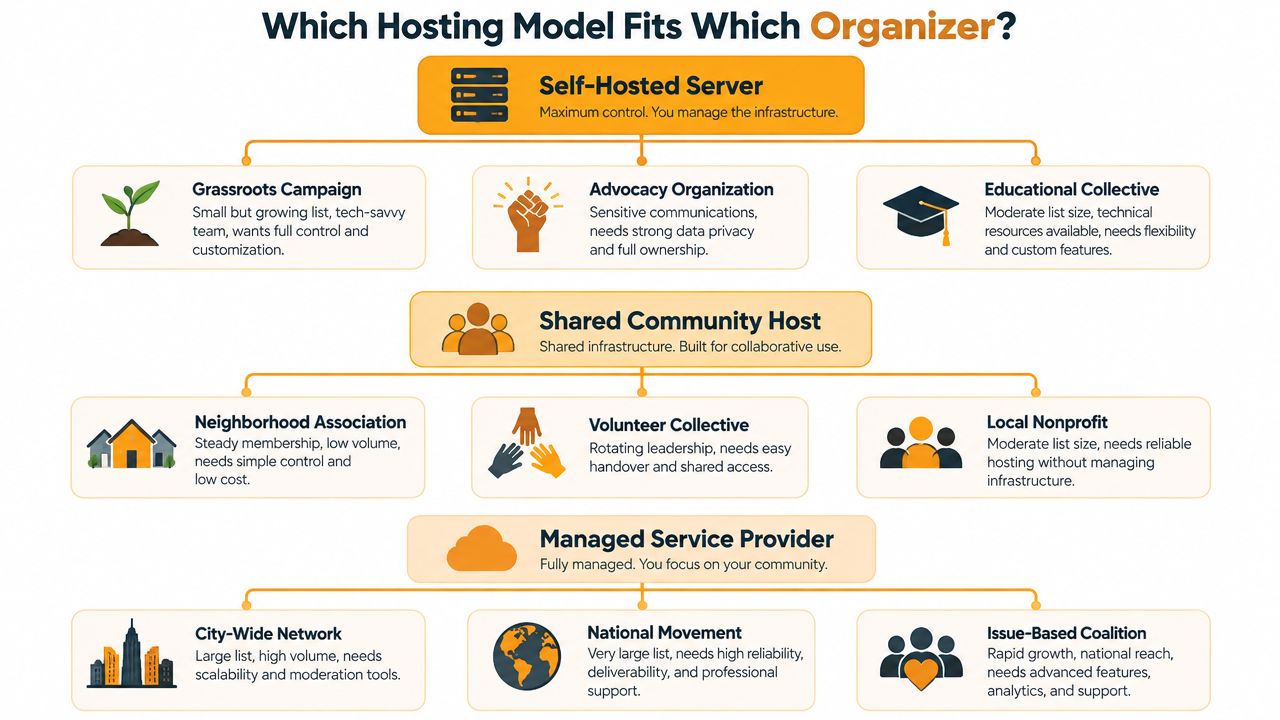
Match the model to the organizer
Neighborhood association with a stable roster. If the association has a treasurer or board member who can renew a domain, maintain documentation, and accept responsibility for member data, self-hosting can fit. The warning sign is single-person ownership. If the server, billing, backups, and administrator login all belong to one resident, the association has created a succession problem.
Volunteer-run club with rotating officers. Choose a hosted list service. The club needs shared administration, ordinary email participation, clear moderation, and a straightforward handover. Don't choose self-hosting because one technically inclined member says they can “look after it.” That person may be unavailable when the club changes officers.
Small advocacy group already using a social platform. A third-party platform may be acceptable if members are comfortable with its interface and the organizers need campaign-style announcements. If the list includes people who won't download apps, create accounts, or follow a new platform, keep the communication email-native.
Time-bound coalition. Use a hosted service if the coalition needs an address and archive that can be handed over or exported when the project ends. Self-hosting adds technical obligations that may outlast the coalition's energy. A third-party system works only if someone will retain account access, billing records, and the final export after dissolution.
Two quick mismatch tests
Ask whether the group can replace the administrator without calling the original setup person. If the answer is no, the model is too dependent on individual knowledge.
Then ask whether members can participate without learning a new system. The W3C resource on distribution lists describes the continuing role of email-based distribution for researchers and communities. For many groups, accessibility means preserving standard email, not adding another portal.
A simple email list manager such as Listava supports a shared group address, member management, spreadsheet import, group replies, and hidden member addresses while allowing members to continue using standard email clients. It's one possible fit for organizers who want list administration without requiring member accounts or app downloads. This practical email list manager guide can help you assess that kind of workflow.
Evaluating Your Current Setup and Migrating Safely
A volunteer coordinator discovers that the group's “email list” is an old spreadsheet, several forwarded announcements, and years of useful decisions stored in personal inboxes. Migration starts with finding those pieces, then deciding which ones the organization should retain.
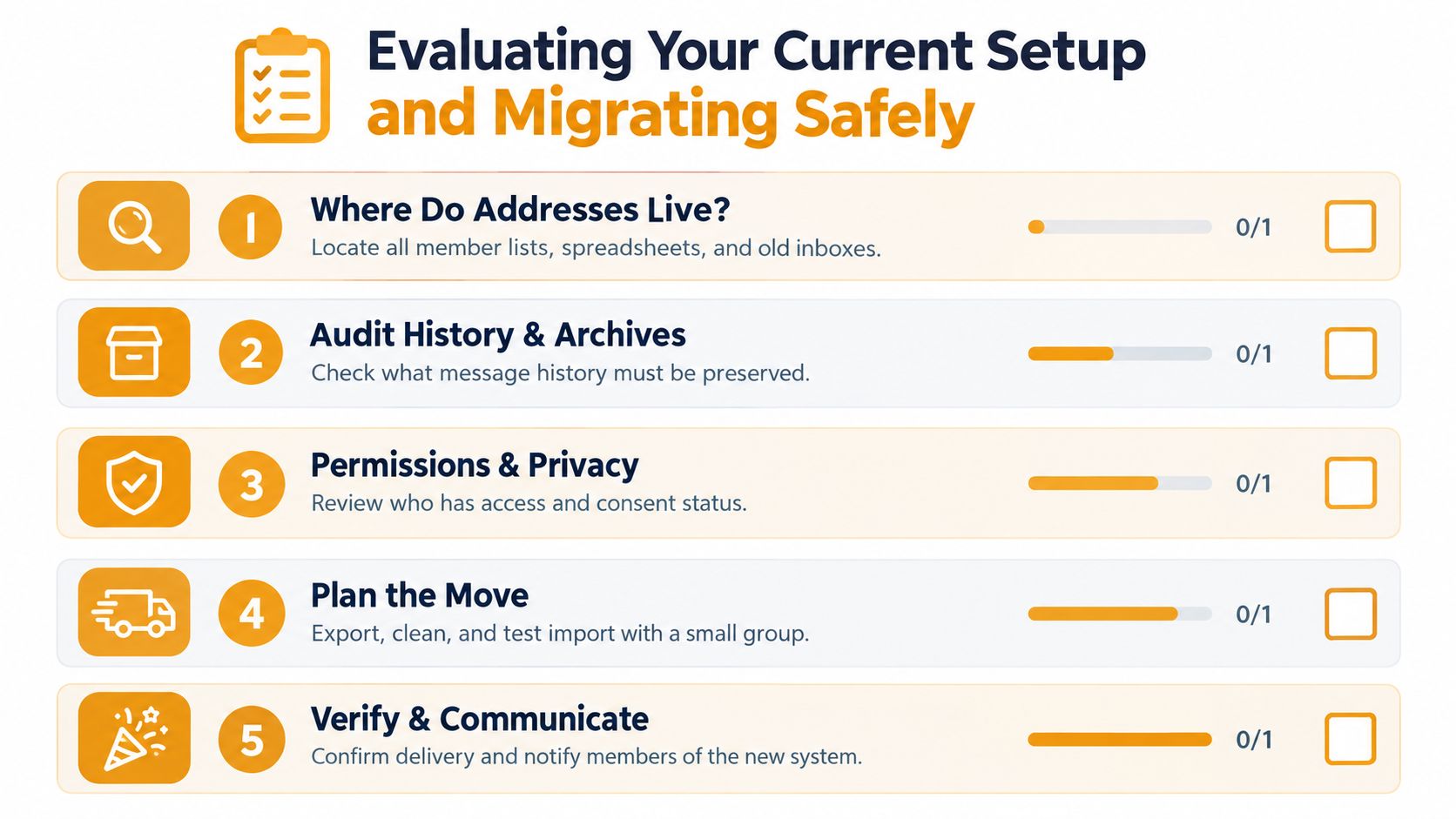
Audit the current arrangement
Record the following before choosing a new host:
- Address locations: Find spreadsheets, provider exports, old inboxes, signup forms, and backup files.
- Sending permissions: Identify who can post, approve messages, change members, and access archives.
- History: Decide which announcements, decisions, and attachments the group must preserve.
- Privacy exposure: Check whether past messages reveal member addresses or include people who never agreed to remain on the list.
- Failure point: Ask what would stop working if the current provider disappeared tomorrow.
Export the member list in a portable format, and preserve the archive separately. A provider's contact screen is not a backup. Store a dated copy in the organization's shared storage, with access controlled by the group rather than one volunteer.
Move in a controlled sequence
Clean the list before importing it. Remove duplicates, outdated contacts, addresses nobody can verify, and people who asked to leave. Importing a dirty list transfers the problem and can hurt the new host's sending reputation.
Test the new setup with a small internal group. Confirm that messages reach the intended recipients, replies go to the right audience, member addresses stay hidden where required, and moderation works as expected. Configure SPF, DKIM, and DMARC for the new sending domain according to the host's documented process. These authentication methods are identified as part of modern sending requirements in HubSpot's explanation of email sending and authentication.
Notify members before the cutover. Give them the new sending address, explain what changes, provide unsubscribe instructions, and name a contact for delivery problems. After switching, send a brief confirmation and stop the old list from accepting new conversations. Running both lists creates duplicate messages and leaves members unsure which address is authoritative.
Check the first two weeks
Review bounced addresses, moderation queues, removals, replies, and archive capture. Ask members who use different email providers whether messages arrived and whether replies behaved correctly. Keep the old export and archive until the new system passes these checks.
If the new host uses a fresh sending identity, follow its gradual sending guidance instead of sending every announcement immediately. Bounce rates and inbox placement require ongoing attention, not a one-time setup task. Keep an administrator responsible for reviewing delivery problems, and document the handover so another volunteer can take over without rebuilding the list from personal records.
Choosing the Right Hosting Approach for Your Group
Here's the direct recommendation. Small volunteer groups with stable rosters should use a hosted list service such as Sympa or Mailman through a managed provider. The group keeps ordinary email participation, while the provider reduces the unpaid technical work that causes lists to decay or disappear during leadership changes.
HOAs and neighborhood associations should default to a self-hosted mailing-list manager on a trusted provider when member-data ownership and independence are central requirements. This choice only works if the board assigns at least two administrators, documents the renewal and backup process, and keeps credentials with the association. If nobody can maintain that arrangement, choose a managed hosted service instead. Control without operational capacity is false security.
Issue-based coalitions and advocacy groups should use a third-party platform only when the members accept its interface and the organizers need campaign functions. If the list serves residents, volunteers, or supporters who refuse app adoption and don't want accounts, use a list-focused service that keeps participation inside ordinary email.
| Organizer Type | Recommended Hosting | Why It Wins | |---|---|---| | Small club with rotating volunteers | Hosted list service | It minimizes server work and makes handover practical. | | HOA with strong data-ownership requirements | Self-hosted, if technical administration is available | The association retains direct control over data and infrastructure. | | Neighborhood group without technical volunteers | Managed hosted service | It preserves email access without assigning server duties to the board. | | Advocacy group needing campaign workflows | Third-party platform | It can support broader outreach when members accept the platform model. | | Family, faith, or community list avoiding apps | Hosted list service or email-native manager | Members can participate through their existing inboxes. | | Temporary coalition | Hosted list service | The group can document ownership and preserve records through the project. |
Don't select a host because its product page lists more features. Select the model whose failure mode your group can survive. If the group can't maintain a server, don't self-host. If members won't use a dashboard or app, don't build the group around one. If leadership changes regularly, don't let the list live inside one person's account.
Choose the system now, assign shared ownership, export the current list, and write down the handover procedure before the next volunteer steps down.
Listava provides email-based group communication with a shared address, member management, spreadsheet import, group replies, and privacy controls that hide personal addresses from other members. Visit Listava to see whether its email-native approach fits your group's need for continuity without accounts, apps, or dashboard-dependent participation.