HOA Email Policy: What Every Board Should Include
Learn what an HOA email policy should cover, from privacy and retention to moderation and member access, with sample language and implementation tips.
A board member sends a routine update from a personal inbox. The message goes to a visible CC list, so every resident can see everyone else's address. Later, a homeowner asks whether the thread about a vendor's proposal was an official association record, but the board can't find the full conversation because it's split across personal accounts.
That's not a rare technology problem. It's a governance problem created by informal habits. A clear HOA email policy gives directors, managers, and residents shared expectations for who communicates, how privacy is protected, which messages need to be preserved, and when a conversation must move out of email.
Table of Contents
- Why HOA Email Policies Matter
- What an HOA Email Policy Covers
- Roles, Reply Behavior, and Moderation
- Privacy, Consent, Retention, and Security
- Avoiding Accidental Electronic Meetings
- Sample HOA Email Policy Clauses
- Implementing and Enforcing the Policy
- Reviewing the Policy After Launch
Why HOA Email Policies Matter
Email feels casual, but an association's messages can carry notices, approvals, complaints, financial decisions, and resident information. When every board member uses a different account and decides independently who to copy, the association has no reliable way to protect addresses, retain important records, or maintain continuity when leadership changes.
The scale makes those choices more than administrative housekeeping. In 2024–2025 estimates, approximately 77.1 million Americans lived in 28.8 million homes across more than 369,000 community associations, and roughly 2.5 million people served as volunteer association leaders (Community Associations Institute's national community association figures). Many boards rely on volunteers who have limited time and little technical support. A written policy helps keep basic communication practices from depending on who happens to be president or which volunteer is comfortable managing a mailing list.
The practical failures a policy prevents
Consider a board that shares a maintenance update with residents using CC. One resident replies to everyone with a question; another replies with a complaint; then a director responds from a personal account. Addresses are exposed, the conversation drifts from the original purpose, and no one knows which inbox contains the complete exchange.
A policy can prevent that confusion by specifying an official sending address, authorized senders, privacy protections, reply behavior, and retention responsibilities. It can also clarify that routine email doesn't replace statutory delivery methods when governing documents or local law require another channel. The point isn't to make every message formal. It's to make the rules predictable before a mistake becomes a dispute.
A policy is useful only if a new volunteer can follow it without inheriting another person's inbox or guessing what the last board intended.
Draft the rules before the next officer handover or email controversy. Treat the policy as communication infrastructure, while keeping it subordinate to the association's governing documents and applicable legal requirements.
What an HOA Email Policy Covers
An HOA email policy is the association's written rulebook for sending, receiving, protecting, and retaining email. It should say who can send official communications, who maintains the distribution list, what residents should expect when they reply, and how the board handles messages that involve decisions or sensitive matters.
Think of messages as traffic using different lanes. A routine announcement can travel through a broad distribution channel; a discussion may need controlled replies; a legally significant notice may require a specific delivery method and proof of delivery. Putting all three in the same lane creates avoidable risk.
Match the message to its handling
| Message type | Typical content | Expected reply behavior | Record and delivery treatment | |---|---|---|---| | Routine announcement | Maintenance schedule, community event, service interruption | Reply to the sender unless group discussion is invited | Preserve if it documents an association communication or decision; use the approved member channel | | Resident discussion | Questions or comments about a community issue | Follow the stated reply rule; keep board deliberation out of an open thread | Retain messages that document complaints, commitments, or decisions | | Official notice | Meeting, election, or other governed notice | Direct questions to the designated contact | Follow the applicable governing documents and legal delivery requirements; retain proof as required | | Sensitive or restricted matter | Personnel, legal, violation, or financial details | Don't use a general resident list; escalate through an authorized channel | Restrict access and preserve under the association's retention rules |
Use this table as a drafting checklist, not a substitute for the bylaws, a complete records schedule, or jurisdiction-specific notice rules. Make clear that an email label alone doesn't turn a message into a legally sufficient notice.
For routine communications, the board can also improve consistency by setting a standard format for subject lines, dates, contact details, and next steps. These homeowners association newsletter tips offer useful ideas for making community updates easier to scan and act on. Keep the policy itself focused on governance: who can communicate, what channel to use, and what happens after a message is sent.
Roles, Reply Behavior, and Moderation
A volunteer who built the email list three years ago moves out of state, and nobody else knows the administrator password. That scenario ends more HOA email systems than any technical failure. The policy should name an owner for the system and define who holds each permission, so access survives board turnover instead of expiring with one volunteer's term.
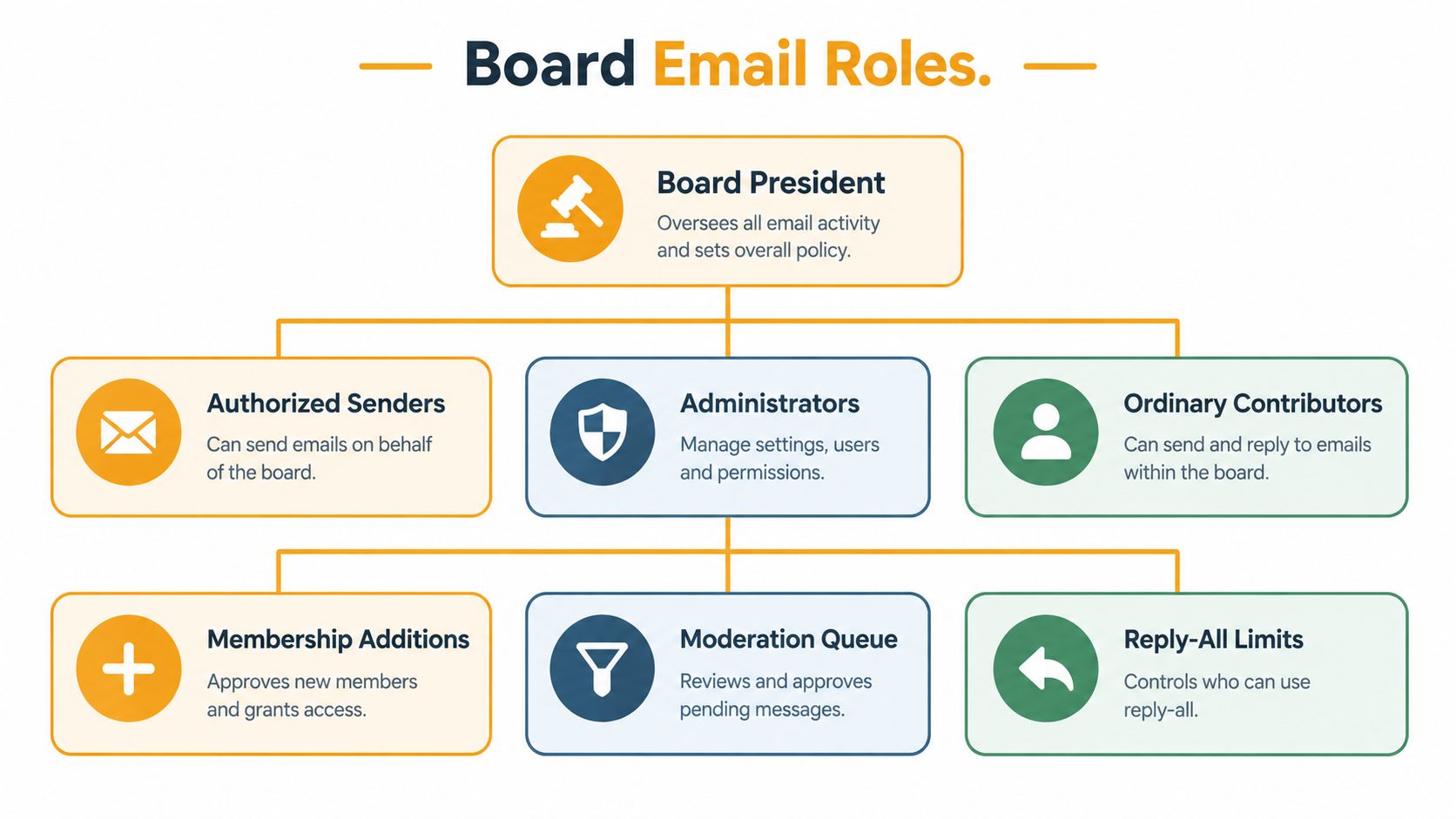
Separate three roles in writing. Authorized senders can issue official association messages. Administrators can add or remove recipients and change delivery settings. Ordinary contributors may draft content or raise questions, but they cannot send to the full list. Record the names next to each role in a policy appendix and update it at every election, because a role list that names positions instead of people goes stale fast.
Keep membership changes controlled and documented. A role-based lifecycle should maintain a current distribution list, restrict changes to designated officers or administrators, verify additions and removals, and preserve continuity when leadership changes.
Choose how replies work
The policy needs one explicit default per channel, not three implied ones. A broad discussion list lets members reply to the group, which suits genuine community conversation but invites reply-all chains and misfires if the list is configured poorly. A moderated announcement channel keeps control with administrators and fits communities where residents need updates rather than open debate. The third option routes replies to the sender by default and opens group discussion only when a topic warrants it. Pick the model, write it into the policy, and apply it consistently.
If volunteers handle CC or BCC manually, set a clear standard so they understand the privacy and conversation trade-offs. This practical guide to CC versus BCC in email helps a board compare those choices before settling on a default.
Moderate consistently, not arbitrarily
Give moderators a decision rule for each situation they will face. A wrong pool-closure date gets a correction sent to the same audience. A repetitive or off-topic thread gets closed, with residents pointed to the right channel. A suspected phishing message gets reported to the designated administrator and is never forwarded to the full list. An urgent matter follows the established emergency process rather than an unmonitored group thread.
Assign four tasks in writing: administration, board oversight, escalation, and periodic review. Record who inherits access when officers change. That single line prevents the list from becoming a private asset controlled by one volunteer.
Privacy, Consent, Retention, and Security
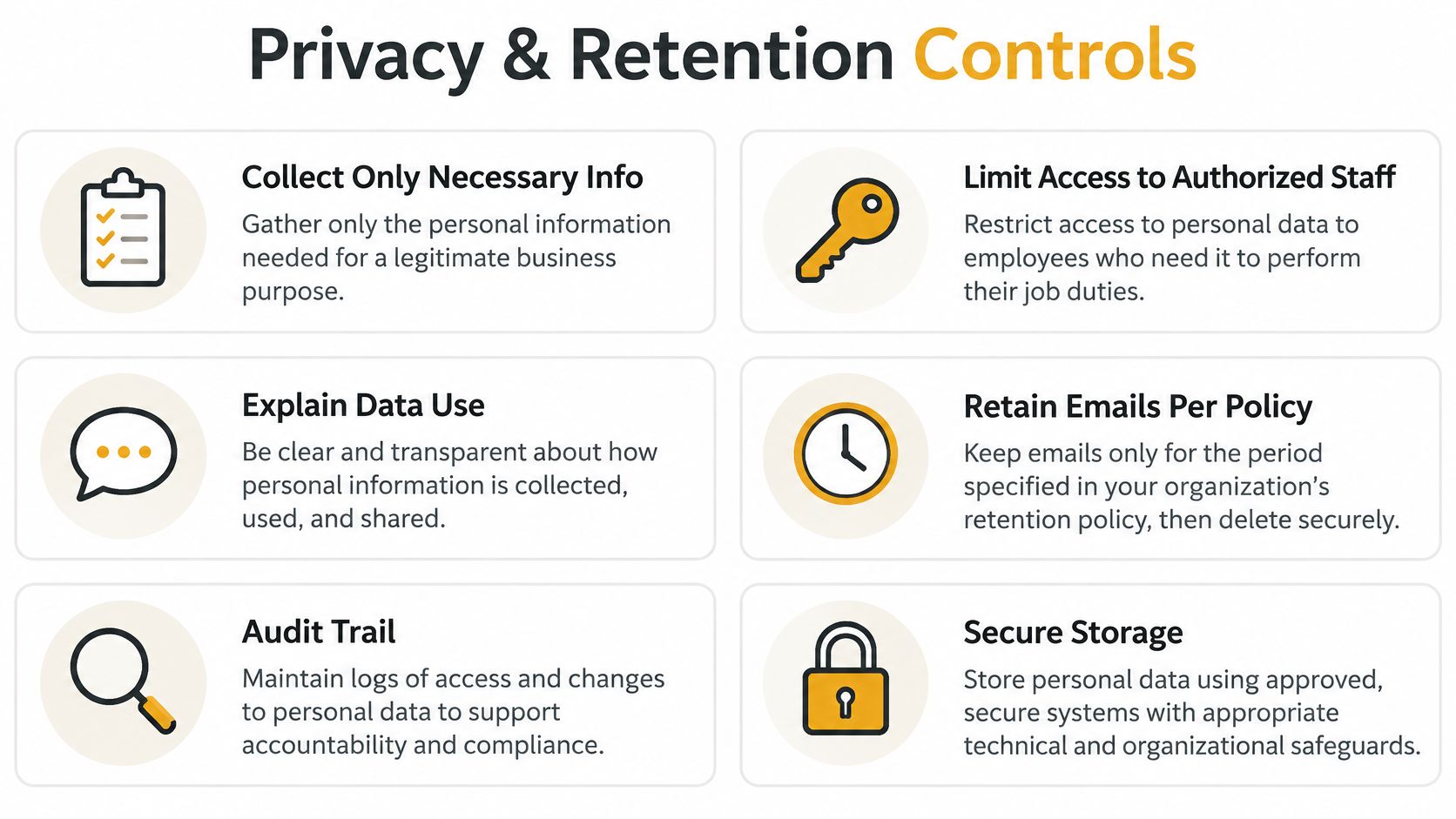
A resident asks who can see her email address, and nobody on the board can answer. That gap is what this part of the policy closes. State what contact information the association collects, who can access it, and how it will be used. Gather only the details needed for association communications, limit list access to designated officers or administrators, and keep addresses out of the visible header during routine group delivery. The policy should also say whether residents can opt out of ordinary announcements, how that choice gets recorded, and which channel applies when email is not an authorized method for a required notice.
Don't promise absolute secrecy without checking local law and governing documents. Florida law, for example, addresses the association's duty to maintain email addresses members designate for electronic notices after consenting to electronic transmission (Florida's community association statute). Have local counsel review how the jurisdiction treats consent, member access, and official notices before the board publishes anything.
Decide what stays and what can be cleared
A retention rule works only if it separates genuine association records from temporary coordination. Preserve governing notices, contracts, approvals, complaints, and financial decisions for the period required by applicable law, governing documents, insurer, or auditor. Set a defined window for routine scheduling and short-lived coordination messages, unless a message becomes evidence of a decision, complaint, or dispute.
For each category, name who can access it and where it belongs. An approval sitting only in a director's personal inbox disappears the day that director resigns. Keep access limited, require multi-factor authentication on administrator accounts where available, and give volunteers a straightforward way to report suspicious messages. Filtering, domain authentication that rejects spoofed messages, and phishing-resistant sign-in methods are the controls worth asking an IT provider about. For a broader example of how an organization describes handling personal information, see this law firm's published privacy policy and data-handling practices.
Protect the association from impersonation
An official sending domain should use SPF, DKIM, and DMARC so receiving servers can validate that messages come from approved senders, which makes it harder for someone to impersonate the board. NIST recommends these authentication technologies alongside transport security such as TLS, with S/MIME where end-to-end authentication or encryption is required (NIST guidance on trustworthy email). The board does not need to configure these controls itself. Assign an email administrator or service provider to confirm the association's sending domain and vendors are covered.
Never approve a payment or change to bank details solely because an email requests it. Verify the request using a known telephone number or another previously confirmed channel.
Avoiding Accidental Electronic Meetings
Fast email can help directors coordinate, but a reply-all thread can become deliberation. A director proposes a vendor, another objects, and the board president asks everyone to choose an option by email. The messages may look informal, yet they can resemble discussion or action that belongs in a properly authorized meeting.

The policy should give directors a conservative boundary: use email for administration and logistics, not substantive board debate or routine voting, unless applicable law and governing documents expressly permit the procedure. California generally prohibits boards from conducting meetings through a series of electronic transmissions, while allowing email-based written consent for qualifying emergencies when directors consent and the consents are placed with the minutes (California HOA guidance on email meetings). Rules differ by jurisdiction, so a board shouldn't treat one state's exception as a general permission.
Set an escalation path
Administrative coordination can stay in email. A question about the time of a meeting or who will distribute an agenda doesn't usually require board deliberation. Legal, personnel, violation, emergency, and voting matters should move to an authorized process, such as counsel, a properly noticed meeting, or a specific procedure reviewed for the association's jurisdiction.
Put a short warning in director email footers or group descriptions: “Use this channel for coordination. Don't deliberate or vote on board business here unless the association's approved procedure allows it.” That reminder won't decide the legal status of an exchange, but it helps directors recognize when to stop replying and change channels.
A qualifying emergency consent process isn't a blank check for ordinary decisions. If a matter might involve a vote, quorum, or formal board action, the chair should pause the thread and confirm the permitted process before collecting responses. The board should preserve relevant messages and place formal consents with the appropriate records. A clear boundary protects both participation and the validity of board action.
The video below provides another perspective on email-based governance and board communication.
Sample HOA Email Policy Clauses
Treat sample clauses as drafting material, not universal legal language. Replace bracketed details with the association's information, compare every provision with governing documents, and ask local counsel to review notice, records, and meeting language.
Starting language for core rules
Purpose and scope: “This policy governs association email sent through [official address or service] by directors, managers, and authorized administrators. It does not replace the governing documents or any legally required delivery method.”
Authorized senders: “Only [roles or named positions] may send official association-wide messages. Other board members may submit content to an authorized sender or use the approved discussion channel.”
Membership administration: “The [administrator role] maintains the distribution list, verifies requested additions and removals, and records changes. Access and list responsibility must be transferred when an officer or manager leaves the role.”
Address privacy: “Routine group messages must use an approved delivery method that does not expose members' personal email addresses to other recipients. The association will describe who can access addresses and how member choices affect delivery.”
Message labels: “Official notices must be clearly identified in the subject line and sent through the delivery method approved for that notice. An email label does not make an otherwise improper delivery method sufficient.”
Retention and security: “Messages documenting association decisions, contracts, complaints, approvals, or required notices will be retained under the association's records schedule. Payment instructions or bank-detail changes require confirmation through a previously verified channel.”
Pick one reply rule for each channel
For a discussion channel, use: “Replies may go to the group when the sender invites community discussion. Participants must keep replies relevant and must not use the thread for board deliberation or voting.”
For a moderated announcement channel, use: “Replies go to the designated sender or administrator unless the message explicitly invites a group response. The administrator may correct, redirect, or close a thread that is off topic or unsafe.”
Don't combine those two rules into a vague promise that members can reply “as appropriate.” Residents and volunteers need to know what the system will do before they hit Reply.
Escalation: “Questions involving legal advice, personnel, violations, emergencies, or board action must be directed to [role or process]. When a message raises uncertainty about a meeting or vote, directors must stop the email discussion and consult the approved process.”
Review details: Add the association name, official address, responsible officers, policy owner, review date, and references to applicable local requirements. A useful email footer example can help the board make its sender identity and contact instructions consistent.
Implementing and Enforcing the Policy
A policy sitting in a board folder won't fix exposed addresses or missing records. Assign an owner, set a realistic approval path, then train the people who will administer the list and send messages.
Move from draft to routine
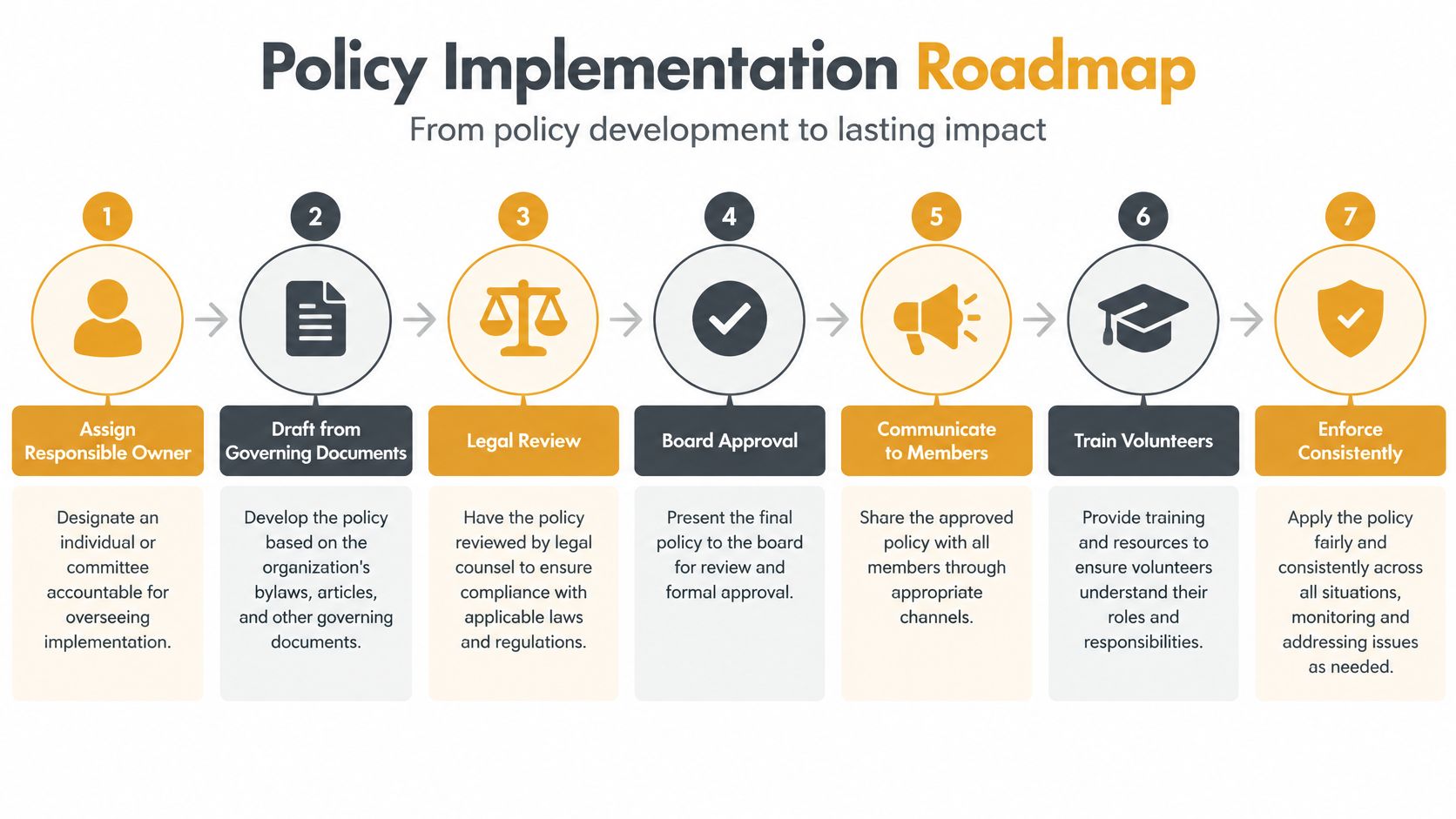
Start with a responsible owner, such as the secretary, manager, or designated administrator. Have that person compare current email habits with the governing documents and identify practical gaps: personal accounts, exposed recipient lists, unclear reply behavior, missing handover instructions, or no retention rule. Draft only what the association can consistently administer.
Next, get association-specific legal review, then adopt the policy through the body authorized to approve it. Publish the final version where residents can find association records and explain the difference between opting out of routine announcements and any consent or delivery choice that affects official notices. Don't imply that ignoring an email cancels a required communication.
Train administrators on adding and removing members, domain authentication responsibilities, phishing reports, record transfers, and escalation. A simple email list management guide can help volunteers plan the ongoing work of keeping a group distribution list current. The association can choose a role-based group address or another suitable setup, but it should avoid making any one person's inbox the permanent home of community communications.
Enforcement should correct behavior without turning every mistake into a disciplinary matter. An administrator can remind a sender to use the approved channel, request a correction when a message contains inaccurate information, or restrict posting access if someone repeatedly misuses the list. If conduct goes beyond email administration, refer it through the association's established process. Moderation controls the communication channel; it isn't a substitute for the board's formal enforcement procedures.
Reviewing the Policy After Launch
A short review is more useful than a long policy nobody checks. Test the rules against actual messages: send a routine announcement, confirm where replies go, and verify that recipients can't see one another's addresses when privacy is expected. Check whether the authorized administrator can remove a stale address, update a member's preferred delivery channel, and transfer responsibilities without relying on the previous officer's personal account.
Review the records process too. Confirm that important approvals, complaints, contracts, and notices have an assigned home, while temporary coordination messages follow the stated retention rule. Look at reported phishing, failed deliveries, and resident questions for patterns that suggest the policy or the system is confusing people.
Bring the policy back for review after a board election, a management-company change, a vendor switch, repeated complaints, or a change in how the association sends notices. Compare the distribution list with current association records and make sure the person responsible for updates still has access. Ask directors and administrators where the rules are difficult to follow, then simplify those parts without weakening privacy or recordkeeping.
The best HOA email policy is a current working document that connects everyday communication to privacy and governance. It should be clear enough for a new volunteer to use and specific enough to prevent the same avoidable mistakes.
Listava gives groups a shared email address that reaches members while keeping personal addresses private, and organizers can manage membership through familiar email workflows. If your board wants a simple way to handle resident group communication, explore Listava and see whether its approach fits your policy.