Email Distribution List Explained: How Group Email Works
Learn what an email distribution list is, how it compares to CC and BCC, key terminology, and when a shared list address beats other group communication tools.
You volunteered to coordinate the book club, HOA newsletter, or church breakfast. Then someone asks you to “just email everyone,” and suddenly you're pasting a long row of addresses into CC, checking an old spreadsheet, and wondering whether the person who moved away is still receiving every announcement. One enthusiastic reply-all later, the original message is buried beneath a cheerful argument about parking, biscuits, or the next book.
Your real job is keeping people informed, not becoming the group's unpaid IT department. An email distribution list can remove much of that repetitive work, but only when you choose it for the right reason and maintain it properly. The important questions aren't only how to create one, but who controls it, how it survives leadership changes, and when another tool would be safer or simpler.
Table of Contents
- Why Your Group Keeps Reinventing Email
- What Is an Email Distribution List
- How an Email Distribution List Works
- The Hidden Costs of CC and BCC Workflows
- Distribution List Terminology Decoded
- Choosing Between a Shared List and Other Group Tools
- Keeping Your List Healthy Through Leadership Changes
- Putting It All Together
Why Your Group Keeps Reinventing Email
The trouble often begins innocently. Maya agrees to organize the neighborhood book club, finds the previous organizer's spreadsheet, and copies the addresses into a new Gmail message. The next month, she adds two members but forgets one address. A few weeks later, three people reply separately because nobody knows whether the group should use Reply or Reply all.
Nothing is technically broken. The process is living in too many places at once. One address book contains some members, a spreadsheet contains others, and old email threads contain the group's history. When Maya takes a holiday, nobody knows which version is current.
Practical rule: If the same group receives recurring messages, the recipient list should have a home that isn't one volunteer's inbox.
The volunteer organizer problem
CC feels quick because it uses tools everyone already understands. It also makes the sender responsible for remembering every recipient, protecting every address, and managing every reply. That might be manageable for a small, one-off note. It becomes tiring when the group communicates throughout the year.
BCC solves one issue by hiding addresses, but it creates another. Recipients may not know who else received the message, and their replies usually return only to the sender. The organizer becomes a human switchboard, forwarding questions and copying people back into conversations.
A shared list address changes the job. Instead of maintaining a long row of recipients in every message, you send to one address that represents the group. The list service maintains membership, distributes messages, and can keep replies within the group.
What this guide will help you decide
You'll learn the difference between a contact group and a true shared distribution list, how group delivery works, and why CC and BCC become awkward for recurring communication. You'll also see where Google Groups, Facebook Groups, and ordinary email still make sense.
Most critically, you'll get a decision framework for groups with real turnover. An HOA board changes volunteers, a faith community changes coordinators, and a hobby club gains and loses members. A list that depends on one person's private spreadsheet may disappear without notice when that person steps down.
What Is an Email Distribution List
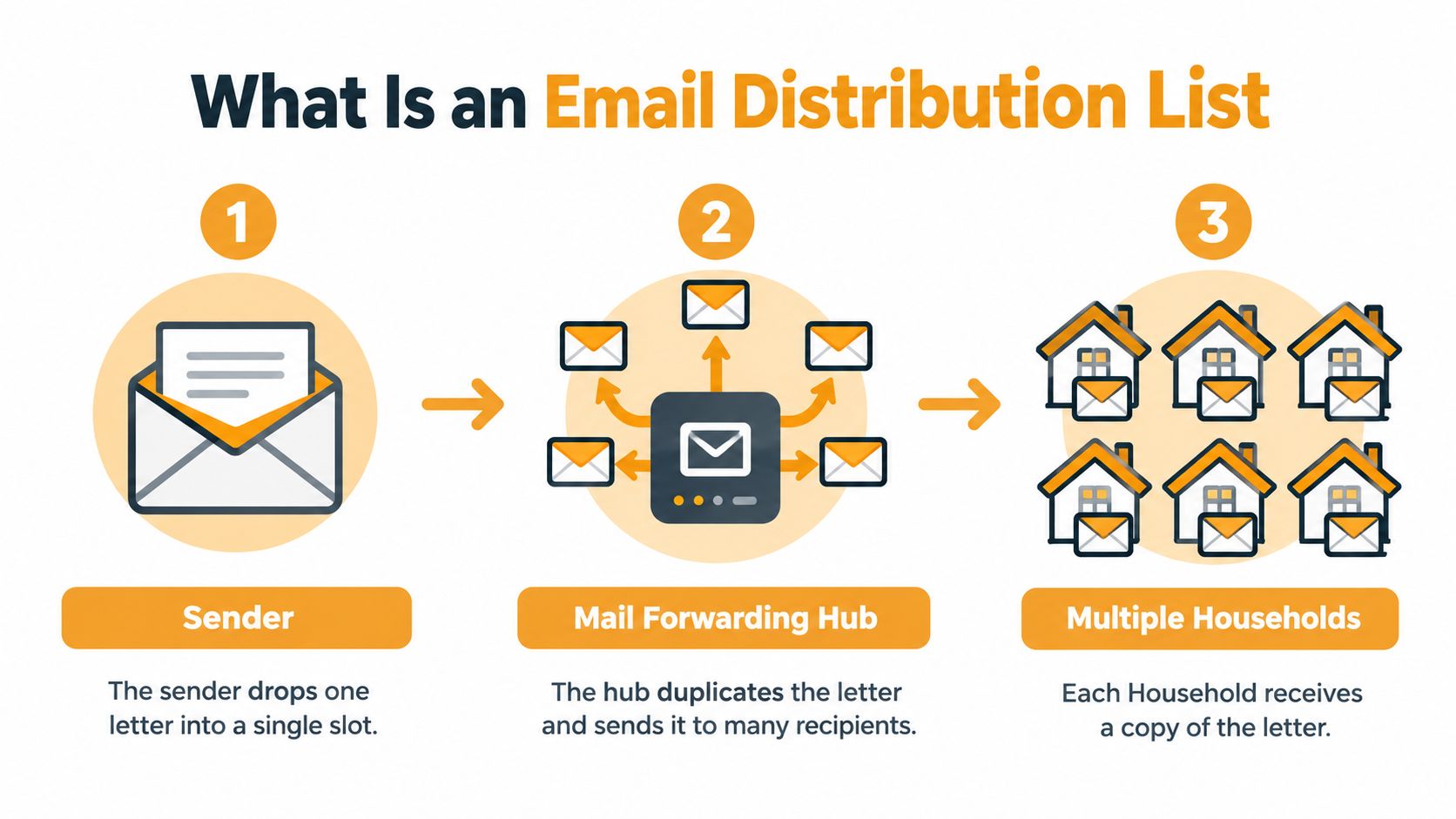
An email distribution list works like a mail-forwarding service. You send one letter to a forwarding address, the service checks its current roster, and it delivers a copy to each household listed there. With email, the “letter” is your message, the forwarding address is the shared list address, and the households are the subscribed members.
That makes a distribution list different from a contact group in Gmail, Outlook, Yahoo, or Hotmail. A contact group is usually a shortcut stored in one person's address book. A true email distribution list has a shared address that exists independently of that person's inbox, so another authorized organizer can manage membership and continue sending messages.
The model has been around for decades. In 1986, Eric Thomas developed LISTSERV to automate email list management, helping establish the modern email list communication industry. The system reached the 1,000th public list in 1988, one list passed 500,000 subscribers in 1996, and subscriptions exceeded 100 million worldwide in 2000, according to L-Soft's LISTSERV history.
The useful distinction
Think of the list as a routing mechanism, not a magical inbox. It doesn't require every member to learn a new social network or check a special website. Members can continue using their normal email client while the list handles the repetitive addressing work in the background.
The approach remains operational at substantial scale. L-Soft says LISTSERV manages over 170,000 email lists and more than 100 million list subscriptions worldwide, while its corporate homepage describes 3,000 customers and 90 million subscribers on all public lists. Those figures appear on L-Soft's current LISTSERV history page, and they illustrate that list-based communication is established infrastructure rather than a temporary workaround.
An email distribution list is a shared address that routes messages to a managed group of recipients, independently of any one member's personal inbox.
How an Email Distribution List Works
Take a fictional hiking club with the shared address [email protected]. The address represents the club, not a particular chairperson. Once the organizer adds members, the group can use it for trail updates, meeting reminders, and questions about equipment.
The message journey
-
The club gets one shared address. Members learn one address instead of memorizing a changing collection of personal addresses.
-
A member composes a normal email. Jordan opens Gmail or Outlook, writes a message about Saturday's trail conditions, and enters the shared address in the To field.
-
The list receives the message. The list service checks whether Jordan is allowed to send. Some groups permit all members to post, while an HOA announcement list might limit sending to board officers.
-
The service expands the list. It looks at the current membership roster and creates deliveries for the people subscribed at that moment.
-
Members receive and reply. Depending on the list settings, replies can return to the whole group, allowing everyone to follow the same conversation.
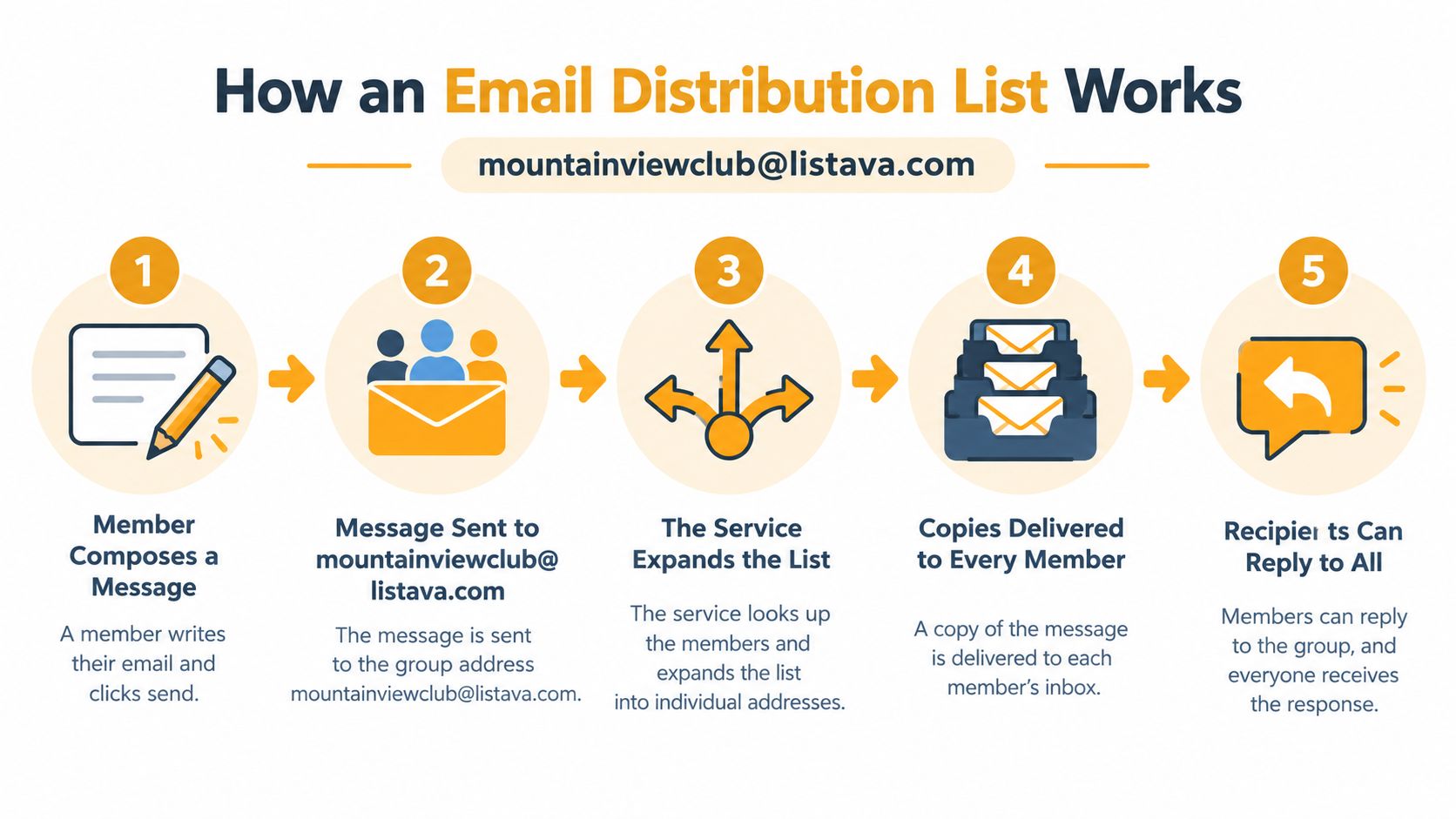
That final setting deserves attention. An announcement list and a discussion list don't need identical behavior. For a church schedule, members may only need to receive messages from coordinators. For a book club, members may need to reply to everyone about which evening works. The organizer should choose the reply behavior before the first wave of “I can do Tuesday” messages arrives.
Joining without extra technical baggage
Members generally use the email client they already know. They don't need a separate app, a new password, or a special dashboard just to receive and answer messages. An organizer can add people individually, use a simple CC-based invitation flow, or import addresses from a spreadsheet, depending on the service.
Privacy settings matter too. A properly configured list can hide personal addresses from other recipients, so a member sees the group address or controlled sender information rather than a long exposed list. That helps the book club communicate without turning every message into a directory of private contact details.
The simplest mental model is this: members send to the group, the service routes the message, and the roster determines who receives it. The organizer's important work is not copying addresses. It's deciding who belongs, who can send, and how the list should behave.
The Hidden Costs of CC and BCC Workflows
CC and BCC aren't bad tools. For a family update sent once to a small group, either may be perfectly reasonable. Problems appear when an organizer repeats the same process for a changing membership and expects the email thread to behave like a shared communication space.
What happens with CC
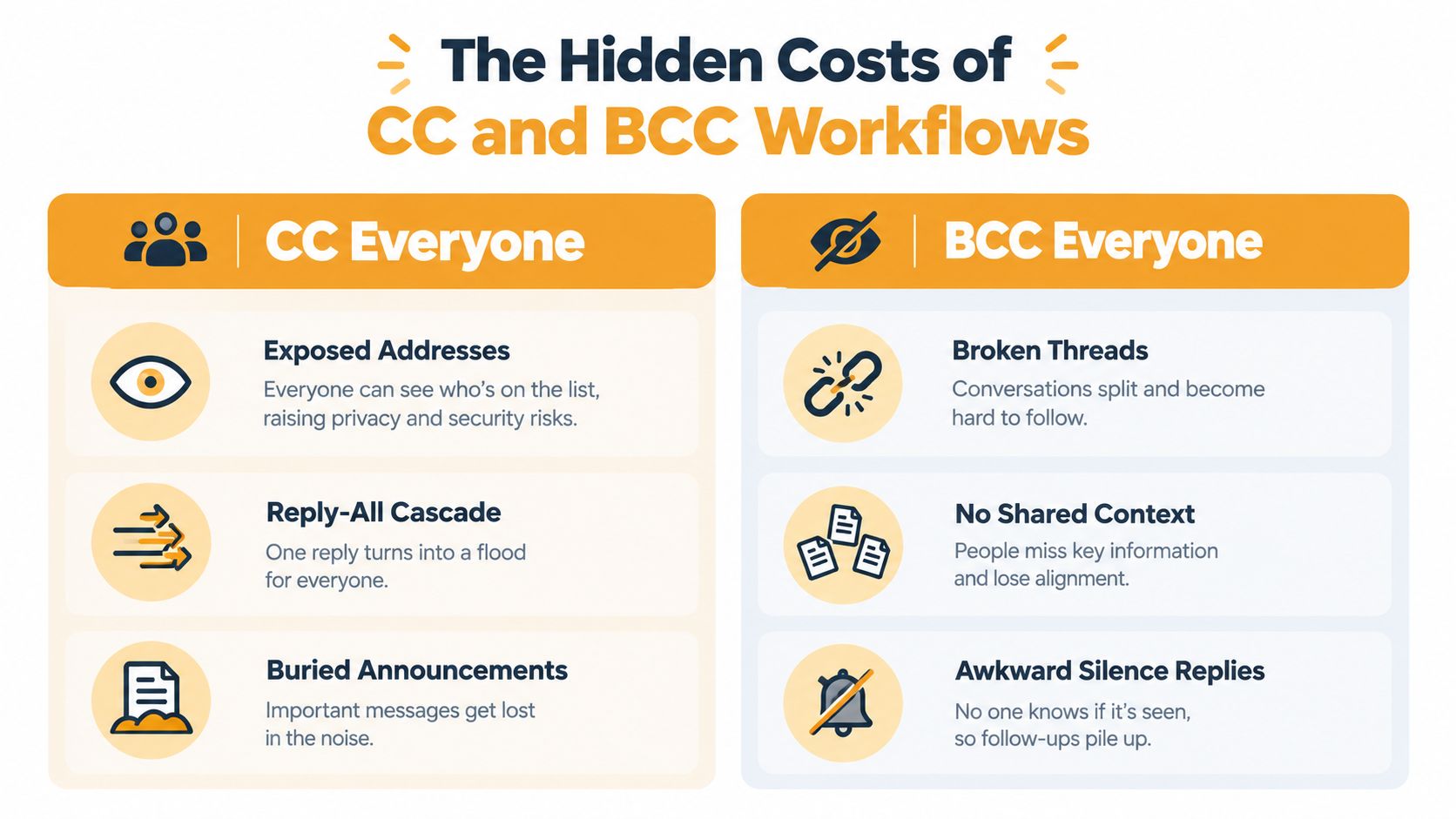
CC exposes every recipient address unless the sender takes additional precautions. That may be acceptable among close friends, but it isn't a thoughtful default for a neighborhood association, volunteer roster, or large club.
It also invites reply-all chaos. One person confirms attendance, another corrects a date, and a third replies with “Thanks.” Suddenly, everyone receives a stream of messages that may have nothing to do with them. Important details sink beneath the noise.
- Exposed addresses: Members can see personal email addresses that they may not expect to share with the entire group.
- Reply-all cascades: A simple confirmation can trigger a chain of unrelated responses.
- Manual maintenance: The sender must update the CC line whenever someone joins, leaves, or changes address.
What happens with BCC
BCC protects the visible recipient list, which is useful for privacy. However, it hides the group context from recipients and usually sends replies only to the original sender. If the organizer forgets to forward a response, the rest of the group never sees it.
A BCC message also makes each send a fresh event. The organizer can accidentally omit a new member, include someone who left, or use an old saved draft with outdated addresses. The issue isn't that BCC is unsafe in every situation. It's that BCC doesn't create a durable, shared membership system.
For a fuller side-by-side explanation of these patterns, see the guide to CC versus BCC email.
Privacy affects delivery too
Privacy and deliverability are connected operational concerns. Hidden-member handling reduces address exposure and can calm reply-all storms. Meanwhile, removing invalid or inactive addresses helps reduce bounces and keeps the delivery roster usable.
Email authentication also matters for reliable delivery. Guidance for distribution lists points to SPF, DKIM, DMARC, and TLS as controls that support trust and inbox placement, while regular validation and pruning help prevent one bad address from disrupting delivery patterns for a broader message set. West Virginia Collegiate Institute's email distribution list guidance explains these privacy and operational considerations in practical terms.
Distribution List Terminology Decoded
The vocabulary overlaps because different services use familiar words for slightly different products. Don't choose a tool based on its label alone. Ask where the address lives, who controls membership, and whether replies stay with the group.
- Distribution list: A shared address that routes messages to a managed set of recipients. An HOA might use one for board announcements.
- Mailing list: A broad term for a managed email audience. A nonprofit may use it for newsletters, while a club may use it for discussion.
- Group email: A conversational phrase for sending one message to several people. It can describe CC, BCC, or a real list service.
- Contact group: A shortcut in one person's address book. It saves typing but may vanish from practical use when that person leaves.
- Shared mailbox: A role-based inbox that several people can access and manage. A church office might use one for
[email protected], but it isn't automatically a membership list. - LISTSERV: A well-known list management system and a name people sometimes use generically for email lists. Historically, it automated distribution to subscribers.
- Forum: A place where conversations are stored and browsed, often through a website or app. Unlike a basic list, a forum usually emphasizes searchable history and topic organization.
Which distinctions actually matter
A contact group is personal. A distribution list is shared. A shared mailbox is usually built around a role or office, while a list is built around a changing audience. A forum may be better when members need to browse old discussions rather than receive every message in their inbox.
People also use “mailing list” to mean a promotional newsletter list, a private volunteer group, or a technical discussion list. Those audiences may need different consent, moderation, and reply settings. Before signing up, describe the workflow in plain language: who can send, who receives, whether addresses are hidden, and where replies go.
Choosing Between a Shared List and Other Group Tools
The right choice depends less on how fashionable a tool is and more on what your members can reliably use. A family coordinator may value simplicity above all else. An HOA may need continuity and privacy. A hobby group may want email participation because several members don't use social platforms.
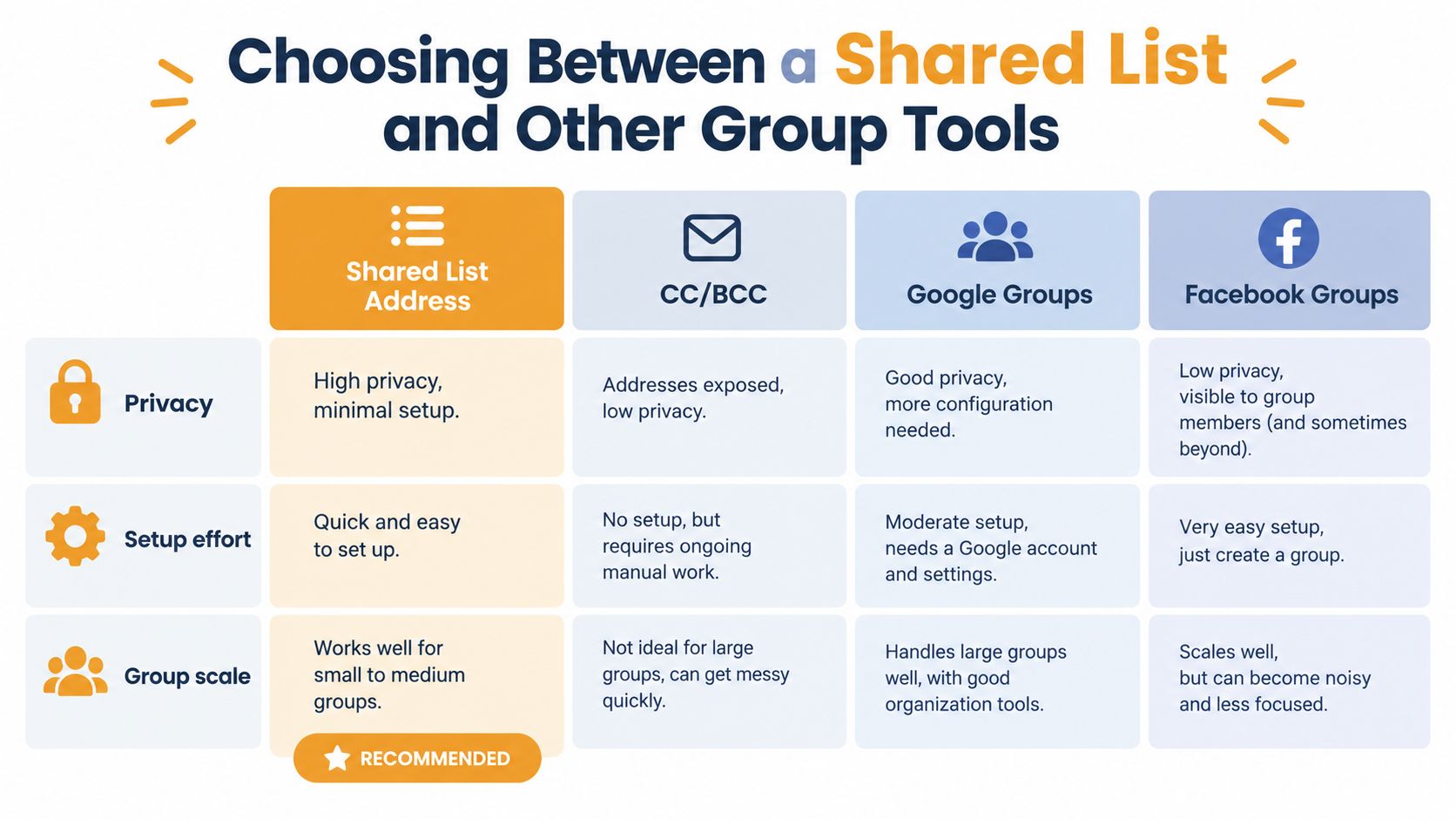
| Option | Member privacy | Accounts or apps needed | Continuity through turnover | Best for | |---|---|---|---|---| | Shared list address | Can hide personal addresses when configured correctly | Standard email can be enough | Strong when ownership and membership are managed separately from one inbox | Recurring announcements and discussions | | CC | Addresses are visible to recipients | Standard email | Weak, because each sender maintains the recipients | Small, one-off messages | | BCC | Addresses are hidden from recipients | Standard email | Weak, because the sender maintains the roster | Private one-way updates to a small audience | | Google Groups | Depends on group settings and member account access | May require Google account familiarity | Can persist beyond one volunteer if managed well | Groups already using Google Workspace | | Facebook Groups | Members' participation and visibility depend on platform settings | Facebook account and app or website access | Tied to the platform and its membership | Communities already active on Facebook |
Match the tool to the group
HOAs and neighborhood associations usually benefit from a shared list when board members change and residents need a dependable announcement address. Restricting send permission to authorized officers can reduce accidental broadcasts. A Google Group may also work if residents already use Google accounts and the board is comfortable managing its settings.
Book clubs, car clubs, bridge groups, and pickleball groups often need two-way conversation. A shared list keeps participation inside familiar email, while a Facebook Group may be fine for a club whose members already check Facebook regularly. Don't force a new platform on people who only want meeting reminders and replies.
Faith communities need to separate routine announcements from sensitive pastoral or personal information. Email can serve a broad schedule list, but private matters should go only to people who need them. A shared mailbox may suit a church office, while a restricted announcement list may suit the congregation.
Family coordinators often don't need a dedicated list for occasional updates. If the same person sends infrequent messages to a stable, small group, BCC may be enough. Choose a shared list when the family roster changes frequently or several relatives need to send and receive group replies.
A service such as email list hosting from Listava is one option for groups that want a shared address, standard email participation, member privacy controls, and continuity outside one person's inbox. It isn't a reason to turn every family message into a formal system. The value appears when recurring communication has become an administrative chore.
Keeping Your List Healthy Through Leadership Changes
A book club list may work perfectly after its first setup, then stop serving the group without notice. One member changes email, a volunteer moves away, a new coordinator joins, and nobody knows who can update the roster. The list still exists, but its information and permissions begin to age. That slow failure is list decay.
Recent coverage cited by ContactMonkey identifies stale Outlook lists as a cause of missed updates. Its discussion of Outlook distribution lists reports that 56% of respondents miss important updates occasionally, while 30% say this happens often or very often (ContactMonkey's discussion of Outlook distribution lists). Volunteer organizations can encounter the same problem when leadership changes without a clear maintenance habit.
Give the list a real owner
“Whoever set it up” is a temporary arrangement, not an ownership policy. Assign responsibility to a current role or person, such as the HOA secretary, club membership coordinator, or church administrator. That owner should be able to approve members, remove former members, adjust sending permissions, and pass control to the next coordinator.
A shared list address helps here because the communication channel does not depend on one volunteer's personal inbox. The person holding the role may change, while the address, membership records, and operating rules continue with the organization.
Set sending restrictions according to the group's purpose. A discussion list may let every member post, while an announcement list for a church office or HOA may accept messages only from approved leaders. Moderation adds a review before a message reaches everyone, which can prevent an accidental reply-all storm.
Use a simple maintenance checklist
Review the list on a schedule that suits the organization. A short check can prevent a future handoff from becoming detective work.
- Confirm the owner: Make sure the named person still belongs to the group and understands the responsibility.
- Check membership: Remove people who left, add approved members, and investigate addresses that repeatedly bounce.
- Review permissions: Confirm who can send, whether messages need approval, and where replies go.
- Check exposure: Verify that personal addresses remain hidden when members do not need to see them.
- Plan the handoff: Record how the next coordinator receives control before a leadership change occurs. The email list management guide can help organize that process.
- Question the tool: Reconsider the list if the group's communication needs have changed.
A distribution list may be the wrong tool for a sensitive community when broad delivery could expose information to people without a legitimate reason to receive it. Wide lists can also create information overload and spam risk, and removal requests need prompt attention. Skillcast's email distribution list guidance reinforces the practical rule: convenience should not replace careful judgment about who needs to know.
Putting It All Together
The occasional family coordinator can keep using BCC when the audience is small, stable, and the message is one-way. The next time, check the recipient addresses carefully and avoid treating a one-off update as a permanent communication system.
The club leader buried under reply-all messages needs a shared list address. Set the reply behavior deliberately, decide whether all members can post, and make sure the roster has a named owner instead of living in an old email draft.
The HOA board planning for turnover should prioritize continuity. Create a list that exists independently of one volunteer's inbox, review membership and permissions regularly, and keep sensitive matters outside the broad announcement channel.
The church coordinator should separate routine notices from private conversations. The family organizer should choose the lightest tool that people will willingly use. The hobby club leader should ask whether members need email, a forum, or a platform they already visit.
Group email doesn't require you to become an IT department. Once the communication method matches the group, your time can return to choosing books, organizing events, serving neighbors, or making sure everyone knows where the cookies are.
If your group is tired of CC confusion and BCC silence, Listava provides a shared email address that reaches the group, supports member management, and keeps personal addresses private. Visit Listava to set up a more durable communication routine before the next organizer inherits a spreadsheet and a mystery reply-all thread.