No Reply Email Explained: What It Means and Better Options
Learn what a no reply email address is, why groups use it, the hidden deliverability and privacy trade-offs, and the better alternatives for community lists.
You get an email confirming a neighborhood meeting, reminding everyone about a club event, or sharing a family update. You have a quick question, so you press Reply. Then you notice the sender address begins with “no-reply,” or your message gets an automated response saying the mailbox isn't monitored. The information arrived, but the conversation has nowhere to go.
That familiar dead end is the result of a design choice, not a special email protocol. For volunteer organizers, community groups, and families, understanding that difference helps solve a practical problem: how to invite useful replies without making everyone's personal address visible. The answer starts with what a no-reply address controls, and what it doesn't.
Table of Contents
- The Message You Couldn't Reply To
- What a No Reply Email Actually Is
- Why No Reply Email Became the Default for Communities
- The Hidden Costs of Using No Reply for Group Lists
- Deliverability Is Not What No Reply Fixes
- No Reply Versus CC Versus BCC Versus a Group List Address
- A Better Pattern for Community Communication
- How Listava Turns the Pattern Into a Product
The Message You Couldn't Reply To
The neighborhood association sends a notice about a road closure. A member spots a mistake in the date and tries to reply before anyone makes plans. The message came from no-reply@..., though, and the response either bounces or disappears into a mailbox no one checks.
The same thing happens with a book-club reminder that leaves out the meeting location, a congregation announcement that needs an RSVP, or a family update someone wants to correct privately. A no-reply address turns an ordinary question into a separate task: find another contact, open a portal, or hope the organizer sees the issue elsewhere.
That doesn't mean every email needs to invite a conversation. Password resets and machine-generated receipts may not need a direct response. But group announcements often do, even when the sender's original intention is to keep the mailing list manageable.
For community organizers, the challenge is balancing three practical needs: keep communication easy, protect members' email addresses, and make sure replies reach someone who can act on them. A long CC chain can expose addresses, while a no-reply mailbox can silence useful corrections and questions. Neither has to be the default.
Understanding the mechanics makes the choice clearer. A no-reply label signals that a response isn't expected, but it doesn't determine whether email systems deliver, authenticate, or thread a message. Once those roles are separated, organizers can choose a reply path that suits the message and the group.
What a No Reply Email Actually Is
A no-reply email is a message sent from an address that discourages or doesn't accept responses. The familiar label, such as [email protected], is what the recipient sees in the message's From field. It's a signpost, much like a label on a mailbox saying “announcements only.” It isn't, by itself, a technical rule that prevents a recipient from pressing Reply.
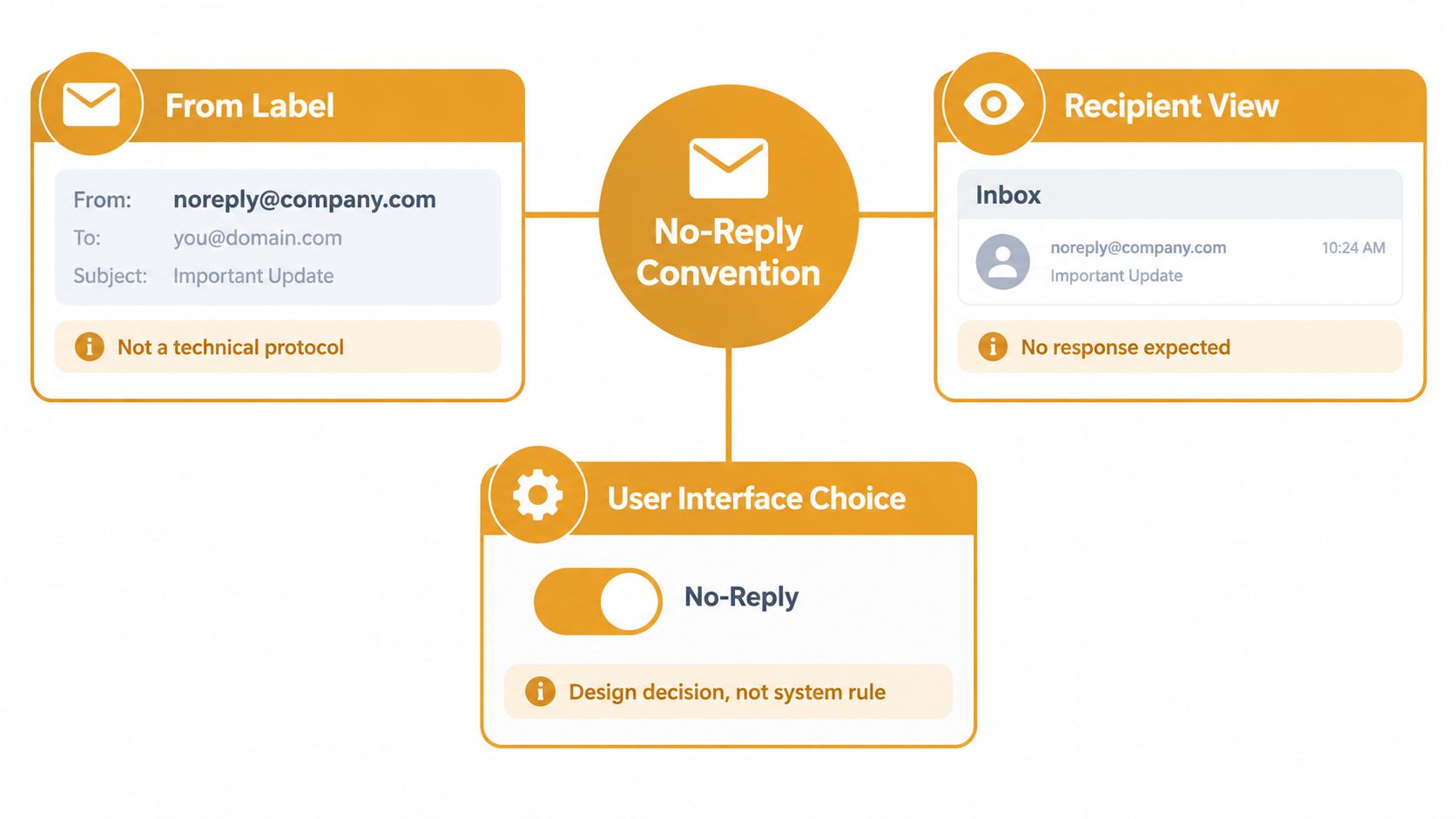
Behind the visible sender name, email uses several fields to manage delivery and conversation. From identifies the sender shown to the recipient. Reply-To, when present, tells the email client where to direct a reply. The SMTP envelope sender is used by mail systems during delivery, while Message-ID, In-Reply-To, and References help connect messages into a thread.
These fields do different jobs. A message can display a recognizable address in From while directing replies to another monitored address through Reply-To. Or its From address can point to a mailbox that accepts no incoming messages. The label alone doesn't tell the whole story.
Why automatic messages need special handling
The Internet Engineering Task Force addressed automatic replies in RFC 3834, published in August 2004. The standard introduced the Auto-Submitted header to identify automatically generated messages. It says that an automatic responder shouldn't send another automatic response when that header has a value other than no. The standard also recommends using an empty SMTP envelope sender, MAIL FROM:<>, or the responder's own address instead of recycling the original sender's address. These measures help prevent reply loops and backscatter between mail systems. (RFC 3834 on automatic responses to email)
That history helps clarify an important distinction: standards guide the handling of automatic messages; “no-reply” is a visible address convention. A group can send an automated message without blocking every useful reply. It can also use a no-reply label while providing a separate, clearly stated contact route.
Why No Reply Email Became the Default for Communities
A volunteer organizer usually doesn't choose a no-reply address because they want to shut people out. They may be trying to prevent a neighborhood announcement from triggering a storm of Reply All messages, keep a personal inbox from becoming the group's unofficial help desk, or avoid exposing everyone's address in a CC chain.
Those concerns are real. A small club may have no dedicated communications staff. An HOA board member may be handling announcements between work and other responsibilities. A family coordinator might be managing a list that changes whenever someone moves, joins, or leaves. A one-way sender address can look like the easiest way to keep the work contained.
But it solves the organizer's inbox problem by removing the recipient's simplest way to respond. Someone with a correction, RSVP, accessibility request, or concern must figure out another route. The burden shifts from the person managing the list to every member who needs to communicate.
Outbound messages aren't automatically conversations
Cold-email data offers a useful, limited illustration of how little reciprocal communication a one-way design may produce. A 2025 dataset of more than 7.5 million cold emails recorded an average reply rate of about 0.45%, after excluding automatic replies and bounces (OutreachBloom's cold-email statistics). That figure describes cold sales outreach, not an HOA, club, congregation, or family list. The audiences and purposes differ, so it isn't a benchmark for community email.
The relevant lesson is narrower: sending a message doesn't guarantee a meaningful conversation. For a group announcement, organizers need to decide whether replies matter before choosing a sender and reply path. A one-way approach may suit an alert that needs no response. It can be a poor fit for an invitation that depends on replies, a notice that could contain an error, or an update that might raise a private concern.
There's also a privacy paradox. Organizers who avoid a group reply address sometimes fall back on CC so everyone can respond directly. That can reveal members' personal addresses and invite reply-all traffic. The aim should be to control the conversation without making recipients choose between silence and public exposure.
The Hidden Costs of Using No Reply for Group Lists
A message can arrive successfully and still fail as communication. If someone replies to an unmonitored address, their response may never reach a person who can correct the announcement, update a recipient list, or answer a question. A road-closure notice with the wrong date remains wrong. A member who can't find a meeting location may give up rather than hunt for another contact.
The problem can be easy to miss because the sender sees the original message go out. But group communication needs a return path when people may have something useful to say. The email fields that support identity and threading matter here: From and Reply-To help direct a response, while Message-ID, In-Reply-To, and References help mail clients connect it to the conversation. Directing replies to an unattended address can turn a reply into a dead end and disrupt threading in clients such as Gmail, Outlook, Yahoo, and Hotmail. (Gmail guidance on email headers and delivery)
For more on how those reply and reference fields connect messages, see this guide to email threading.
Access and privacy are part of the same decision
Not everyone can or wants to switch to a separate app, create an account, or work through a web portal just to ask a simple question. Some members rely on the email client they already use. A blocked reply can make it harder to request clarification, report an error, ask for an accommodation, or privately flag a safety concern.
Meanwhile, a group that needs replies but lacks a shared address may turn to CC. That makes participation easy, but can disclose personal addresses to the entire recipient list. BCC hides recipients from one another, but can make replies less straightforward and leave the organizer responsible for relaying information.
Practical rule: If a member could reasonably need to correct, clarify, or respond to the message, give them a private and monitored route to do so.
That's a more useful test than asking whether every email should allow replies. Some notifications are one-way. Community announcements often aren't.
Deliverability Is Not What No Reply Fixes
A no-reply address works like a sign on a mailbox: it tells people not to answer there, but it does not control whether the message reaches the inbox. Receiving systems evaluate technical and behavioral signals such as authentication, domain alignment, DNS validity, message format, reputation, and recipient engagement. The sender label alone cannot replace those checks.
Gmail requires all senders to use SPF or DKIM. Bulk senders must use SPF, DKIM, and DMARC. DMARC passes only when SPF or DKIM authenticates the message and the authenticated domain aligns with the domain shown in From. (Google's email sender guidelines) For steps to help recipients trust an address, see this guide to the safe senders list.
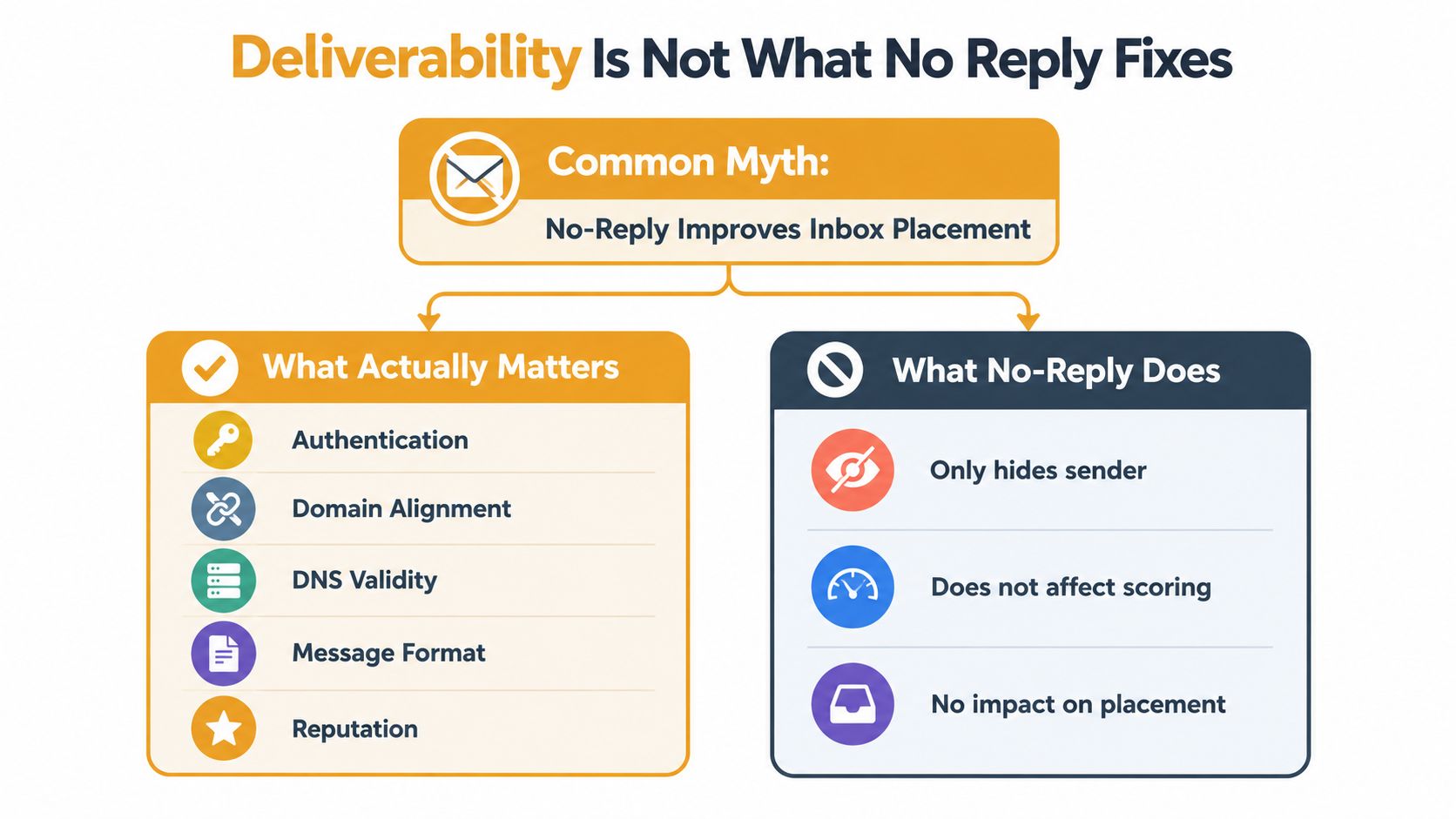
A monitored address still needs correctly configured authentication and someone responsible for checking it. A no-reply address can leave a blind spot if delivery failures or member questions go to an unattended inbox. Keep the recognizable sender identity if it helps members identify the message, but set a separate, monitored reply destination. The no-reply label is a user-interface convention, not a deliverability control.
Choose the address for the message's job
A neighborhood group can use different sending styles for different messages. A no-reply address can suit an automated notice that needs no response. For community updates, choose a reply route that lets people ask questions while protecting personal addresses. That gives organizers a way to preserve two-way communication without putting every member's email on display.
| Approach | Address Privacy | Two-Way Replies | Best Fit | |---|---|---|---| | No-reply From address | Keeps member addresses out of the message when sent to a private list | Replies need another route | Automated notices that don't call for a response | | CC chain | Recipients can see one another's addresses | Direct replies | Small, trusted groups | | BCC list | Hides recipient addresses | Replies go to the sender | One-way notices sent privately | | Shared group address with controlled replies | Keeps members' personal addresses private | Can route replies to the group or an organizer | Discussion, corrections, RSVPs, and ongoing updates |
For organizers deciding how to handle visible recipients, CC versus BCC explains the difference. Choose based on the message's purpose and the reply path members need.
No Reply Versus CC Versus BCC Versus a Group List Address
A neighborhood association's email routine may change with the message. For a roadwork notice, the board can send from its familiar address and ask for no replies. When residents need to discuss a meeting, the same sender identity can direct responses to a monitored group address. The address in the From line identifies who sent the message; it does not, by itself, determine how the group will handle a conversation.
Each sending style suits a different situation. A no-reply address resembles a notice posted on a community bulletin board: people can read it, but need another route to ask a question. A CC chain is more like passing around a sign-up sheet with everyone's contact details visible. That can suit a small, trusted committee, but it exposes addresses to all recipients.
BCC keeps the recipient list out of view, much like sending individual copies of a notice. It can fit a private, one-way announcement, though replies typically return to the sender rather than forming a shared discussion. A group list address is more like a neighborhood mailbox: messages can reach the group, while its settings determine whether replies go to the list, an organizer, or another defined destination.
The distinction matters when a message's purpose changes. An HOA board might send a routine maintenance update as a one-way notice, then use a monitored group address for residents' questions about a meeting. A family coordinator could send plans from a recognizable personal address while directing replies to a group list, keeping everyone's private addresses out of the original message. The sender can remain familiar even as the conversation route changes.
For a password reset or receipt, provide a working support contact if someone may need help. For an invitation or community update, make the expected reply route clear, especially for people reading on a phone or using a standard email app. If deciding whether recipients should see one another's addresses, this guide to CC versus BCC email explains the difference.
Before sending, ask: What response might this message prompt, and which address should receive it?
A Better Pattern for Community Communication
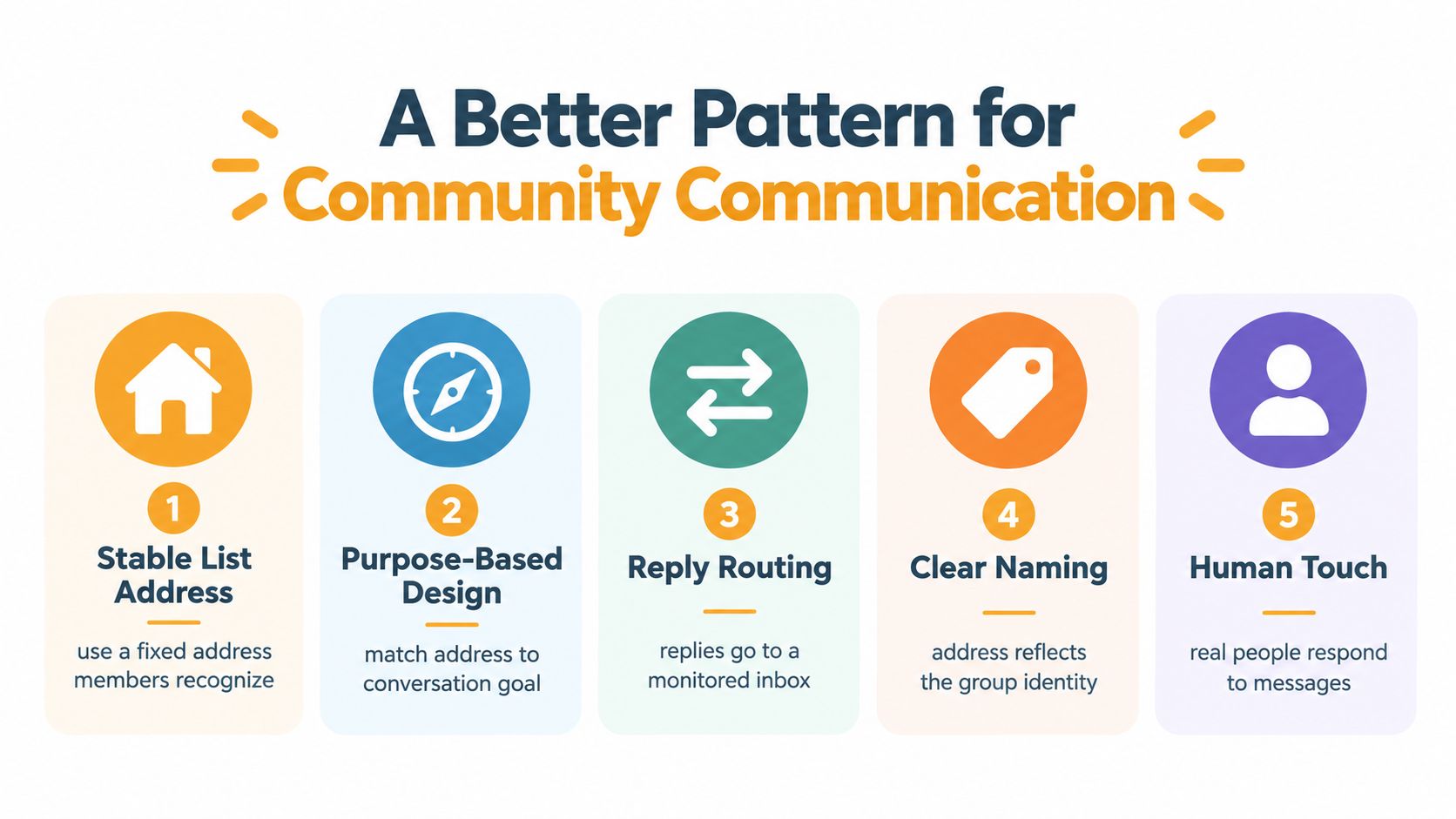
A workable group email setup doesn't have to choose between conversation and privacy. Keep the sender identity stable and recognizable, then route replies to an address that a person or group monitors. Members see who sent the message, while the organizer controls where a response goes.
For a message that may prompt discussion, set Reply-To to the group address or a monitored organizer channel. That gives recipients a familiar Reply button rather than requiring them to search for a different contact. It also gives organizers a way to manage conversation without putting every member's personal address on display.
Assign a real owner to the reply path
A monitored address needs an owner, even if the owner is a rotating volunteer. Decide who checks it, how they handle messages that need follow-up, and what happens when the usual organizer is unavailable. Without that ownership, “monitored” can become another label that doesn't match reality.
The technical setup matters too. Authenticate the sending domain, keep From and Reply-To addresses valid, monitor bounced messages, and remove invalid recipients when needed. Test Reply, Reply All, and forwarded-message behavior in the email clients your members use. A message that works for the organizer may behave differently for recipients.
Microsoft's 2025 bulk-sender requirements specify that From and Reply-To addresses must be valid and capable of receiving replies, reinforcing the importance of monitored sender identities (Customer.io's overview of Microsoft and Google email requirements). That doesn't mean every automatic message needs an open-ended conversation. It means senders should be deliberate about whether replies are accepted and where they go.
Use a no-reply label only when the message is non-interactive. If a recipient could reasonably need help, provide a clearly visible alternative that doesn't depend on guessing.
How Listava Turns the Pattern Into a Product
For a community group, a shared email address can act like a neighborhood bulletin board with a return slot. The group uses one address, members receive the message in their usual inboxes, and replies can stay within the group without putting everyone's personal address in a public CC line.
Listava is designed around that email-only pattern. Organizers can create a shared group address, add members through CC or a bulk Excel import, and use reply-to-group behavior to keep discussion connected. Members can participate through standard email clients such as Gmail, Outlook, Yahoo, and Hotmail, without needing a separate app, member account, or dashboard for routine use.
That setup addresses several common organizer headaches at once. A club can keep the list current without relying on one person's private address book. A family coordinator can share updates without exposing every relative's address to the entire group. And when a volunteer or board member steps down, the group's communication can continue through its shared address instead of being tied to the outgoing organizer's inbox.
Privacy and accessibility are part of the design, too. Listava's controls hide personal email addresses from other members, while large fonts and high-contrast design help make information easier to read. Organizers can manage the group through ordinary email workflows rather than asking every member to learn a new platform.
Use three questions before the next announcement
Before sending a notice, invitation, or reminder, ask:
- Does this message need a reply? A system receipt may not. An RSVP request or correction notice probably does.
- Who owns the reply address? Name the person or group responsible for reading responses and handling anything that needs action.
- Is the sending setup authenticated and monitored? Use valid addresses, maintain the appropriate email authentication, watch for delivery failures, and check that replies reach the intended destination.
Then run a quick pre-send check. Confirm that the From name is recognizable, the reply route matches the message's purpose, and the alternative contact is visible if replies aren't accepted. Send a test and try Reply, Reply All, and forwarding in the clients your group uses. Finally, make sure the list stays private and someone will notice a bounce or a member's question.
That's a repeatable habit for an HOA notice, club reminder, congregation update, or family plan. A message is finished only when recipients know how to respond, or where to turn if they need help.
Listava gives community groups one shared email address, private member delivery, and reply-to-group conversation through the email clients people already use. If you want a practical alternative to no-reply addresses and exposed CC lists, visit Listava to see how it can help your group keep communication connected.