What Is a Thread of Emails and How to Keep One Intact
Learn what a thread of emails really is, how threading works, why CC and BCC break conversations, and how groups keep replies intact without exposing addresses.
A thread of emails is a single conversation built from an original message and all the replies linked to it, grouped together by your email client. In a large-scale study of roughly 16 billion emails, the average thread contained 3.76 emails, the median contained 2, and 22% continued for more than one day.
You know the scene. An organizer sends one message about the neighborhood cleanup, someone replies to everyone, another person forwards the message to a spouse, and a third member starts a fresh email with “Re: Cleanup” in the subject line. By evening, the group has several almost-identical conversations, one person has been left out, and the final decision is buried beneath greetings, corrections, and “please remove me from this thread.”
For a workplace team, that's inconvenient. For a volunteer group, it can damage the group's memory. A new coordinator may not know which date was approved, a new member may receive only half the discussion, and a private address may be exposed only because someone chose CC instead of BCC.
The useful question isn't only how to tidy your inbox. It's how to keep a shared conversation intact, private, and understandable when people use different email services and no one wants another app.
Table of Contents
- When One Reply Becomes Thirty Messages
- What a Thread of Emails Actually Is
- The Hidden Machinery Behind Threading
- Why CC and BCC Break the Conversation
- How Threads Fall Apart in Real Groups
- Keeping an Intact Thread with a Shared Group Address
- Practical Thread Habits for Any Group
When One Reply Becomes Thirty Messages
Mara, the treasurer of a small gardening club, sends an email with the subject “Spring Plant Sale”. She asks members to confirm who can work the Saturday table. One member selects Reply All and says she can help in the morning. Another replies only to Mara. A third forwards the original to a new volunteer, who responds from a different account with the subject “Plant sale question.”
By lunchtime, the group has three conversations. Some members see the morning shift as confirmed. Others are still discussing possible dates. Mara's inbox contains the complete history, but everyone else has fragments.
That's the ordinary failure behind the phrase thread of emails. A thread is one conversation made from an original message and its replies, arranged so readers can follow what happened. The email client may show it as one expandable item, but the group depends on more than that visual display. It depends on the right people receiving each reply and on each message retaining its connection to the earlier ones.
The problem isn't just inbox clutter
A broken thread creates several practical problems at once:
- Context disappears: A member sees “That works for me” without seeing the date being discussed.
- Participation becomes uneven: Replies sent only to the organizer leave the wider group guessing.
- Addresses become exposed: A long CC list reveals personal addresses to everyone.
- Decisions become difficult to verify: People remember different versions of the agreement.
- Leadership changes create gaps: The conversation may exist mainly in one coordinator's mailbox.
Folders and labels can help one person find messages. They can't repair a conversation that was sent to the wrong people or split into unrelated chains.
Practical rule: Treat the thread as a shared record, not as a decorative inbox setting.
The rest of the problem becomes easier once you understand what email clients group together, what invisible information holds the messages in place, and why CC and BCC each solve only part of the group's needs.
What a Thread of Emails Actually Is
Take a book club planning next month's meeting. The first message asks, “Would Tuesday or Thursday work?” That's the origin message. One member replies with a suggested date, another confirms availability, and a third shares the location.
The email client groups these messages into one conversation. You can open the thread, read the original question, and follow each answer in sequence. Quoted text may repeat part of the earlier message, while the conversation view in Gmail, Outlook, or Yahoo usually collapses older replies until you expand them.
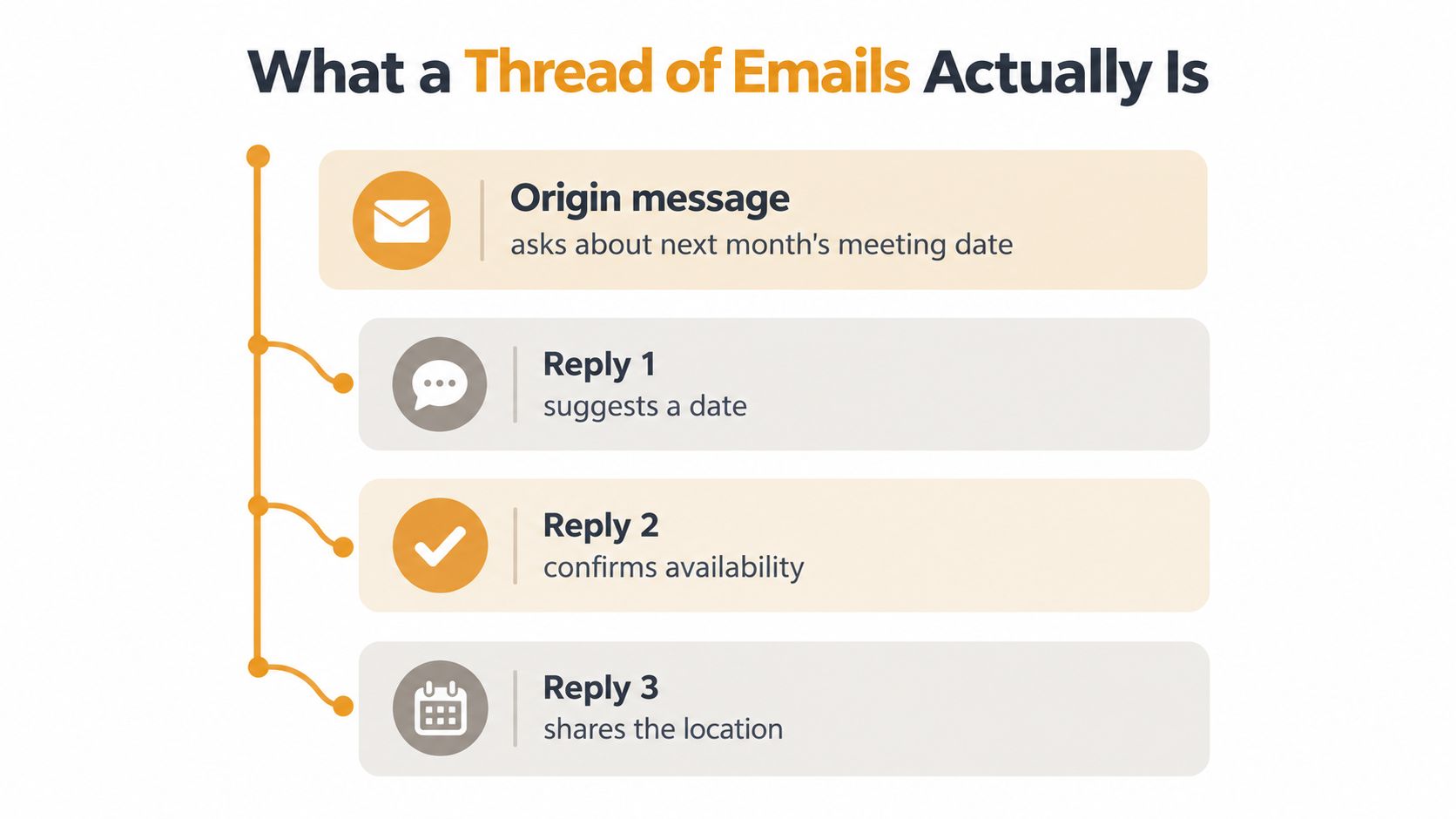
A helpful analogy is a meeting-minutes document that grows while the meeting is happening. The first page records the question. Each reply adds a contribution, correction, or decision. If someone removes a page or creates a separate document with the same title, the record becomes harder to trust.
How replies build the conversation
A simple thread usually follows this path:
- An original message starts the topic. It establishes the subject and the initial group of recipients.
- A reply adds information. The reply keeps the topic connected to the original conversation.
- Further replies create branches. Several people may answer the same message, producing different paths within one discussion.
- The client displays the history together. The exact presentation varies, but the purpose is the same, to make related messages easier to follow.
A thread can contain several branches without being several unrelated conversations. That distinction matters when one person replies to the latest message while another replies to an earlier point. The reader needs the ancestry of each message to understand which answer responds to which question.
Real-world email behavior shows why this structure deserves attention. A large-scale study of approximately 16 billion emails exchanged by more than 2 million Yahoo Mail users found that the average thread contained 3.76 emails, while the median contained 2. The same large-scale email thread study found that half of threads lasted 3.5 hours or less, while 22% continued for more than one day.
Most conversations are therefore short, but a meaningful portion stays active long enough for people to join late, change devices, or miss an exchange. A tidy thread helps those readers recover the question, the responses, and the decision without asking the organizer to reconstruct everything.
The Hidden Machinery Behind Threading
Your email client doesn't rely only on the visible subject line. “Meeting location” and “Re: Meeting location” may look related to you, but the software needs stronger evidence before it places messages in the same conversation.
Each message carries invisible metadata that works like a family tree. The Message-ID is the message's unique identity. When someone replies, In-Reply-To identifies the message being answered. The References header carries the earlier chain of message identities, allowing the client to trace the reply back through its ancestors.
A family tree for messages
Suppose the club's original message is the root of the family tree. Ana replies to it, creating the first branch. Ben replies to Ana, creating another link. Carla replies to the original question instead, creating a second branch from the same root.
The visible subject may remain similar across all three messages, but the metadata tells the client how they relate:
- Message-ID: “This is the unique identity of this message.”
- In-Reply-To: “This message answers that parent message.”
- References: “These are the earlier messages in the chain.”
The RFC 5322 email standard defines this relationship. If a forwarding or redistribution service gives every delivery an unrelated new Message-ID and fails to preserve valid In-Reply-To and References values, Gmail, Outlook, Yahoo, or another client may treat each delivery as a separate conversation. If the ancestry remains connected, the client has the information needed to reconstruct branches coherently.
That's why a subject-line rule alone is unreliable. Someone can copy a subject into an entirely new message, and two separate topics can accidentally share the same wording. The invisible identifiers provide the stronger connection.
Why different providers can work together
This system rests on standards refined over decades. Experimental network email appeared soon after ARPANET began in 1969, Ray Tomlinson is generally credited with sending the first network email in 1971, and later standards defined message formats and transport rules used by interoperable email systems.
RFC 733 appeared in 1977. RFC 821 and RFC 822 followed in 1982, defining important parts of SMTP and Internet message structure. ARPANET adopted TCP/IP on January 1, 1983, helping establish the interoperable environment in which modern email developed. Later revisions replaced earlier standards, including RFC 2822 in 2001 and RFC 5322 in 2008, as described in this overview of email's development.
The result is practical rather than academic. A member can write from Outlook, another can answer from Gmail, and a third can read from Yahoo because shared standards carry the message and its relationships across services.
Why CC and BCC Break the Conversation
CC and BCC look like simple recipient choices, but group organizers are choosing between two competing outcomes. CC supports visible participation, while BCC supports address privacy. Neither option, used by itself, reliably gives a volunteer group both.
CC shows every recipient to every other recipient. A reply can reach the whole group, and members can see who is included. The cost is that personal addresses are exposed, and one careless Reply All can send a minor comment to everyone.
BCC hides recipients from one another. That protects addresses, but it also makes the group less visible. A member replying to a BCC message may reach only the sender, not the other people who received the original. A new participant may also receive a message without knowing who else is part of the discussion.
| Aspect | Using CC | Using BCC | |---|---|---| | Privacy | Every recipient can see the listed addresses. | Recipients generally can't see the hidden list. | | Thread integrity | Replies can remain connected when members use Reply All correctly. | Replies often return only to the sender or a partial recipient set. | | Participation | Everyone can identify the group and contribute, but reply-all cascades are possible. | Members may not know who should receive a response, so participation becomes inconsistent. | | Recovery | A member can often identify who was included, but the visible list may expose private details. | The sender must manually restore anyone omitted from a reply. |
The trade-off is especially serious for HOAs, clubs, congregations, and extended families. These groups may include people using Gmail, Outlook, Yahoo, older devices, or personal accounts. They may not have an administrator who can explain why a reply vanished or why a private address was revealed.
Published email-security guidance often describes enterprise environments. For example, a 2025 email-security study surveyed 252 security professionals, all using Microsoft 365 as their primary platform. That perspective can be useful, but it doesn't fully answer the ordinary organizer's question: how can a mixed-provider group preserve participation while limiting address exposure?
A shared group address changes the decision. The group has one public destination for replies, while the delivery layer controls which members receive the message and whether personal addresses are shown. That arrangement addresses the structural problem instead of asking volunteers to choose which weakness they prefer.
For a detailed comparison of the mechanics and risks, see this guide to CC versus BCC for email groups.
How Threads Fall Apart in Real Groups
Thread failure rarely comes from one dramatic mistake. It usually comes from small changes that seem harmless at the time.
A coordinator changes the subject from “Annual meeting” to “Parking question.” A member forwards the last message to someone who wasn't included. Another person replies from a work account instead of the personal account used earlier. Someone else starts a fresh message because the original thread is difficult to find.
Each action can separate part of the conversation from the rest.
Common points of failure
- The subject changes midstream: Readers and clients may struggle to connect a new subject with the original topic.
- A forward replaces a reply: Forwarding may preserve visible quoted text but doesn't necessarily preserve the original conversation relationship.
- Recipients drift: A reply to the organizer alone can turn a group decision into a private exchange.
- A member is added without context: The new person receives the latest question but not the earlier reasoning.
- The thread stays in one inbox: The coordinator becomes the only reliable source of history.
The final problem is often the quietest. A volunteer chairperson keeps the full conversation in a personal mailbox, then hands the role to someone else. The list of members may be stored in a spreadsheet, but the reasoning behind decisions remains scattered across sent mail, forwards, and individual recollections.
That's why folders, batching, and shorter messages don't solve the group problem. Those techniques help an individual manage incoming work. They don't establish who owns a decision, who must receive a reply, or how a new coordinator recovers the group's history.
A survey reported in 2025 found that 35% of employees spend up to five hours per day managing email, while 93% check email at least daily. The figures describe the pressure on individual inboxes, but they also highlight why group organizers need a different approach. A busy inbox can hide a message. It can't serve as a dependable archive for everyone.
A durable group conversation should survive the person who started it.
The practical target isn't necessarily fewer messages. It's a conversation record with stable subjects, clear reply expectations, periodic decision summaries, and a recipient list that doesn't depend on one organizer remembering every address.
Keeping an Intact Thread with a Shared Group Address
A shared group address gives the conversation one consistent destination. Instead of putting every member in CC or hiding everyone in BCC, the organizer sends to the group address. The service delivers the message to members while keeping their personal addresses out of the visible recipient list.
The important detail is reply-to-group behavior. When a member replies, the reply goes back through the group address and reaches the group again. The discussion remains a group discussion, rather than becoming a private exchange between one member and the organizer.
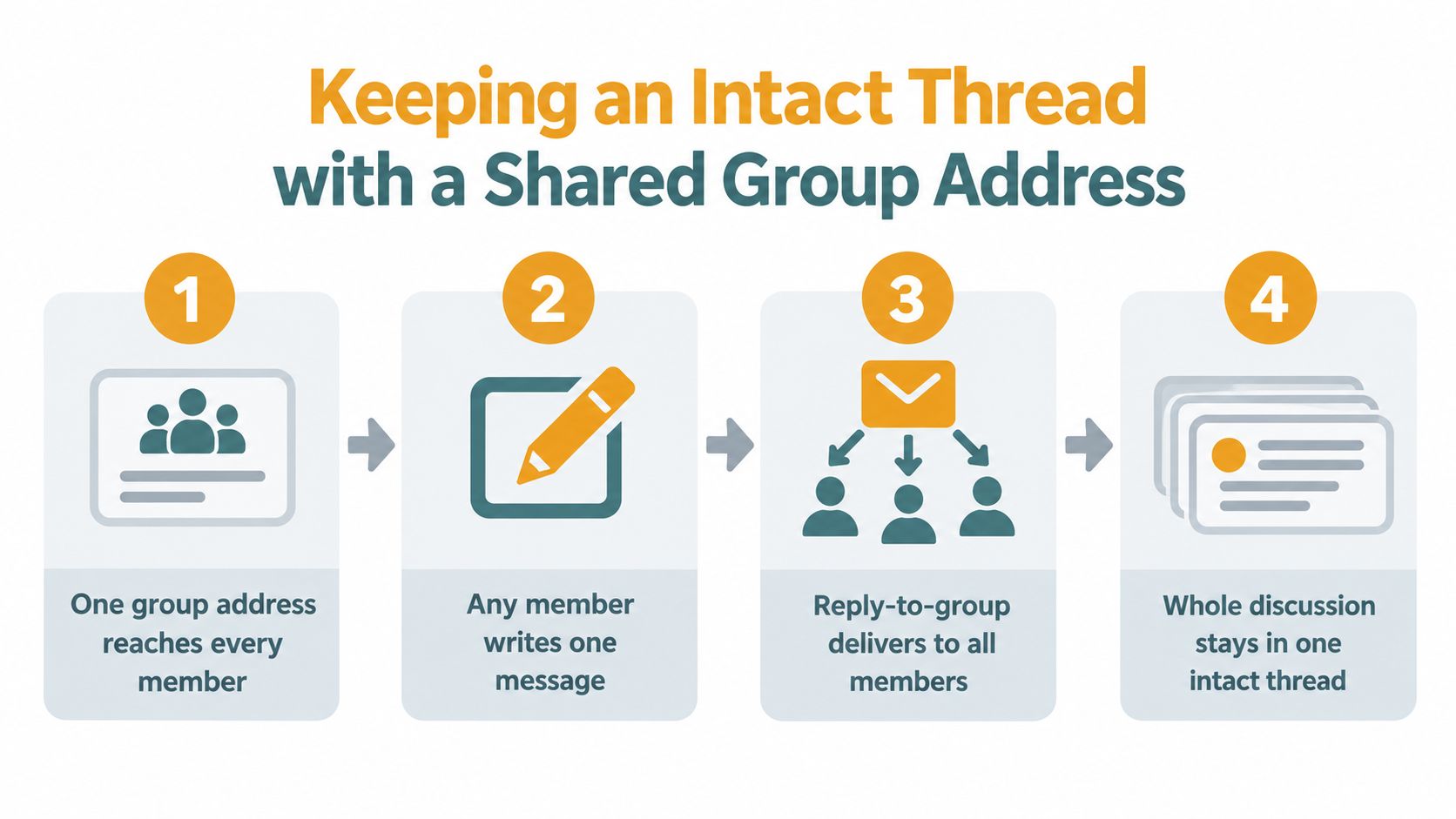
Consider a pickleball group planning an event. The organizer sends the first note to the shared address. One player replies with a preferred court, another confirms the time, and a third asks whether a ride is available. Each person uses the email client they already know, and the group address keeps the replies pointed toward the same audience.
What the organizer and members do
- Create one group destination. The address represents the group, not one volunteer's mailbox.
- Send the original message there. Every member receives the same starting point.
- Reply to the group. The group address remains the destination for discussion.
- Maintain membership separately from the conversation. Adding or removing a member doesn't require rebuilding every recipient field by hand.
This approach doesn't require members to create accounts, download an app, or learn a dashboard. Gmail, Outlook, Yahoo, and Hotmail users can participate through ordinary email. The group's continuity also remains available when the coordinator changes, because the list isn't merely a collection of addresses saved in one person's contacts.
A service such as Listava's shared email address is designed around this model. It distributes messages to the group, supports replies directed back to the group, and hides personal addresses from other members. That makes it relevant to organizers who need ordinary email access without turning volunteers into technical administrators.
The underlying message relationships still matter. A redistribution layer must preserve or correctly recreate the metadata that lets clients recognize replies as part of the same conversation. Without that, a shared address could deliver messages successfully while still producing disconnected threads in members' inboxes.
Watch the process in action before setting up your own group:
Privacy and continuity aren't identical goals, but a properly designed group address can support both. Members see the discussion they need, while the organizer avoids exposing a directory of personal addresses every time someone sends an announcement.
Practical Thread Habits for Any Group
Even without a group-address service, a few habits make conversations easier to follow.
Keep the subject stable while the topic remains the same. Start a new thread when the subject genuinely changes, and add a short context line when bringing in someone new. “Adding Priya, she's coordinating the venue” gives the new member a useful orientation without forcing everyone to resend the full history.
Use reply choices deliberately:
- Reply to the group: Use it for decisions, questions, and information the members need.
- Reply to one person: Use it for personal details, private coordination, or a message that doesn't concern the whole group.
- CC: Use it when visible recipient participation matters and everyone has agreed that addresses can be shared.
- BCC: Use it for a one-way announcement when recipients don't need to reply to one another.
- A new thread: Use it when the subject has changed enough that the old history creates confusion.
A short decision summary can rescue a long-running conversation. Write the agreed date, owner, next action, and unresolved question in a fresh reply while keeping the subject unchanged. New members can then understand the current position without reading every earlier message.
Groups should also choose tools intentionally. A small announcement list may work perfectly with BCC. A private discussion that needs shared replies may need a group address. A community already comfortable with a Facebook group may prefer that space for conversations requiring searchable posts and member profiles.
For recurring groups, email list management guidance can help organizers keep membership and communication rules consistent. The central idea is simple: a healthy thread of emails is a group's shared memory. Protecting that memory keeps decisions visible, helps new members catch up, and gives Harold a fair chance of reading the message before the next meeting.
If your HOA, club, congregation, or family group needs private addresses and reliable reply-to-group conversations, Listava provides a shared email address that works through members' existing email clients. Set up the group, keep membership independent of one organizer's inbox, and invite members to continue the discussion in one intact conversation.