Email for Older Adults: How to Run a Group List That Works
Learn how to set up email for older adults with a private group address, easy-to-read messages, scam protection and simple fixes for every member.
You send a neighbourhood notice, and the thank-you replies start arriving before you've finished your tea. Say there are 47 people copied into the address line: everyone can see everyone else's details, a newcomer replies to all, and nobody knows where the membership spreadsheet lives. Meanwhile, someone phones to ask why they never received the original message.
Good email for older adults isn't about persuading everyone to learn another app. It's about making a familiar tool easier to read, safer to use and less dependent on one volunteer remembering every detail. The organiser's job is to make participation straightforward, including for members who can't reliably use email.
Table of Contents
- Choose the Right Group Email Method
- Set Up and Test the Group Address
- Make Every Message Easy to Read
- Protect Members From Scams and Exposed Addresses
- Reach Members Who Cannot Rely on Email
- Fix Common Group Email Problems Fast
Choose the Right Group Email Method
Group email methods compared
| Method | Hides member addresses | Replies reach the group | Members need an account or app | Survives an organiser leaving | |---|---|---|---|---| | CC list | No | Reply-all only | No new account | No, unless someone transfers the list | | BCC list | Yes | No, replies go to the sender | No new account | No, unless someone transfers the list | | Google Groups | Address visibility is controlled through permissions | Yes | Email participation can work without a Google account; web features require sign-in | Yes, if other owners are added | | Facebook group | Email addresses aren't displayed in the group feed | Yes, inside the group feed | Yes, a Facebook account | Yes, if another administrator exists | | Private group address, for example Listava | Yes | Yes | No, existing email only | Yes, the list doesn't live in one inbox |
A CC list is quick and adequate for a small group whose members have agreed to share addresses. Its weakness isn't sending the first message. It's managing what happens when everyone starts replying.
A BCC list suits announcements that don't need discussion. Recipients can't see the hidden distribution list, but their replies normally return to the sender rather than becoming a shared conversation.
Match the method to the conversation
Google Groups offers email discussion and a shared conversation history, but somebody must understand its membership and visibility settings. Don't assume every participant needs an app, or that every feature works without signing in. Test the actual joining and replying process before inviting the whole club.
A Facebook group makes sense when members already use Facebook and want a feed with photographs and comments. It isn't an email substitute for someone who won't create a Facebook account or doesn't check the feed.
A private group address gives members a single destination for messages and replies while keeping personal addresses out of the distribution list. That removes the CC-versus-BCC choice, although the organiser still needs clear membership and sending rules.
Access matters more than familiarity with a brand. In April 2012, 53% of US adults aged 65 and older used the internet or email, according to Pew's older-adult internet-use report. That's historical context, not a measure of your members today: ask whether each person can reliably receive and answer messages before choosing anything that requires a web login.
I would decide using these questions:
- Membership: How many people need messages, and how often does membership change?
- Conversation: Do members need to reply to everyone, or only contact the organiser?
- Continuity: Who will run the list if the organiser moves away?
Set Up and Test the Group Address
A working list should let members concentrate on the message, not the machinery. A peer-reviewed study of older adults' communication identified reduced access to devices and the internet as a possible explanation for lower email use among the oldest participants. Keep the joining process free of unnecessary installations, passwords and navigation.
Use this visual checklist when preparing the address and its operating notes.
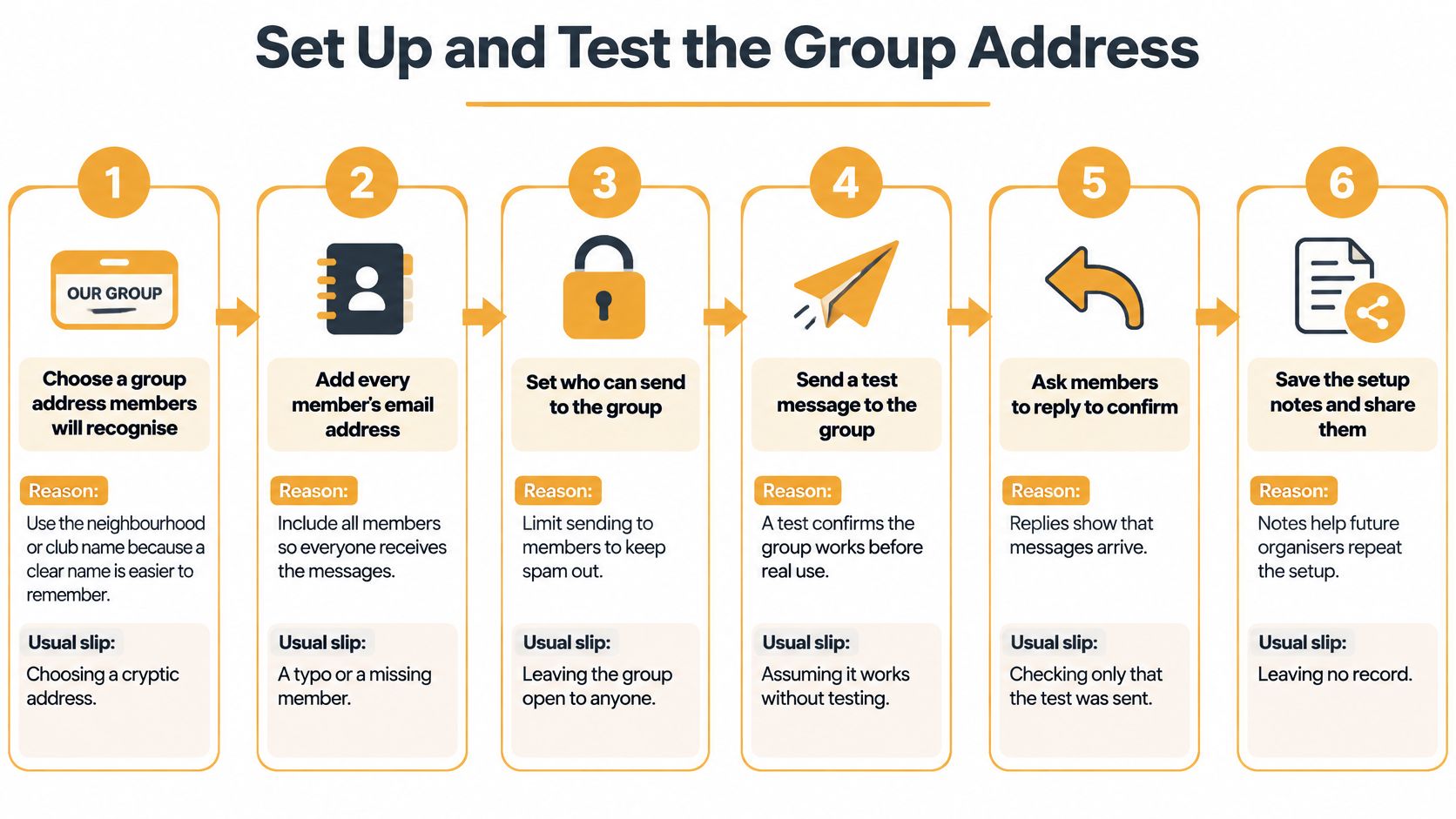
Build the list carefully
-
Choose a name members will recognise. Use the neighbourhood, congregation or club name, rather than the organiser's initials or an obscure abbreviation. Keep the displayed sender name equally clear so recipients can find it later. The usual slip is choosing a name that makes sense to the committee but looks unfamiliar to everyone else.
-
Get explicit permission before adding anyone. Ask members to confirm in writing that they want the group's messages, and record who agreed and when. A reply to an invitation or a signed membership form gives you a usable record. Finding an address on an old attendance sheet isn't permission, and consent to meeting notices shouldn't be treated as consent to unrelated fundraising messages. Our policy requires explicit consent from every recipient.
-
Add members to a single maintained list. Import the agreed addresses from a spreadsheet or paste them into the membership tool, then check for missing names, duplicates and typing errors. Ask members which address they read, not which address they gave the club years ago. Restrict sending to the intended participants or authorised organisers. The usual slip is keeping several competing copies and updating only the one on your own computer.
Treat a membership spreadsheet as private working material. It can contain the consent record and contact preferences, but it shouldn't travel around as an attachment whenever somebody asks who's in the club.
Explain the rules before the first notice
-
Send a plain-language welcome message. Explain what the list is for, who can send, where replies go, how to leave and whom to call for help. Describe the actual buttons or actions members should use, rather than saying the system is intuitive. Put clear unsubscribe instructions in the first message and keep them in subsequent messages; our policy requires them on every email. The common mistake is hiding this information in an attachment that nobody opens.
-
Send a realistic test announcement. Include a date, a time, a place and a clear action, using a harmless practice scenario rather than an urgent notice. I would check it on different phones with enlarged text, then ask a small set of members to confirm receipt and send a practice reply. Inspect what recipients receive, including the visible sender and reply destination. The usual slip is checking the Sent folder and assuming delivery, readability and replies all worked.
-
Appoint a backup administrator and share operating notes. Record how to add and remove members, handle delivery failures, change sending permissions and find the consent record. Give the backup organiser their own authorised access rather than circulating a personal mailbox password. The usual slip is naming a successor without giving them the information or access needed to do anything.
For an additional walkthrough, use the video alongside your written checklist.
Launch rule: Don't send the first important announcement until someone other than the organiser has successfully received, read and answered the test.
A working setup has observable results: test messages arrive promptly, permitted replies reach their intended audience, and the active membership matches the people who consented. Investigate an unexplained delay or missing recipient rather than treating it as something members must solve themselves.
Keep the welcome message and setup notes together. When a new volunteer takes over, they should be able to understand the list without reconstructing decisions from somebody else's inbox.
Make Every Message Easy to Read
Readability settings for group messages, based on the Centre for Excellence in Universal Design's text-display guidance, provide these contrast, spacing and enlargement targets.
| Setting | Minimum or target | Why it matters for older readers | |---|---|---| | Normal body text contrast | 4.5:1 against the background | Addresses reduced contrast sensitivity | | Large text contrast | 3:1 for text at least 18-point, or 14-point bold | Larger, thicker type stays readable at lower contrast | | Line spacing | At least 1.5 times the font size | Reduces crowding and skipped lines | | Paragraph spacing | At least 2 times the font size | Separates dates, addresses and instructions | | Line length | About 45 to 75 characters | Makes lines easier to track | | Text enlargement | Still usable at 200% | Supports recipients who enlarge text | | Font sizing | Relative, not fixed | Respects readers' size settings |
Start with dark body text on a plain, light background. Pale grey lettering can look attractive on the organiser's monitor and become difficult to read on a phone outdoors. Colour should never be the only way you identify a cancellation or required action.
Choose a flexible template that follows the recipient's text settings. If your email editor doesn't expose spacing controls, use short paragraphs and a straightforward layout instead of trying to build a newsletter from floating text boxes.
Give each instruction its own space
Put the action near the beginning, then separate the date, time and location. Keep essential information in the email body, not only inside a poster, photograph or PDF.
A practical water-shutoff notice could read:
Please store drinking water before the scheduled shutoff.
Date: [confirmed weekday and date]
Time: [confirmed start and expected finish]
Affected homes: [street or building]
Questions: Call [named coordinator and their usual phone number].
Replace the brackets before sending. Unlike a dense paragraph, this layout lets a reader find the practical details without rereading the entire notice.
For the enlargement test, open the sample on a phone, increase the text size and check the entire message. Watch for clipped addresses, overlapping buttons and sideways scrolling. Don't solve those problems by shrinking the text.
Make readability repeatable
Keep a short style sheet with the approved template, sender format, subject-line pattern and rules for attachments. Our email accessibility guidelines can help you turn those choices into a reusable checklist.
Some members prefer listening to written information. If someone asks about that option, help them compare text-to-speech reading aids through TTS Pro, while keeping the original message readable without additional software.
Adopt the style sheet for every organiser, not just whoever enjoys formatting. Consistency makes notices easier to recognise and prevents a committee change from bringing back tiny type and image-only announcements.
Protect Members From Scams and Exposed Addresses
A trusted group name can make a fraudulent message look believable.
An article in Security Journal discusses older adults' exposure to fraud, vulnerability associated with older age and living alone, and the risk that fear of online crime discourages participation. The practical response isn't to make members suspicious of every club notice. It's to establish predictable habits that let them pause and check.
Use calm house rules
-
Keep distribution addresses private. Use the list's privacy controls rather than exposing the membership through CC. Check the full recipient view during testing, including quoted headers in replies. A forwarded message can still carry information from its body or signature, so remind members not to forward private discussions outside the group.
-
Identify the human sender. End announcements with a name and role, such as Sent by Jane Okafor, board treasurer. Keep the group name consistent, but explain that a familiar display name alone doesn't prove authenticity. Members should inspect the actual sender address when something seems unusual.
-
Keep sensitive requests out of group email. Adopt a rule that organisers won't request passwords, bank details or an unexpected transfer by email. If a message appears to break that rule, members should call using a number they already have, not a number supplied in the questionable message.
-
Make asking for help normal. Give members a named person they can contact without embarrassment. If somebody clicks an unexpected link or replies to a suspicious request, thank them for telling you promptly. Blame makes the next person less likely to report a problem.
Practise checking without creating panic
Use an ordinary example, such as an unexpected parcel-delivery message, to demonstrate pausing before acting. Computer Daddy's guidance can help Australian members recognise fake Australia Post messages and practise checking the sender and request.
A member should be able to ask whether a message is genuine without feeling they've failed a technology test.
Give the same attention to everyday privacy. Don't circulate health updates, home addresses or another person's circumstances merely because the recipients belong to the same club.
Our email list privacy guide provides a useful basis for written membership and forwarding rules. Keep those rules short enough to include in the welcome message, and revisit them when the group's purpose changes.
Reach Members Who Cannot Rely on Email
Email use isn't uniform across older age groups, and being on the membership list doesn't prove somebody can reliably read a notice. A person may manage family messages comfortably but struggle with attachments, an unfamiliar sender or a device they've recently replaced.
The distinction between connected users and everyone else matters. In Ireland in 2024, 82% of internet users aged 75 and over had used email during the previous three months, according to Ireland's Central Statistics Office. That describes internet users, not every older resident in a neighbourhood.
Inclusion standard: Email can be the default, but no critical notice should depend on email alone.
Build the fallback around actual preferences
-
Ask how each member receives information. Record whether they read on a phone, use a computer, rely on a relative or don't use email at all. Ask what works reliably, not whether they consider themselves good with technology. Recheck preferences when someone reports difficulty or changes their living arrangements.
-
Define a critical notice before you need to send one. Include utility interruptions, changed meeting arrangements and other information whose absence could cause harm or prevent participation. Personal medical instructions shouldn't go to a general club list; use an appropriate direct route for sensitive information.
-
Assign a non-digital delivery route. Arrange a phone call or a printed copy delivered by hand for members who need it. Name the volunteer responsible and record completion. Leaving a voicemail isn't the same as confirming that someone knows the water will be off.
-
Create a simple phone tree. Give each volunteer a fixed set of people to call and a way to report unanswered calls. Include a backup caller so illness or a holiday doesn't leave part of the group uncovered. Share only the contact details each caller needs.
-
Use a proxy only with permission. A family member or neighbour can receive notices when the member has agreed in writing. Record what may be shared and how permission can be withdrawn. Don't assume an adult child should receive everything merely because they helped set up the email address.
-
Run a harmless practice notice. Check that printed copies reach the correct homes and callers can make contact. Resolve unanswered calls and unclear responsibilities before an actual disruption.
Keep the message consistent across channels
Use the same approved wording for the email, printed notice and caller's script. If arrangements change, update every route rather than correcting only the email thread.
Our comparison of group communication tools can help organisers weigh different channels, but adding another platform isn't automatically the answer. A reliable phone call may serve a particular member better than another account.
Don't turn the fallback into an unofficial favour that depends on somebody remembering. Give it an owner, a current contact record and a clear completion check, just as you would any other committee responsibility.
Fix Common Group Email Problems Fast
A reply-all storm usually needs a conversation rule, not a replacement platform. Tell members that useful answers and shared questions belong with the group, while personal thanks go privately to the sender. Check the private recipient before sending, especially when the list normally directs replies to everyone.
Group email symptoms, causes and fixes
| Symptom | Likely cause | Fix | |---|---|---| | Reply-all storm of thank-you messages | Members replying to everyone | Agree that thanks go to the sender privately | | Some members miss announcements | Mistyped or bounced address | Check delivery failures, correct the address and ask members to save the group contact | | A member says they never receive mail | Full inbox, spam filtering or removed address | Confirm the address, inspect spam and restore membership only with consent | | A message looks like a scam | Lookalike sender, urgent wording or an unexpected link | Compare the sender address and verify the request by phone | | Members cannot find older notices | Records kept in a personal inbox | Keep key notices in a shared folder that outlasts an organiser | | The list stops when the organiser steps down | Only the departing organiser controls it | Give a backup administrator access before handover |
Separate delivery faults from participation habits
Start a missing-message investigation with the exact recipient address and any delivery-failure notice. Ask the member to search for the subject and sender, then inspect the spam folder and available mailbox space. Saving the group as a contact is useful, but it doesn't guarantee that every provider will accept every message.
Don't repeatedly re-add an address without finding out why it disappeared. The member may have unsubscribed deliberately, and restoring them without permission creates a different problem.
For reply habits, a brief private reminder is better than a public reprimand. If the group needs discussion only occasionally, consider keeping routine announcements restricted to authorised senders and opening a clearly labelled discussion when needed.
Preserve decisions without exposing private discussions
A shared folder should hold approved notices, current procedures and decisions the next committee needs. It doesn't need every casual reply or personal disclosure. Label documents clearly and confirm the incoming organiser can open them.
Technical corrections can often be checked immediately with another test message. Behaviour changes need patient reinforcement, while continuity needs preparation before anyone leaves.
Finish a handover with a practical exercise: ask the incoming organiser to update an agreed test entry, send a practice notice and locate the operating notes. If they can't complete those tasks without the departing volunteer's personal inbox, the handover isn't finished.
Listava gives your group a shared email address that reaches members in their existing inboxes, with private addresses and replies that stay within the group. Visit Listava if your club or neighbourhood needs ordinary email without asking members to create accounts or learn another app, then use a welcome message and a practice notice to check that everyone can participate.