Email List Privacy: How to Protect Member Addresses
Email list privacy explained: compare CC, BCC and group lists, meet GDPR duties, and set up a private list that keeps member addresses hidden.
You sent the pool-gate code to the whole HOA, and the next reply landed in 47 inboxes with every neighbor's address sitting in the header. Nobody meant to publish a roster. The thread grew, someone hit reply all, and a guest on the chain now has names, emails, and a code they can forward anywhere.
That's the job most volunteer organizers inherit. You didn't sign up for IT. You said yes to the book club, the congregation list, or the family updates, and now you hold other people's contact details. Email list privacy is the work of shrinking who can see those addresses, and of deciding what still works after the message leaves your outbox.
The useful question isn't only CC or BCC. It's who keeps a copy, what a reply or a forward still exposes, and what you owe people who trusted you with an address.
Table of Contents
- Why Exposed Member Addresses Create Real Risk
- CC, BCC, Shared Inboxes and Group Software Compared
- Legal Duties When You Hold Member Addresses
- How to Set Up a Private Group List Step by Step
- Where Addresses Leak and the Written Rules That Stop It
- Choose the Right Setup and Confirm It This Week
Why Exposed Member Addresses Create Real Risk
Picture that 47-person HOA thread again, this time from the renter's side. They were copied once about a fence repair. The reply-all about the gate code arrives with every owner's address in the header. They can paste it into a spreadsheet, forward it to a contractor, or leave it in a shared family inbox. You didn't hand them a directory. The mail program did.
An email address is a persistent identifier. It follows a person through shops, clubs, newsletters, and old breach records. Showing it to the group is a real disclosure, not a manners slip. Members who never agreed to share that address with the whole association now carry the risk, including people who only wanted meeting notices.
Surfshark's breach monitoring research counted 23.8 billion compromised accounts worldwide between 2004 and its latest reporting period, including approximately 7.9 billion unique email addresses. The same dataset estimates that a single email address has been breached around three times on average, and that 95 unique email addresses were breached for every 100 people in the measured population.
Why a visible CC field spreads the roster
People reuse one address across registrations. A roster in a CC field gives every recipient a durable link they can copy, store, or misuse later. Privacy-preserving delivery cuts that disclosure at the moment you hit send. That matters for associations, clubs, congregations, and families whose members never consented to a group-wide share.
An exposed address is also a ready target for phishing and impersonation. The North Carolina Department of Justice 2025 data breach report recorded email-related breaches rising from 492 in 2024 to 570 in 2025, which accounted for 24.27% of reported breaches, while phishing-related breaches represented 16% of the total. A visible member list hands an attacker names and inboxes without any extra research.
Practical rule: Treat every address on a group message as something a stranger could keep. If you wouldn't hand that person a printed directory, don't put the address in a header they can see.
You have three decisions to make before the next send: who can see the roster, what a reply or a forward still reveals, and what the law expects from the person holding the list.
CC, BCC, Shared Inboxes and Group Software Compared
| Approach | Hides addresses from members | Replies reach the group | Setup effort | Best fit | | --- | --- | --- | --- | --- | | CC to every member | No, all addresses visible | Yes, but causes reply-all floods | Minutes | Two to four people who already know each other | | BCC to every member | Yes, hidden from other recipients | No, replies go only to the sender | Minutes | One-way announcements with few replies | | Shared inbox or family login | Partly, only people with the password see the file | Partly, one mailbox handles all replies | Under an hour | Three to five trusted people sending updates | | Dedicated group email list service | Yes, members see only the group address | Yes, replies stay with the group | Minutes | Clubs, HOAs, congregations and families of any size |
CC when the circle is tiny
CC puts every address in front of every recipient. Replies can reach the group, and they also start reply-all floods. I would keep a plain CC only for two to four people who already know each other and rarely add outsiders. Past that, one careless forward publishes the roster, and you can't pull the copies back out of other inboxes.
BCC for announcements, not conversation
BCC hides addresses from other recipients, which is why it feels safer on announcement day. Replies go only to the sender, so members never see each other's answers and the thread dies. It fits one-way notices with few replies. It fails the moment you need a discussion, because people start private side threads or you paste everyone into CC "just this once."
A shared inbox or family login
A shared Gmail login or a family mailbox lets one person send for a very small group. It can work for three to five trusted people who already share a password. Every reply lands in one mailbox, so a busy week hides the conversation, and the list disappears when that login's owner moves, forgets the password, or stops volunteering. Anyone with the password can export the contacts.
A dedicated group address
A dedicated group email list gives the group one address. Members see that address, not each other's personal ones. Replies stay with the group, and the list survives a leadership change because it doesn't live in one volunteer's inbox. Setup is measured in minutes if you already hold consented addresses. For what breaks when a list outgrows a personal account, the notes on email list hosting are the practical next read.
For two to four people who already know each other, a plain CC can still be acceptable. The failure mode is growth. The same habit that felt fine at four people is a directory at forty.
Legal Duties When You Hold Member Addresses
Under the GDPR, an email address is personal data when it identifies, or can reasonably be linked to, a living person. That includes many work addresses such as [email protected]. Guidance from the European Commission on how the GDPR applies states that pseudonymization or encryption doesn't take the data out of scope if re-identification remains possible. Scrambling a spreadsheet isn't a free pass if you can still match rows back to neighbors.
Hiding addresses from recipients cuts unauthorized disclosure. It doesn't erase your job. If you run the list, duties cover the member directory, delivery logs, bounce records, exports, and who has administrator access, not only the words in the message.
Controls a volunteer can actually keep
- Collect only what delivery needs. Store the address and the operational notes required to send mail. Skip birthdays, gate codes, and household details in the same file unless the group's purpose requires them.
- Set retention in writing. Pick a period for inactive members and for logs, then delete on that date. "We'll clean it up someday" is how old rosters survive board turnovers.
- Restrict exports. Two named people can download the roster. Everyone else sends through the group address and never receives a spreadsheet.
- Write down the lawful basis. For most clubs that is consent. People asked to be on the list, and you told them what the list is for. Keep that note with the list settings.
- Keep removal auditable. When someone leaves, record the date, delete them from the live list, and delete them from exports you still hold.
Separate what recipients see in message headers from the private membership database. Role-based access means the treasurer doesn't need the full export just to send a dues reminder. A shared "board@" login that five people know is the opposite of that control.
If your group also publishes a website, the plain-language notes on privacy compliance for South Florida startups from Coto & Waddington, Attorneys at Law, are a useful companion for site notices and policy wording. The list still needs its own minimization and removal habits. A privacy page on the neighborhood site doesn't delete last year's Excel file.
Many countries treat GDPR-style principles as a benchmark, including when the organizer sits outside the EU but serves EU residents. Check the rule where you operate and where your members live before you assume a US hobby club is outside every duty.
How to Set Up a Private Group List Step by Step
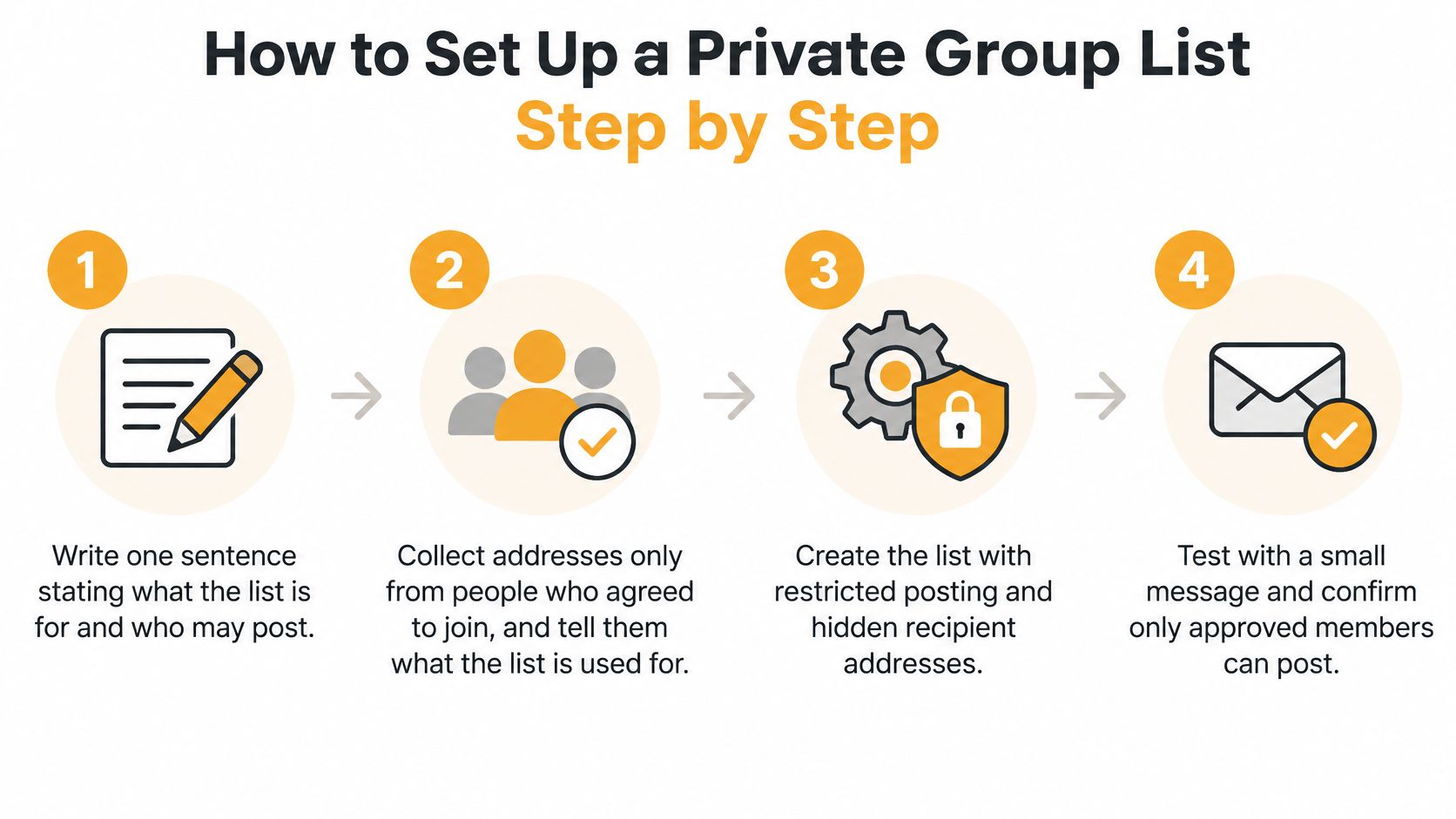
A private list is a short procedure, not a software project. Do the steps in order. The header check in step 5 is the one people skip, and it's the one that catches a visible roster before the neighborhood does.
-
Write one sentence on purpose and who may post. Example: "This list is for pool closures and board votes. Only the three officers may send." That sentence stops the list from becoming a marketplace. The common slip is skipping it, then arguing later about every forward and lost-pet notice.
-
Collect addresses only from people who agreed, and tell them the use. Ask in person, by phone, or by a reply to you alone. Don't harvest the old CC header. Say what you'll send and that they can leave. A neighbor who once emailed you about a fence didn't join a permanent list.
-
Create the group address and add members. Members don't need to create an account, and they receive and reply to emails as they normally do, in Gmail, Outlook, Yahoo, or Hotmail. Add people from your confirmed list, not from a guessed neighborhood directory. Bulk import from a spreadsheet is fine only after you've checked that every row said yes.
-
Confirm replies return to the group. Members of a group receive emails sent to the group's single address, and replies go back to the group. Send yourself a note and answer it. If the answer lands only in your personal inbox, the reply setting is wrong and the conversation will splinter into private mail you can't moderate.
-
Send a test and read the headers. Address the test to the group. Open the received copy on your phone and on a computer, because some apps hide CC until you tap details. No other member's address should appear in To or CC. If you see a roster, stop and fix delivery before any real announcement. This is not optional. Discovering the leak after a reply-all means the copies already exist.
-
Send one welcome message. Explain how to unsubscribe and how to correct a mistyped address, in plain sentences, not a settings tour. A member who shares a device with a spouse should know which name to give you when the wrong person is getting the mail.
-
Delete the old spreadsheet and the old CC list once every member has moved. Leaving the Excel file on a personal laptop, or in a "HOA finals" folder on a shared drive, keeps the exposure you just removed. For the week-to-week habits after launch, distribution list management covers adds, bounces, and handoffs without turning you into the help desk.
What working looks like
One group address. Replies arrive back in the group. Personal addresses stay out of member-visible fields. Two people know how to remove someone, and the old CC draft is gone. That's the whole success test. If step 5 fails, don't send the final version carelessly. Repeat the test until the header is clean.
Where Addresses Leak and the Written Rules That Stop It
Sending safely is half the job. The other half is what happens after the message is in other people's mailboxes, including replies, forwards, exports, and people who have already moved away.

Five places rosters escape
Reply-all chains copy a stranger in, and that stranger now holds the thread. Forwarded messages can carry a full header with every recipient still visible if you used CC. Exported spreadsheets sit on personal phones and old laptops long after the board election. Bounce notices sometimes quote the failed address, and officers paste those notices back to the whole group. Former members stay on the list because nobody owns removal, so a departed resident keeps receiving votes and can still reply.
BCC isn't a privacy architecture by itself. RFC 9787 warns that encrypted BCC messages can still leak recipient information through cryptographic metadata, such as certificates that identify intended recipients. Omitting BCC information from protected headers is more privacy-preserving when deliverability permits. A list that generates a separate delivery per recipient, and never copies the roster into visible headers, avoids asking every member to choose CC or BCC correctly.
Naive forwarding creates a second failure. Mailing-list rewrites can break SPF and DKIM alignment, so DMARC fails because the visible From domain doesn't match the domain that signs or sends the relayed message. Mail lands in spam or gets rejected. The service should send from its own domain, publish SPF and DKIM, enforce DMARC, keep Reply-To pointed at the group, and watch bounces. You shouldn't be hand-forwarding the HOA list from a personal Gmail account and hoping authentication survives.
The same leaks show up in ordinary inboxes, which is why a short primer on email data loss prevention strategies from Freeform Company helps officers who also use work mail. For associations, a written HOA email policy turns those habits into rules the next board can follow without reinventing them.
A one-page policy
- Consent before joining. All recipients must have explicitly consented to receive emails sent through Listava.
- Unsubscribe on every message. Every email sent through Listava must include clear unsubscribe instructions.
- Removal on a clock. Departed members come off within a period you name, such as seven days, and their addresses leave exports too.
- Corrections get done. Honor fix and deletion requests without a committee vote.
- Two administrators, one written record. Record the group address and where the settings live. The list stays available when a board member moves away because it doesn't live in anyone's inbox.
People who won't use an app
A 2025 review in JMIR Aging reported that 3.9 million people over age 65 in the United Kingdom, about 31% of that age group, didn't use the internet at home. Offer a printed notice or a phone number for opt-out and address corrections. If two relatives share one device or a family-managed account, tell them who to call so a mistake doesn't require a dashboard.
Before the next announcement, watch a short header check so you know where To and CC hide on a phone:
Choose the Right Setup and Confirm It This Week
Match the tool to the group you have, not the group you wish were more technical.
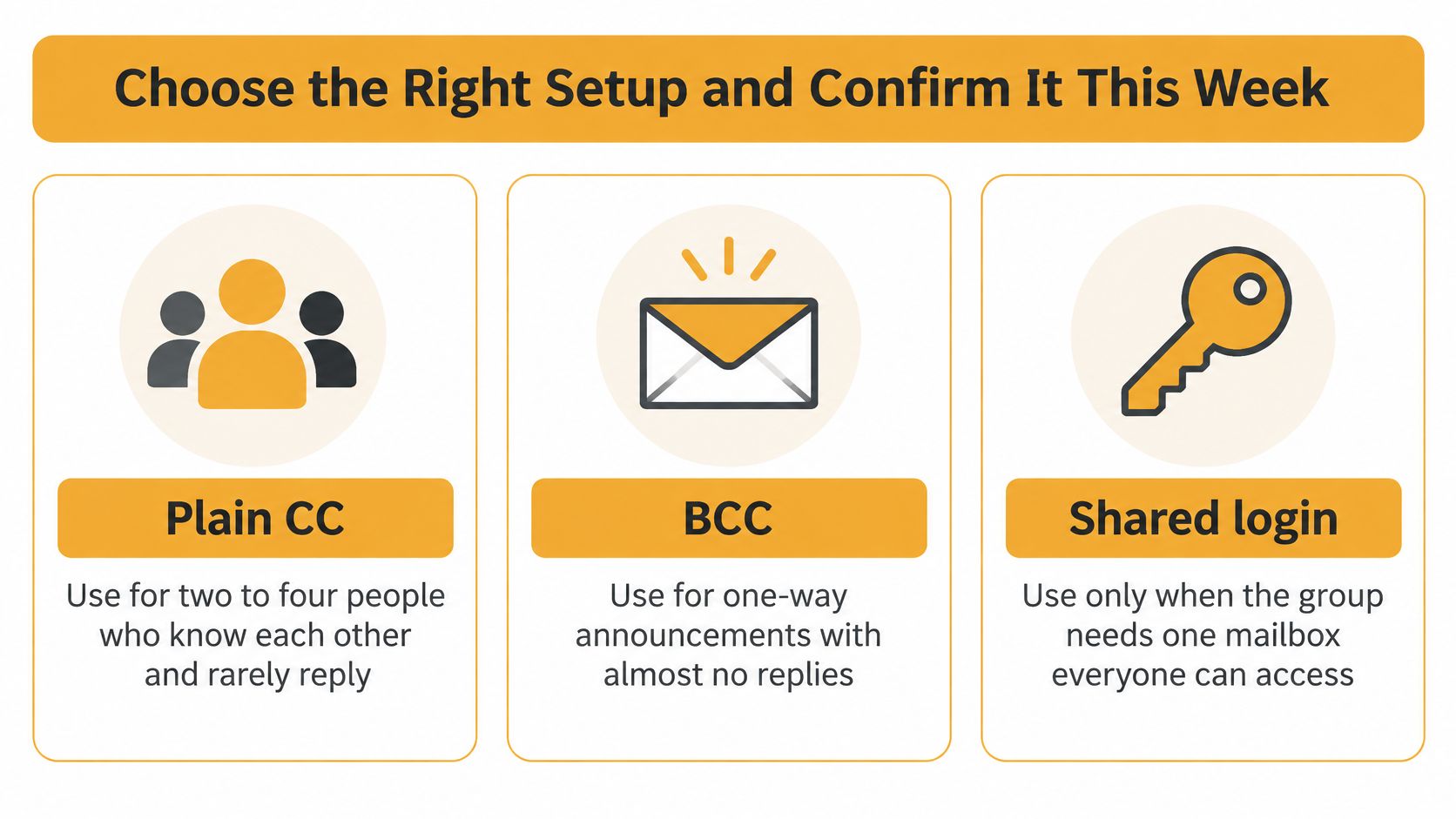
Plain CC fits two to four people who know each other and rarely reply. BCC fits one-way announcements with almost no replies. A shared login fits only three to five trusted senders who accept that one mailbox holds every answer. A dedicated group list fits HOAs, clubs, congregations, and families where members are strangers to each other, replies matter, or officers change often.
Plenty of our own articles tell readers when CC, BCC, Google Groups, or a Facebook group is good enough. I wouldn't push a group address on a four-person book club that already replies without drama. I wouldn't keep a 47-person HOA on CC because "it's what we've always done." Convenience and privacy aren't opposites when one shared address carries the discussion and personal addresses stay off the header.
This week's checklist
- Send a test to yourself and confirm no other member's address appears in the visible fields, including the expanded header on a phone.
- Reply to that test and confirm the answer lands with the group, not only in your personal inbox.
- Write the one-page policy with consent, unsubscribe, a removal deadline, corrections, and two named administrators.
- Record the group address and where its settings live, on paper if that's what the next officer will find.
- Delete old exports and the old CC list from laptops, phones, and shared drives, then empty the trash.
We offer a free account, and free users can own only one active list at a time. That's enough for a single HOA or club while you prove the replies and the hidden headers. If any check fails, repeat the setup order: purpose sentence, consented addresses, group address, reply test, header test, welcome note, then delete the spreadsheet.
If the test shows a roster, don't send the real announcement "just this once." Fix the headers first. A clean test is the whole point of doing this in a quiet week instead of during a gate-code emergency.
Listava gives a group one address that reaches every member while personal addresses stay out of the headers other people can see, with replies that come back to the group and no member accounts to manage. If you're the volunteer holding the HOA, club, congregation, or family list, put consented addresses on that single list and retire the old CC draft this week. Visit Listava and set up the address before the next reply-all.