7 Email to Remind Templates for Community Groups
Find 7 email to remind templates for meetings, events, payments, and group deadlines, plus practical timing and etiquette guidance for community organizers.
An organizer sends one announcement, then discovers that members missed the date, forgot to RSVP, or can't find the payment instructions. The problem usually isn't a lack of goodwill. It's that the original message is buried, the next step is unclear, or important logistics were left in another thread.
An effective email to remind isn't just a repeat announcement. It puts the action, deadline, context, and reply path in one easy-to-scan place. The seven templates below cover everyday community workflows, from attendance and preparation to payments, compliance, and re-engagement. Each includes timing, etiquette, privacy, and reply-management guidance for volunteer organizers using ordinary email.
For groups that need one shared address, Listava can deliver the same message to members without exposing personal addresses or requiring accounts and apps.
The best reminder makes the next step obvious.
Table of Contents
- 1. Event Attendance Reminder
- 2. Payment or Dues Deadline Reminder
- 3. Meeting Agenda and Preparation Reminder
- 4. Volunteer or Task Assignment Reminder
- 5. Deadline or Administrative Action Reminder
- 6. Policy Update or Important Announcement Reminder
- 7. Membership Renewal or Re-engagement Reminder
- Comparison of 7 Reminder Email Types
- Make Every Reminder Easier to Act On
1. Event Attendance Reminder
Attendance reminders work best when members can answer the central question immediately: What is happening, when is it, where is it, and what should I do now? Repeat the location and time in every reminder, even if they appeared in the original invitation. People often search their inbox for the latest message, not the full conversation.
A consistent subject line also helps members filter recurring messages. Use a format such as “REMINDER: Spring Cleanup, Saturday, April 16” or “REMINDER: Book Club, March Meeting”. For a community meeting, ask for a simple response such as “ATTENDING” or “UNABLE” rather than sending members through a complicated form.
Practical rule: Every attendance reminder should stand on its own if the recipient never opens the original announcement.
For a monthly book club, the organizer might send the first announcement several weeks ahead, then a reminder about a week before the meeting and another shortly before it. The right schedule depends on the event, but the message should become shorter and more logistical as the date approaches. Guidance on choosing a suitable send time is available in this practical guide to the best time to send an email.
Template
Subject: REMINDER: [Event Name], [Date]
Hi everyone,
Just a reminder that [Event Name] is happening on [date] at [time] at [location or online link].
Please reply ATTENDING or UNABLE by [RSVP deadline]. If you have a question about parking, accessibility, food, or transportation, reply to this message and we'll help.
Please bring [specific item]. We look forward to seeing you.
Thanks, [Organizer name]
A shared group address can keep everyone on the same thread while privacy controls prevent members' personal addresses from being exposed. With Listava, organizers can also adapt this message for HOA meetings, faith-community services, neighborhood gatherings, or recurring volunteer days.

2. Payment or Dues Deadline Reminder
Money-related reminders need a neutral tone and complete instructions. A member shouldn't have to search a website, find an old invoice, or email three people to discover how much is due, when it's due, and how to pay.
Put the amount and deadline near the top. If the amount varies by member, identify where they can confirm their balance privately. Include at least one straightforward payment method, such as a secure payment link or check instructions. If late fees or other consequences apply, state them plainly without sounding punitive.
A payment reminder for HOA dues should distinguish between the amount owed and any possible late charge. A club renewal message may need the membership period, payment recipient, and renewal procedure. For a faith community or neighborhood fundraiser, explain what the contribution supports, but don't use emotional pressure.
Template
Subject: Reminder: [Dues or Payment] Due [Date]
Hi everyone,
This is a friendly reminder that [payment or dues description] is due by [date].
Amount due: [amount or instructions for checking the balance]
Payment method: [secure link or check instructions]
Payable to: [name]
Mailing address: [address, if applicable]
If payment isn't received by [date], [brief explanation of the applicable late fee or consequence] may apply.
Questions about your balance or payment status should go to [treasurer name and private contact method]. Please don't include sensitive financial details in a group reply.
Thanks, [Treasurer or organizer name]
For organizers managing several recipients, consistent delivery matters more than sending a series of individual follow-ups. Listava's guidance on sending email in bulk can help you think through group delivery while keeping payment questions directed to the right person.
A separate finance contact is especially important when replies go to a shared address. Members should be able to ask questions without exposing account information to the full group. If the payment process changes, send a short correction quickly rather than allowing outdated instructions to circulate.
3. Meeting Agenda and Preparation Reminder
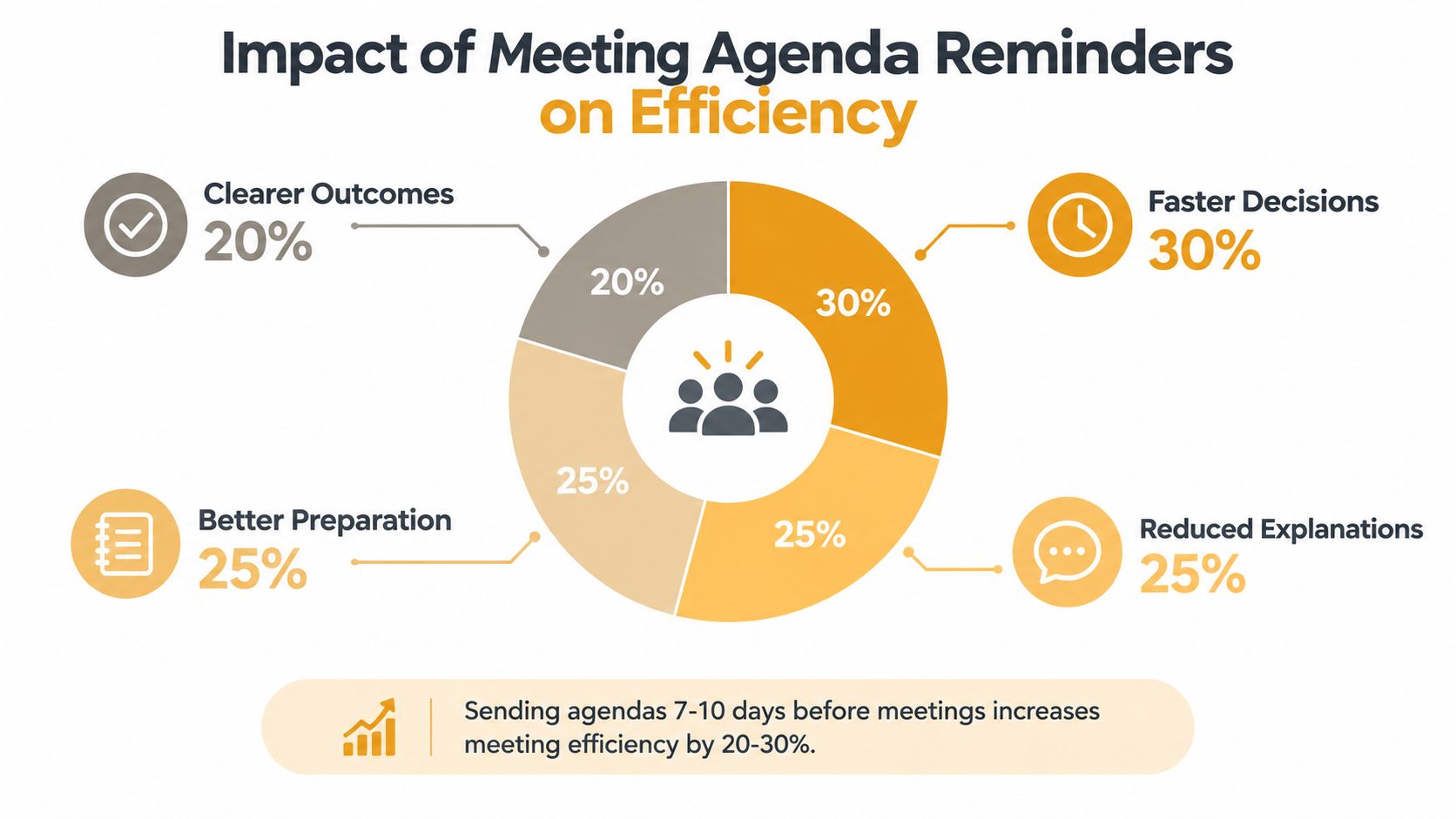
An agenda reminder should do more than announce a meeting. It should help members arrive ready to discuss, decide, or vote. Send the agenda with enough time for members to read supporting material, and make the preparation request unmistakable.
A board chair might identify a proposed budget, parking issue, or maintenance decision that needs review. A book club leader may include the discussion questions and the selected chapter. A nonprofit committee can list the decision required under each agenda item instead of making members infer the purpose from a topic label.
Keep the email readable on a phone. Number the agenda items, identify time-sensitive issues, and provide both an attachment and a link when practical. An attached PDF summary is useful when an external document link requires a login or may expire.
Template
Subject: AGENDA: [Board or Committee Name] Meeting, [Date]
Hi everyone,
Our [board or committee] meeting will take place on [date] at [time] at [location or online link].
Please review the attached agenda and materials before the meeting. We especially need preparation for:
- [Agenda item], decision or discussion needed
- [Agenda item], information to review
- [Agenda item], proposed next step
If you have an additional agenda item, please send it to [contact] by [deadline]. Please also bring [specific document, reading, or information].
Thanks, [Chair or organizer name]
For HOA boards and similar groups, a clear communication process prevents agenda changes from getting lost in personal inboxes. This guide to HOA email communication is relevant when organizers want to keep routine notices within standard email rather than requiring a separate dashboard.
A Listava group can receive the agenda and attachments through members' existing email clients. That approach is useful for members who don't want another login, but organizers should still use sensible file names, accessible formatting, and a private route for confidential board material.
4. Volunteer or Task Assignment Reminder
Volunteer reminders fail when they describe a worthy project but leave the actual assignment vague. “Please help with setup” doesn't tell anyone whether they should arrive early, bring equipment, or take responsibility for a particular task.
Name the task, arrival time, meeting point, supplies, and contact person. If someone has already volunteered, write to confirm their role rather than making them wonder whether the message is a new request. A neighborhood cleanup reminder might assign teams to streets, while a faith-community message might confirm nursery, food pantry, or hospitality coverage.
Template
Subject: REMINDER: [Task Name], [Date]
Hi everyone,
Thank you for helping with [event or project] on [date].
Your assignment is [specific task]. Please arrive at [time] at [meeting point]. Bring [specific supplies or clothing].
If you can no longer help, or if you need an adjustment, reply to [contact person] by [date]. If you can't make this date, reply NEXT DATE and we'll contact you about another opportunity.
We appreciate your help. It makes [specific community outcome] possible.
Thanks, [Volunteer coordinator]
A useful reminder gives people a graceful way to cancel. Treating a missed commitment as a communication problem, rather than a character flaw, makes it more likely that volunteers will explain what happened and accept a future assignment.
A good volunteer reminder confirms responsibility without making the recipient feel publicly reprimanded.
For recurring tasks, save the subject line and body as a template, then change only the date, location, assignment, and supplies. A group email address can keep the entire volunteer team informed, while replies can be directed to a coordinator when the issue is personal or time-sensitive.
5. Deadline or Administrative Action Reminder
Administrative reminders need a sharper call to action than event invitations. The recipient must know what to submit, where to submit it, why it matters, and what happens if they miss the deadline.
Use a subject line such as “ACTION REQUIRED: Emergency Contact Update, Deadline April 16.” Put the direct form link or attachment near the beginning, not after several paragraphs of background. If members need to provide sensitive information, explain whether they should use a private reply, a secure form, or another approved channel.
Template
Subject: ACTION REQUIRED: [Task Name], Deadline [Date]
Hi everyone,
Please complete [form, survey, renewal, or document] by [date and time].
You can submit it here: [direct link]
Or send it to: [specific email or instructions]
We need the following information: [brief list of requested details]. This helps us [plain-language reason].
If you don't complete this by [deadline], [specific consequence, such as delayed processing or inability to participate] may apply.
After submitting, reply COMPLETED if you'd like confirmation. Questions should go to [contact], not the full group.
Thanks, [Organizer name]
Don't send repeated reminders to people who have already completed the action. Maintain a simple status list, and remove completed recipients from later messages where possible. If that isn't practical, write “If you've already completed this, no further action is needed” near the top.
For a family directory, this might mean collecting updated addresses and dietary information. For an HOA, it could involve parking permits or emergency contacts. The privacy issue differs by task, but the principle is the same: make the submission route explicit and avoid inviting personal data into a group thread.
6. Policy Update or Important Announcement Reminder
Policy reminders work when they explain both the rule and the reason. Members are more likely to follow a new parking procedure, facility-use rule, or safety protocol when the message shows what changed and how the change affects ordinary behavior.
Don't paste a long policy into every follow-up. Send the full document with the original announcement, then summarize the practical points in the reminder. A short FAQ can address predictable concerns, such as when enforcement starts, whom to contact, and whether exceptions exist.
Template
Subject: REMINDER: [Policy Name] Begins [Date]
Hi everyone,
This is a reminder that the updated [policy or procedure] takes effect on [date].
The change helps us [brief reason, such as improve safety, make access fairer, or reduce confusion]. Please note:
- [Change one], what members need to do
- [Change two], when it applies
- [Change three], where to get help
The full policy is attached or available here: [link].
Common questions
When does this apply? [Answer]
What if I have a concern? [Answer and contact]
Where can I ask for clarification? [Private contact or feedback route]
If the change affects you directly, please review the policy before [date].
Thanks, [Organizer or board name]
A reminder shouldn't disguise an unpopular decision. If members disagreed with the change, acknowledge that plainly and explain the decision process without turning the message into an argument. Offer a defined way to submit questions or feedback, then keep the operational instructions separate from the debate.
For groups using Listava, the initial announcement can carry the complete policy, while the follow-up keeps the summary visible in members' inboxes. This is useful for communities without reliable access to a website or member portal, provided organizers keep the definitive version clearly identified.
7. Membership Renewal or Re-engagement Reminder
Re-engagement messages need a different emotional register from payment notices. A member who has missed meetings may be busy, uncertain about the group's direction, or uncomfortable with the effort required to return. Start with appreciation, not accusation.
The invitation should be easy to accept and easy to decline. Give recipients a simple choice, such as replying STAY IN TOUCH, RENEW, or REMOVE ME. An option to receive updates without taking an active role can preserve connection without pressuring someone into a commitment.
Template
Subject: We'd Love to Stay in Touch
Hi [name or everyone],
We've missed you and wanted to check whether you'd like to stay connected with [group name].
Since you were last active, we've [briefly mention a real development, event, or achievement]. We're also planning [upcoming event or opportunity] on [date], and you'd be welcome to join us.
Please reply with one of these options:
- RENEW, if you'd like to participate again
- STAY IN TOUCH, if you'd like occasional updates without an active role
- REMOVE ME, if you no longer want group messages
You can also renew here: [direct link].
Thank you for being part of the group.
[Organizer name]
Avoid pretending that every inactive member wants the same thing. A hobby club member who missed meetings may want to return, while a relative who stopped reading family updates may prefer occasional news. Segment the message by relationship where you can, and don't include personal reasons for someone's absence in a group email.
Listava can support continuity when leadership changes because the group address isn't tied to one organizer's personal inbox. That makes it suitable for long-running HOAs, book clubs, faith communities, and family groups that want to preserve a simple email route without requiring members to create accounts or download an app.
Comparison of 7 Reminder Email Types
| Item | Complexity 🔄 | Resources ⚡ | Expected Outcome ⭐ / 📊 | Ideal Use Cases | Key Advantages 💡 | |---|---:|---:|---|---|---| | Event Attendance Reminder | 🔄 Low, simple template & scheduling | ⚡ Low, email template, RSVP tracking | ⭐ High, ↑ attendance 20–40% when sent 1–2 weeks prior 📊 | HOAs, clubs, faith communities events | Clear logistics, reduces follow-ups, preserves group threads | | Payment or Dues Deadline Reminder | 🔄 Medium, careful wording for finances | ⚡ Medium, payment links, treasurer contact, secure handling | ⭐ High, ↑ on-time payments 25–35% 📊 | HOA dues, membership renewals, fundraisers | Clarifies amounts/deadlines, lowers 1:1 inquiries, centralized questions | | Meeting Agenda & Preparation Reminder | 🔄 Medium, prep of agenda + attachments | ⚡ Medium, organizer time, attachments/pre-reads | ⭐ High, ↑ meeting efficiency 20–30% 📊 | Board/committee meetings, leadership groups | Improves preparedness, speeds decisions, structures discussion | | Volunteer / Task Assignment Reminder | 🔄 Low–Medium, role details & coordination | ⚡ Low, task descriptions, contact person, supplies list | ⭐ High, ↑ volunteer attendance 30–45% 📊 | Volunteer-dependent events, maintenance days | Sets expectations, reduces organizer calls, enables group coordination | | Deadline / Administrative Action Reminder | 🔄 Medium, multiple reminders & tracking | ⚡ Medium, forms/links, submission instructions, progress tracker | ⭐ High, ↑ compliance 25–40% 📊 | Surveys, permits, form submissions, renewals | Increases compliance, reduces last-minute rushes, centralizes instructions | | Policy Update / Important Announcement Reminder | 🔄 Medium–High, careful messaging & FAQs | ⚡ Medium, draft, FAQ, links to full policy | ⭐ Medium–High, improved awareness & compliance 📊 | Policy changes, new rules, governance updates | Provides context, documentation trail, addresses FAQs | | Membership Renewal / Re-engagement Reminder | 🔄 Low–Medium, tone + timing considerations | ⚡ Low, messaging, renewal link, optional incentives | ⭐ Medium, recovers 15–25% lapsed members 📊 | Lapsed members, re-engagement campaigns | Cost-effective retention, preserves continuity, simple CTAs |
Make Every Reminder Easier to Act On
The seven templates become easier to manage when you treat them as a small operating system for community communication. First, identify the message type: attendance, payment, preparation, volunteering, administration, policy, or re-engagement. Then put the action and deadline near the top, repeat essential logistics, and make the reply path explicit.
Use a respectful cadence rather than sending the same message repeatedly. A reminder sent too early may be forgotten, while one sent too often can feel like pressure. Guidance for survey reminders commonly recommends one to three reminders, with diminishing returns after the third, and advises reminding non-responders rather than repeatedly contacting people who already completed the task. See survey reminder guidance for that approach.
Timing also depends on the action. Attendance reminders can focus on logistics as the event approaches. Payment messages should provide enough notice for members to arrange payment. Administrative requests need time for completion and correction. If the task is urgent, say why, but don't manufacture urgency where none exists.
Keep the etiquette simple:
- Avoid unnecessary repetition: Rewrite the message so the latest email contains the information people need.
- Explain the reason: Members respond better when they understand what their action supports.
- Protect privacy: Don't request financial, health, contact, or other sensitive details in a group reply.
- Make replies manageable: Say whether recipients should reply to everyone, the organizer, or a separate contact.
- Offer a correction route: Tell people how to report a wrong detail or ask for help.
- Respect disengagement: Provide an appropriate way to opt out or change communication preferences.
Mobile readability matters, especially for older members and people who rely on Gmail or Outlook on phones. Keep subject lines concise, use short paragraphs, place links on their own lines when helpful, and make buttons or links easy to tap. Current reminder guidance also emphasizes short subjects, personalized greetings, clear deadlines, and direct links for mobile readers, including keeping subject lines under 60 characters to reduce truncation, as outlined in mobile-friendly reminder guidance.
Save reusable subject lines and templates for recurring meetings, dues, volunteer shifts, and renewals. Update the dates, contacts, links, and privacy instructions before sending. For organizers who need one persistent group address across Gmail, Outlook, Yahoo, or Hotmail, Listava offers email-based delivery, privacy controls, and participation without member accounts or app downloads.
Listava gives community organizers one group email address that reaches every member while keeping personal addresses private. Use it for recurring reminders, shared replies, and leadership continuity without asking members to install an app or create an account.