How to Hide Email Recipients in Gmail, Outlook and More
Learn how to hide email recipients with BCC, shared group addresses, and client settings in Gmail and Outlook. Keep addresses private, replies intact.
You're sending a neighborhood notice about a water shutoff. You paste everyone into the CC field so the whole group gets the update, then one neighbor clicks Reply All to ask a question. Suddenly, people who only needed the notice can see everyone's email address, and the replies keep coming.
If you want to hide email recipients, the right fix depends on what you're trying to protect. BCC can hide addresses for a one-way announcement, but it can make group replies awkward. A group address or mailing-list service can protect addresses while keeping conversation together, but it takes a little setup.
Table of Contents
- Why Email Addresses Get Exposed in Group Messages
- Using BCC Without Breaking Group Replies
- Hiding Recipients Step by Step in Common Email Clients
- Comparing BCC, Group Addresses and List Services
- What Hiding Recipients Cannot Protect
- Launching a Private Group Email This Week
Why Email Addresses Get Exposed in Group Messages
CC feels convenient because everyone gets the same message and sees who else received it. But for a neighborhood association, family, congregation, or club, that visibility may be unnecessary. A water-shutoff notice doesn't usually require neighbors to receive one another's contact details.
Email is so widely used that this isn't a niche concern. In 2025, approximately 4.59 billion people worldwide used email, about 56% of the global population, and users exchanged roughly 376.4 billion messages per day (email usage figures for 2025). Each group message is another chance to expose addresses by putting them in a visible recipient field.

Hiding recipients means sending a message without showing each member's address to the other recipients. The distinction between the fields matters: addresses in To and CC are generally visible to recipients, while BCC is intended to conceal its recipients from one another.
That difference can matter even when the message itself is ordinary. A visible list might reveal who belongs to a support group, a congregation, a residents' association, or a family mailing list. And if someone replies to all, the original notice can become a long thread that carries the addresses along with it.
There are three practical ways to handle this: use BCC for an occasional one-way message, follow the right steps in your email client, or use a group address designed to keep addresses private while allowing replies. Which one fits depends on whether your group mainly receives announcements or needs an ongoing conversation.
Using BCC Without Breaking Group Replies
BCC, or Blind Carbon Copy, hides recipients' addresses from the delivered message headers. The email standard's guidance on BCC also makes clear that this isn't a guarantee against every disclosure: a blind recipient can reveal they were included by replying to visible recipients.
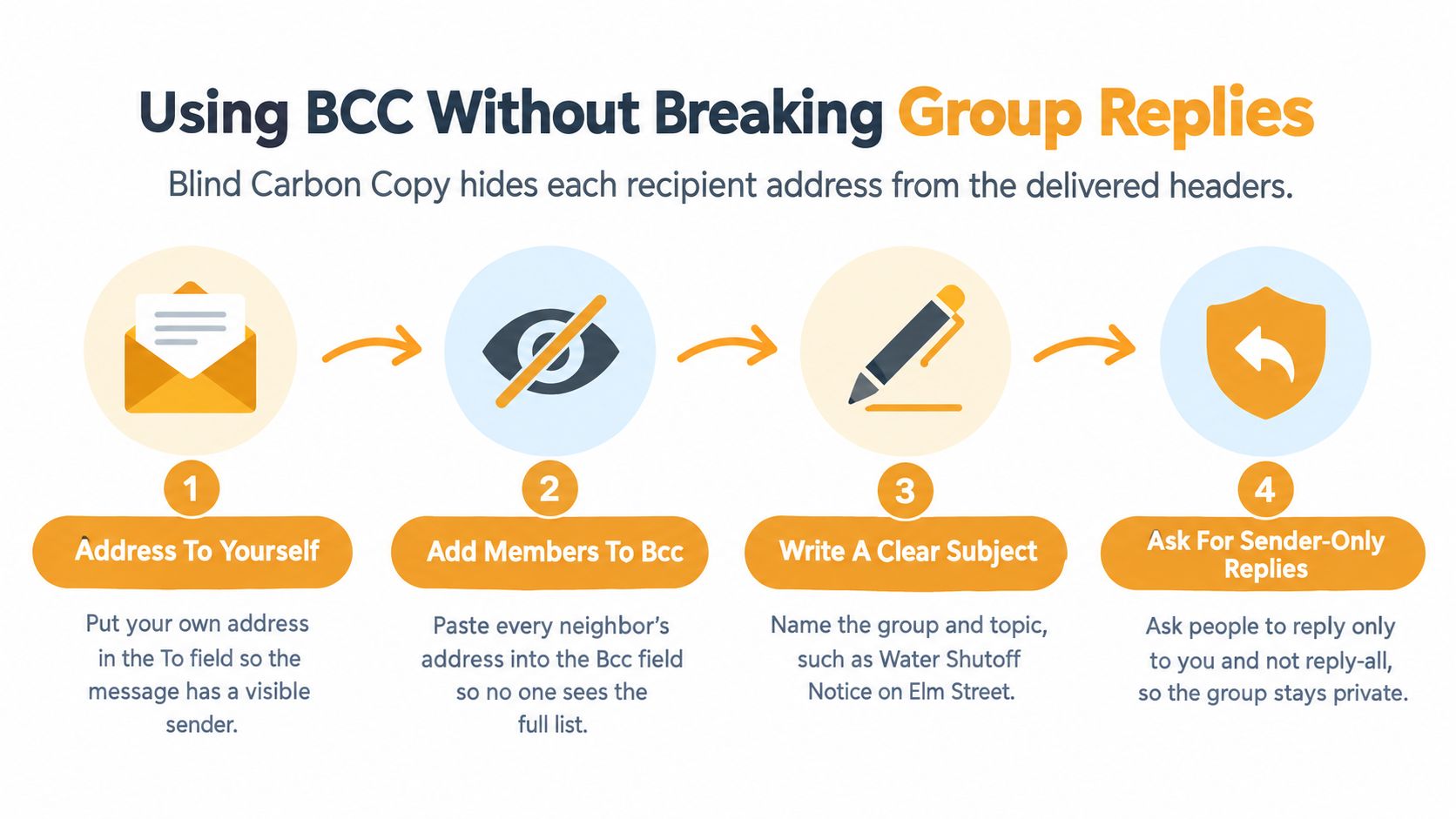
For a notice that doesn't need group discussion, use this pattern:
- Put yourself or a neutral address in To. The message needs a visible recipient. Using your own address is simple; a suitable group or administrative address can work too.
- Put the members in BCC. Check that you haven't pasted the list into CC by habit.
- Write a subject that explains the message. “Water shutoff notice for Elm Street” is clearer than “Update.”
- Check the sent copy. Confirm that member addresses don't appear in To or CC, and that a BCC field hasn't been retained in a way that exposes them.
- Tell people how to reply. If the message is for information only, say to reply to you rather than use Reply All.
The trade-off shows up when people respond. A BCC recipient's reply normally goes to the sender, not to the hidden group. If they choose Reply All, they may send their response to visible recipients and reveal that they were included. So BCC can prevent a public address list, but it doesn't provide a reliable shared conversation.
That distinction matters when people expect a continuing thread. If your group needs a common reply destination, a group email thread that stays together needs more than a one-time BCC list.
Manual BCC works well for an occasional announcement. It becomes tiresome when the organizer has to rebuild the list, remove former members, add newcomers, and remind people how to respond. It also relies on whoever is sending the message remembering the same careful steps every time.
Hiding Recipients Step by Step in Common Email Clients
The BCC control is usually available in mainstream email services, though it can be tucked away in the compose window. Look for it before adding recipients, then check the completed message before sending.

Gmail
Start a new message. In the recipient area, select Bcc, usually shown near the To field, to reveal the blind-recipient line. Enter the group's addresses there, and leave To addressed to yourself or an appropriate neutral address. Before sending, check that the member list is in Bcc, not Cc.
In the Gmail mobile app, open a new message and use the small recipient-field controls to reveal Bcc. The control can be less obvious on a phone, so expand the address area before typing rather than assuming the field is already visible.
Outlook
In Outlook for desktop, create a new message and use the message options to show Bcc if it isn't displayed. In Outlook on the web, start a message and select Bcc beside the recipient line. Add members to Bcc, then review To and Cc before sending.
The mobile app's compose screen may hide Bcc behind the recipient controls. Expand those controls and verify the addresses appear in the Bcc row. Don't use the visible CC line as a shortcut, even if the list is saved as a contact group.
Yahoo Mail and Hotmail
In Yahoo Mail, open a new message and select CC/BCC near the recipient line to show the BCC field. Add the members there and check the visible To and CC lines before sending. Hotmail accounts are accessed through Outlook, so use the Outlook steps above.
A saved contact group or reusable draft can reduce repeated typing, but it doesn't remove the need to check the recipient fields each time. For a walkthrough of the compose controls, use the video below.
Comparing BCC, Group Addresses and List Services
A club sending occasional announcements has different needs from a group that expects members to reply to one another. Choose the setup around what should happen after delivery: who can see addresses, where replies go, and who maintains membership.
| Approach | Hides member addresses | Replies reach whole group | Ongoing upkeep | Best fit | |---|---|---|---|---| | Manual BCC | Yes, when configured correctly | No, not reliably | Organizer rebuilds and checks the list | Occasional one-way notices | | Shared alias or group address | Depends on configuration | Often, depending on reply settings | Someone must maintain membership and access | Groups already supported by an organization | | Google Groups or Facebook groups | Can offer member privacy, depending on settings | Yes, within the group's tools | Members may need to join and use the platform | Clubs comfortable using those services | | Listava | Yes, personal addresses stay hidden from members | Yes, replies stay with the group | List management is separate from one person's inbox | Email-first groups that need private group replies |
An organization-managed alias can suit a workplace, school, or club that already has someone responsible for it. Check who controls access and how replies are configured: an alias may depend on a particular provider or administrator. That arrangement can work well, but its continuity depends on someone keeping those settings and membership up to date.
Google Groups or Facebook groups can serve clubs whose members already use those platforms. The trade-off is that members may need to join or use another service. If people prefer regular email, a list service can keep the conversation in their inboxes instead.
Manual BCC is a habit, not a lasting group structure. The organizer has to select the correct field, keep the address list current, and understand that a member's reply may go only to the sender. A recipient who is unsure where to reply can leave the group out of the conversation or accidentally expose addresses by choosing Reply All.
Listava provides a shared group address that delivers messages to members while keeping their personal addresses hidden from one another. Members can be added by CC or through an Excel import, and replies stay with the group without requiring members to create accounts or install an app. Read more about how a group email address works to decide whether your group needs a continuing shared destination or only occasional BCC announcements.
A small group of close friends may be fine with manual BCC when notices are occasional and replies should come to the sender alone. A group address or list service is a better fit when membership changes and group replies should continue even if the organizer changes. Those tools reduce reliance on one person's inbox, though someone still needs to manage membership and access.
What Hiding Recipients Cannot Protect
Hiding addresses is not the same as protecting privacy. A message can keep every address out of view and still disclose sensitive information through its subject, body, or recipient list.
For example, an otherwise harmless note can reveal that someone belongs to a health program, a religious congregation, or a support group just by showing who received it. The UK Information Commissioner's Office warns that recipient visibility can disclose confidential information even when the email content isn't sensitive, and that BCC doesn't protect information in the message body (ICO guidance on email and security).
Before sending, separate the risks:
- Address privacy: Can recipients see one another's email addresses?
- Membership privacy: Does the recipient list reveal someone's affiliation?
- Message confidentiality: Does the body contain information that shouldn't be shared broadly?
- Forwarding: Could a recipient pass the message to someone outside the group?
- Accidental disclosure: Could a mistaken reply, copied list, or screenshot expose details?
BCC addresses the first risk, not all five. A group address can also keep personal addresses out of ordinary message headers, but recipients can still forward a message, take a screenshot, or copy information into another conversation. No recipient field can stop someone from sharing content they can read.
Treat the message itself as part of the privacy decision. Use a neutral subject if naming the group would reveal something sensitive, avoid including personal details that don't belong in a group email, and tell members when the message should not be forwarded. Where addresses identify people by name, exposing them can also raise personal-data concerns under UK and EU GDPR. Don't promise members that a hidden-recipient workflow makes them anonymous or makes the message confidential.
Launching a Private Group Email This Week
A good setup is one members can use without remembering special tricks and another organizer can take over without digging through someone's inbox. Start with a small launch checklist:
- Choose the approach: Use BCC for one-way announcements, or a group address for ongoing discussion.
- Collect addresses with consent: Tell members what the list is for and how their address will be used.
- Set up membership and replies: Decide who can manage the list and whether replies go to the sender or the group.
- Test delivery: Send a test to Gmail, Outlook, and Yahoo accounts. Check the recipient fields and confirm where replies go.
- Write down the handoff: Record who manages the list, how members are added or removed, and what to do when leadership changes.
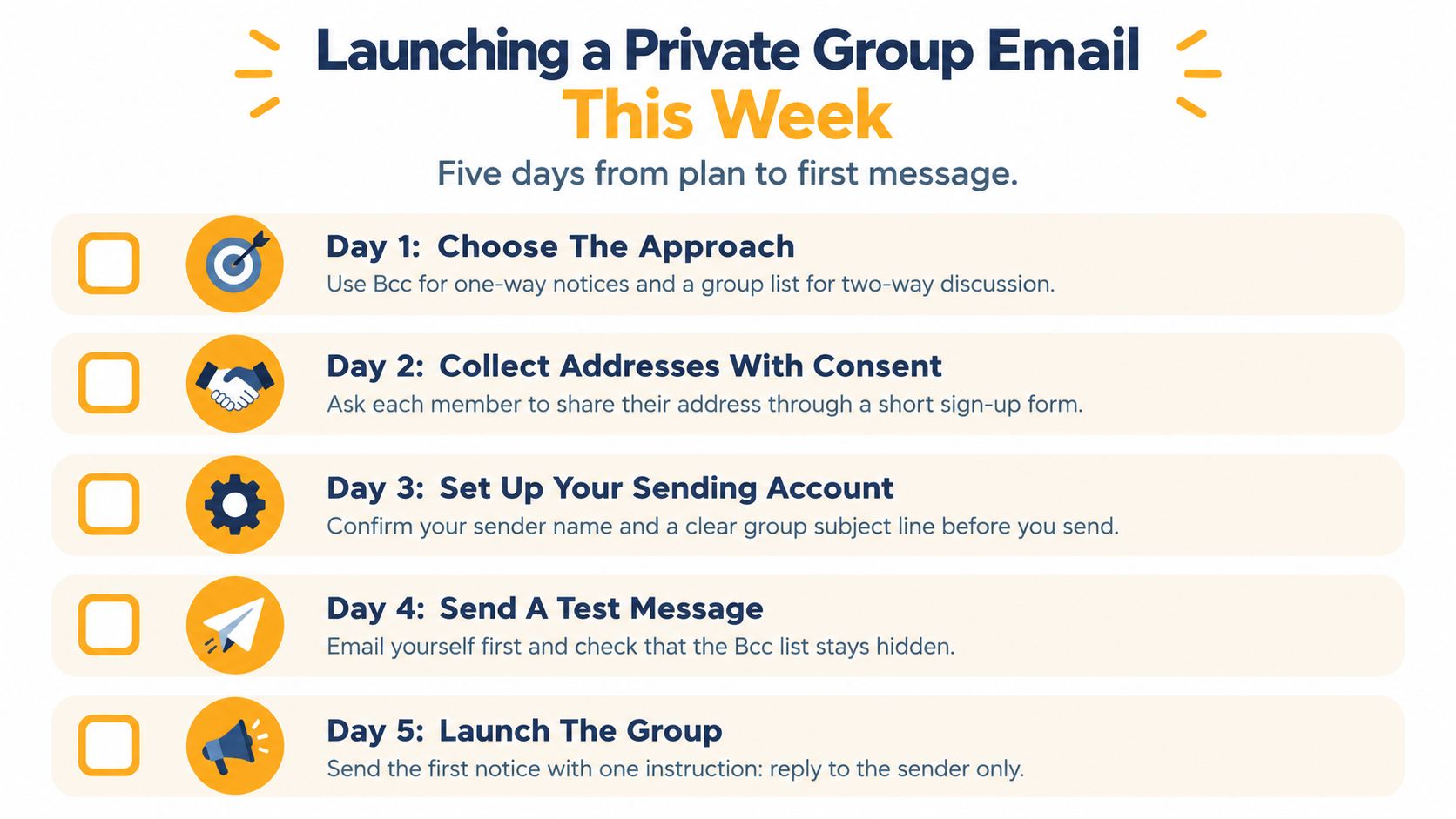
Make the instructions as simple as the workflow. For a BCC-only notice, tell members to reply to the sender. For a group address, tell them to reply to the group when the whole membership should see the response. Avoid relying on people to infer the right choice from the recipient fields.
List maintenance needs a named owner, but it shouldn't depend on that person's personal inbox. Keep a short written note with the list's purpose, who can change membership, how to remove someone, and where the instructions live. That small handoff makes it easier for a new volunteer, board member, or family coordinator to take over.
If you send through a domain your group controls, recipient privacy won't replace sender authentication. NIST recommends combining SPF and/or DKIM with DMARC, which are complementary controls, not alternatives (NIST guidance on email security). Ask whoever manages the domain to check the setup, then review authentication reports and delivery issues after changes. These controls help receiving services assess whether a message is legitimate; they don't make a BCC list more private or improve reply behavior by themselves.
For organizers who want a shared address without requiring members to use an app, a private email list can keep routine participation in familiar email clients. Set up the group, send a test, and make sure a reply reaches the intended people before the next announcement.
Listava gives a group one shared email address, keeps members' personal addresses hidden, and lets replies stay with the group using ordinary email. If your BCC notices are turning into missed replies or extra list maintenance, visit Listava and set up a private group address before the next message goes out.