Homeowner Association Newsletter Guide
Create a homeowner association newsletter residents actually read. Learn content strategy, privacy-safe distribution with Listava, and simple board workflows.
A board member sends a maintenance reminder to a long CC list. Within minutes, residents are replying to everyone, someone's personal email address is visible to the entire neighborhood, and the original announcement is buried under arguments about parking. The next month, a different volunteer starts a new spreadsheet, misses several owners, and sends a newsletter that answers none of the questions residents are asking.
That pattern is common because an HOA newsletter is often treated as a writing task instead of an operating system. A useful newsletter gives residents a dependable place to find maintenance timing, amenity rules, meeting details, contacts, and answers to recurring questions. It also gives volunteer boards a repeatable process that protects privacy, reduces reply-all chaos, and remains usable after leadership changes.
Table of Contents
- Why Your Homeowner Association Newsletter Matters
- Essential Content Sections for Every Issue
- Design and Accessibility Best Practices
- Solving the Distribution and Privacy Problem
- Simple Workflows for Volunteer Organizers
- Common Newsletter Mistakes and How to Avoid Them
- Launching Your Improved Community Newsletter
Why Your Homeowner Association Newsletter Matters
A neighborhood board rarely creates communication problems on purpose. The first issue may be simple: a president writes a short update, copies the addresses in a spreadsheet, and sends it. Over time, committees add recipients, owners move in or out, and urgent notices get mixed with routine reminders. One resident asks a question, another responds, and soon the board is managing a conversation rather than communicating a decision.
That confusion damages confidence even when the board is acting responsibly. Residents may not know which message is official, whether a maintenance date has changed, or where to find an answer later. A clear HOA email communication process establishes rules for announcements, replies, document storage, and questions before the inbox becomes the community's unofficial filing cabinet.
Treat the newsletter as community infrastructure
The Community Associations Institute's 2024 Homeowner Satisfaction Survey asked residents how effective electronic communication methods such as email and newsletters were for keeping them informed about events, meetings, and important updates. The survey summary reported 37% who found these methods “very effectively” and 42% who found them “somewhat effectively,” alongside negative, mixed, and uncertain responses, including 31% marked “not sure.” The pattern is useful, not because it proves that every newsletter works, but because it shows that email and newsletters remain central while their effectiveness varies. Review the survey summary and communication findings.
A newsletter becomes valuable when it performs three jobs consistently:
- It creates a reliable record: Residents can return to an archived issue instead of searching through personal inboxes.
- It answers practical questions: The issue explains what is happening, when it will happen, and whom residents should contact.
- It sets communication boundaries: The newsletter distributes information without turning every announcement into a neighborhood-wide debate.
Independent HOA communication research summarized in industry reporting found that 74% of associations rank resident communication as their top priority, while 89% of residents in well-managed communities rate their HOA experience positively or neutrally. Those figures appear in the 2024 technology and communication report. The operational lesson is straightforward: recurring communication supports the resident experience, but only when residents can understand and use it.
Practical rule: Every issue should help a resident answer a question without contacting a board member.
That standard changes the tone of the publication. Instead of filling space with general updates, the board can explain the pool closure date, clarify where maintenance requests belong, summarize an upcoming meeting, and link to the governing document or official form. The newsletter then reduces avoidable questions while giving residents a consistent view of how the association operates.
Essential Content Sections for Every Issue
Residents usually scan before they read. They want to know whether a road will close, when landscaping will occur, whether an amenity rule changed, or whom to contact about a leaking sprinkler. A practical homeowner association newsletter should make those answers visible without requiring residents to work through a dense editorial.
Use a stable template. Familiar sections let residents skip directly to the information they need, and they make production easier for volunteers.
Build the issue around resident questions
Start with a short board or president's message. Keep it focused on the decisions, projects, or priorities that affect residents. It shouldn't become a personal essay or a second set of meeting minutes. If the board has no meaningful message, use the space for a concise “What changed” summary.
Then add the operational information residents ask for most often:
- What is happening next: List maintenance, inspections, landscaping, repairs, and scheduled service work with dates or timing windows when the board has confirmed them.
- What residents need to do: State whether owners must move vehicles, provide access, remove belongings, submit a form, or observe a temporary restriction.
- What rules need clarification: Explain amenity hours, guest procedures, parking expectations, architectural requests, or waste collection without turning the newsletter into a punitive notice.
- Who handles the question: Separate contacts for management, architectural requests, maintenance emergencies, accounts, and board governance. A named role is often more useful than a general “contact the HOA.”
- What the board decided: Summarize decisions in plain language and point readers to official records when a fuller explanation is required.
- What residents keep asking: Maintain a recurring FAQ area. If several residents ask when a repair will happen, answer that question in the newsletter and preserve the answer in the archive.
The FAQ section should grow from actual inquiries, not assumptions. Ask the manager or secretary to record repeated questions during the month. A simple spreadsheet with columns for question, answer, owner of the answer, and publication date can turn inbox traffic into useful editorial planning.
Make every module easy to scan
Use short paragraphs, specific wording, bullets, meaningful headings, and generous white space. Guidance from the Educational Community for Homeowners on effective HOA newsletters recommends simple language, consistent branding, and readable formatting. Those choices matter because residents may open the issue on a phone, print it, or use assistive technology.
A strong maintenance item might read:
- Parking lot repair: Contractors will work in the east lot during the posted closure window. Move vehicles before the closure begins. Contact management for access questions.
That is more useful than a paragraph about “ongoing improvements to community assets.” The newsletter should explain the consequence for the resident, not merely repeat the board's internal language.
Keep the main issue concise, but don't remove information residents need to act. Put background documents, policies, maps, and full meeting materials in an archive or linked document. The newsletter is the signpost and the practical summary, not necessarily the entire record.
Design and Accessibility Best Practices
A newsletter can look polished and still fail when residents cannot read it on a phone, distinguish text from its background, or find the answer to a routine question. Treat the issue as a searchable, repeatable FAQ hub. Clear answers about parking, repairs, meetings, and contacts reduce repeat board inquiries, while consistent headings and stored issues help new volunteers continue the system after leadership changes.
Decorative elements, oversized banners, and crowded columns take space away from dates, instructions, and contact details. Email delivery can be fast, yet filtering and disengagement may cause residents to miss messages. Pair each issue with an archiveable web version or another durable location, and keep the layout consistent so residents know where to find recurring information.
Use a readable visual system
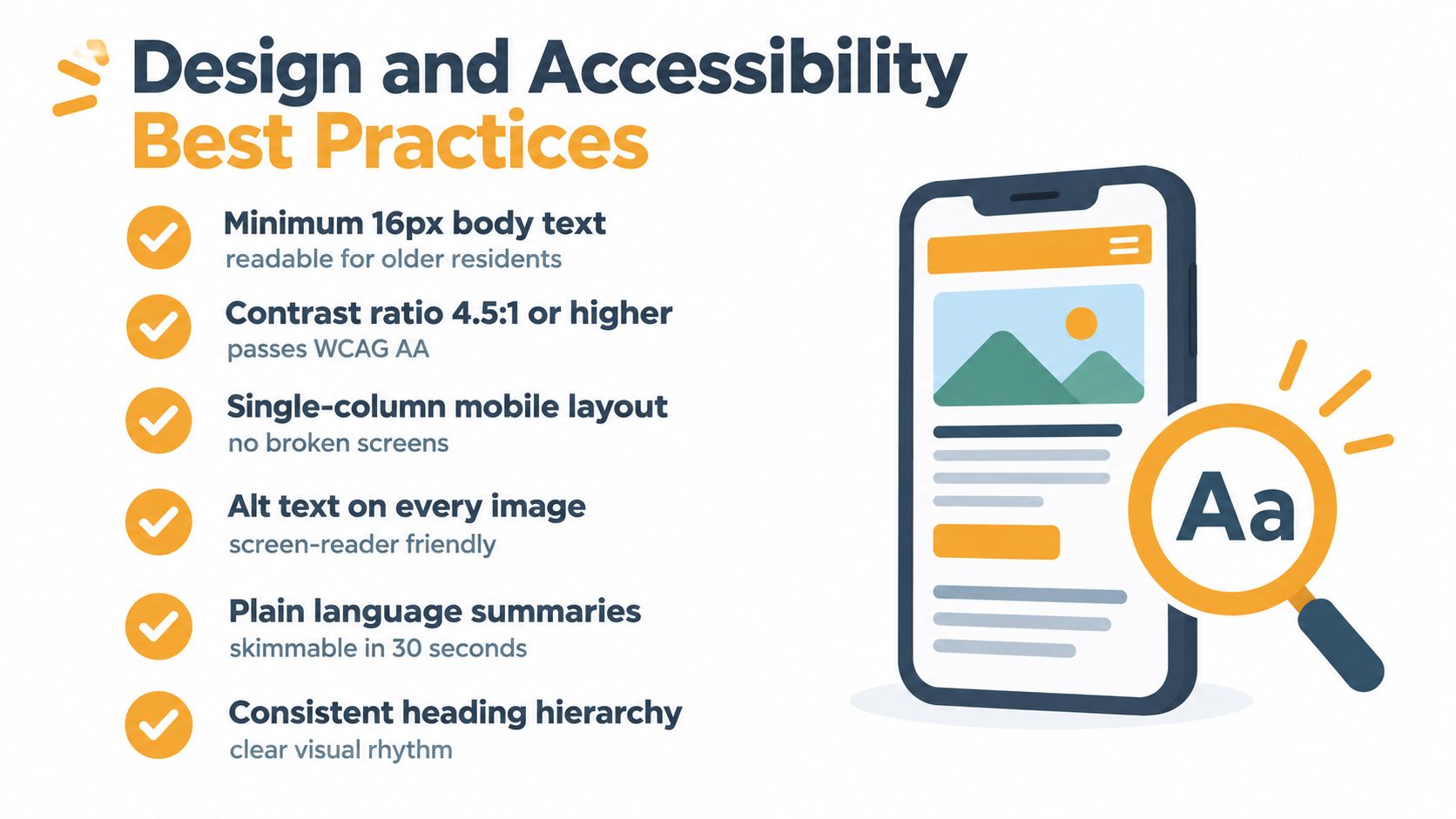
Choose a legible font, strong contrast, and a clear heading hierarchy. Keep paragraphs brief and use bullets for instructions. A single-column layout generally works better on small screens than a design that requires residents to zoom, pan, or interpret narrow sidebars.
Accessibility also reflects the community's different needs. Older residents may need larger type and more space between sections. Residents reading in a second language may understand short, direct sentences more easily than idioms or legalistic prose. Screen-reader users need meaningful headings and alternative text for informative images.
Before sending, check the issue against this list:
- Readable text: Residents should understand the message without enlarging it.
- Strong contrast: Avoid pale text, patterned backgrounds, and instructions that rely on color alone.
- Mobile behavior: Open the email on more than one phone. Check buttons, links, tables, and line breaks.
- Plain-language summaries: State the action first, then add context or document references.
- Accessible images: Add useful alt text. Keep essential instructions out of images.
- Print and archive usability: Confirm that the issue remains understandable when printed or viewed outside the original email.
Use the checklist before every send, then keep the approved template in a shared folder. That small control reduces volunteer rework and prevents each new board from rebuilding the newsletter from scratch.
Plan for language and privacy differences
A community may include residents who speak different languages or rely on translation tools. Communication guidance identifies translation features and mobile-first presentation as growing priorities, but a translated newsletter still needs human review for rule names, dates, and contact instructions. If the board cannot translate the full issue reliably, begin with short summaries of urgent or high-impact information and provide a consistent path to clarification. See the communication trends and resident channel preferences summarized by Saunders HOA.
Privacy belongs in the design checklist. Do not publish a resident's phone number, unit-specific account information, complaint details, or personal circumstances. Treat photos as permission-based content. Ask before including a recognizable resident, child, guest, or private event participant, and avoid captions that reveal more than the image needs to say.
Do not publicly identify a resident involved in an enforcement matter. Explain the rule or community-wide reminder without turning the newsletter into a naming-and-shaming device. Handle sensitive issues through the appropriate private process, using the association's governing documents or legal counsel when needed.
If the board is choosing between HTML and plain text, compare the HTML and text email formats with the audience's needs. Choose the format that preserves clarity, accessibility, and dependable delivery.
Solving the Distribution and Privacy Problem
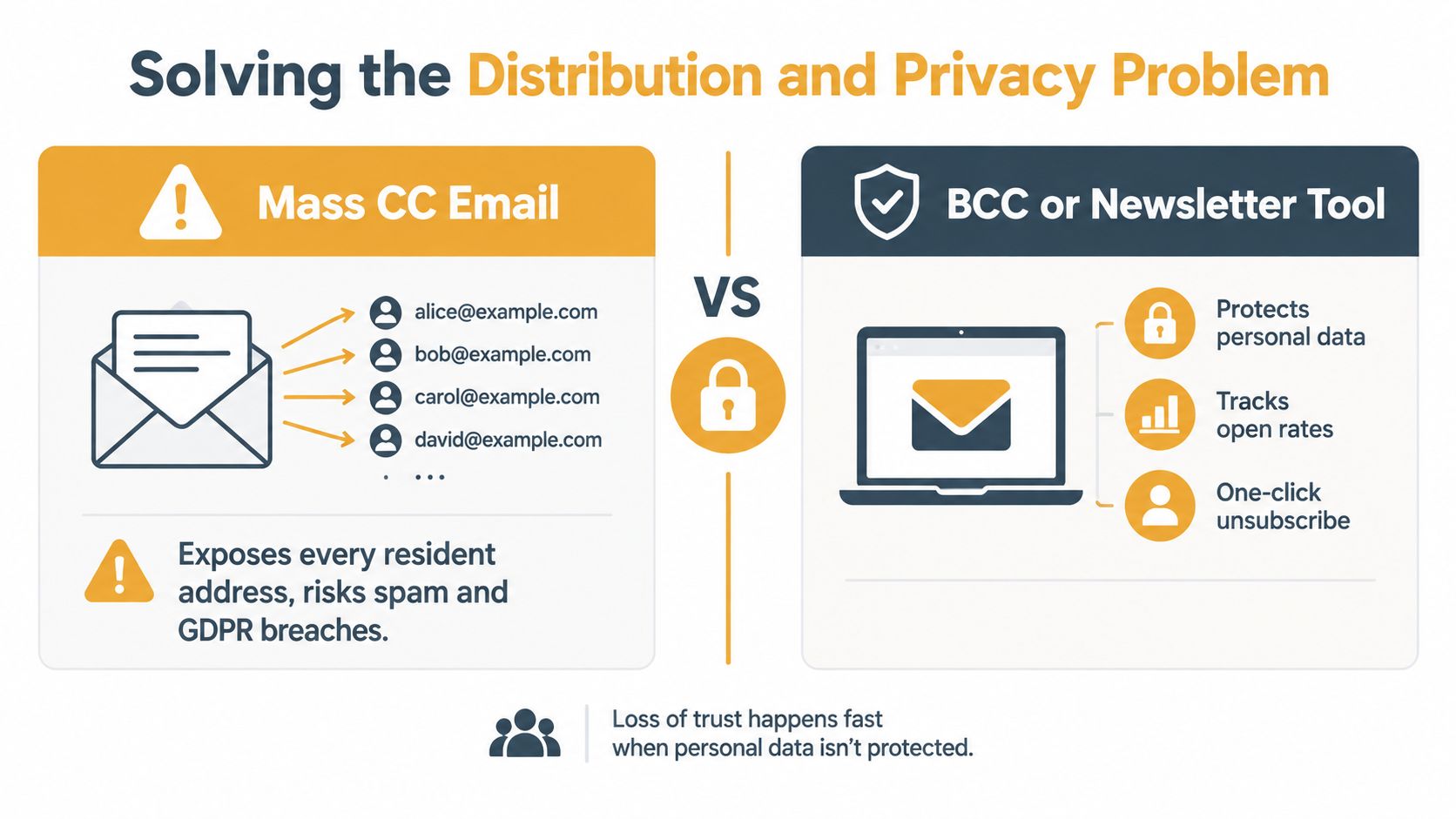
A newsletter can become the association's privacy-safe FAQ hub, but only if distribution is controlled from the start. Sending every resident in the CC field exposes personal addresses, invites reply-all chains, and turns a routine notice into an uncontrolled discussion. BCC hides addresses, yet replies may go only to the sender, leaving the board without a clear conversation record.
Inbox filtering and resident disengagement can also cause messages to be missed. Consistent publication and an accessible archive help, but the board still needs accurate membership records, a recognizable sender name, and clear instructions for opting out or changing an address. Treat each issue as a durable answer to recurring questions. That reduces repeat inquiries and gives new board members a reliable record after leadership changes.
Compare the practical options
| Method | Strength | Risk or limitation | |---|---|---| | Mass CC | Familiar and quick | Exposes addresses and encourages reply-all cascades | | BCC | Hides recipient addresses | Can fragment replies and make list maintenance manual | | Newsletter platform | Supports controlled delivery and archives | Requires setup, ownership rules, and list governance | | Website only | Creates a durable public reference | Residents may not visit it unless the board drives awareness | | Social media group | Convenient for informal updates | Participation, moderation, ownership, and access can become difficult |
A dedicated group email service may suit residents who prefer ordinary email over accounts or an app. Listava, for example, provides a shared group address that delivers messages to members while keeping individual addresses hidden. Residents can participate through standard email clients, so volunteers do not have to manage every recipient manually from a personal inbox. Before adopting the service, the board should review its privacy terms, permissions, retention practices, and administrator controls. The private email list workflow offers a practical reference for this type of setup.
Establish ownership before the first send
The list belongs to the association, not the volunteer who created it. Store administrative access in a board-controlled account, document who may add or remove members, and maintain a simple change log for move-ins, move-outs, returned messages, and consent preferences. Preserve the archive under the association's account so a departing volunteer cannot take the communication history with them.
Use a sender identity residents recognize. Send a test issue to board members, check reply behavior, confirm that addresses remain hidden, and verify that the archived version contains the same instructions as the email. A familiar email client does not make an informal process safe by default.
Privacy check: Never use a resident list as a convenient address book for unrelated announcements, fundraising, political messages, or personal disputes.
Give residents a private route for questions, maintenance reports, address changes, and requests to stop receiving nonessential messages. Document which urgent notices require another channel, such as a phone call, text alert, website notice, or posted communication. This separation keeps the newsletter useful as a reference without treating it as the response channel for every issue.
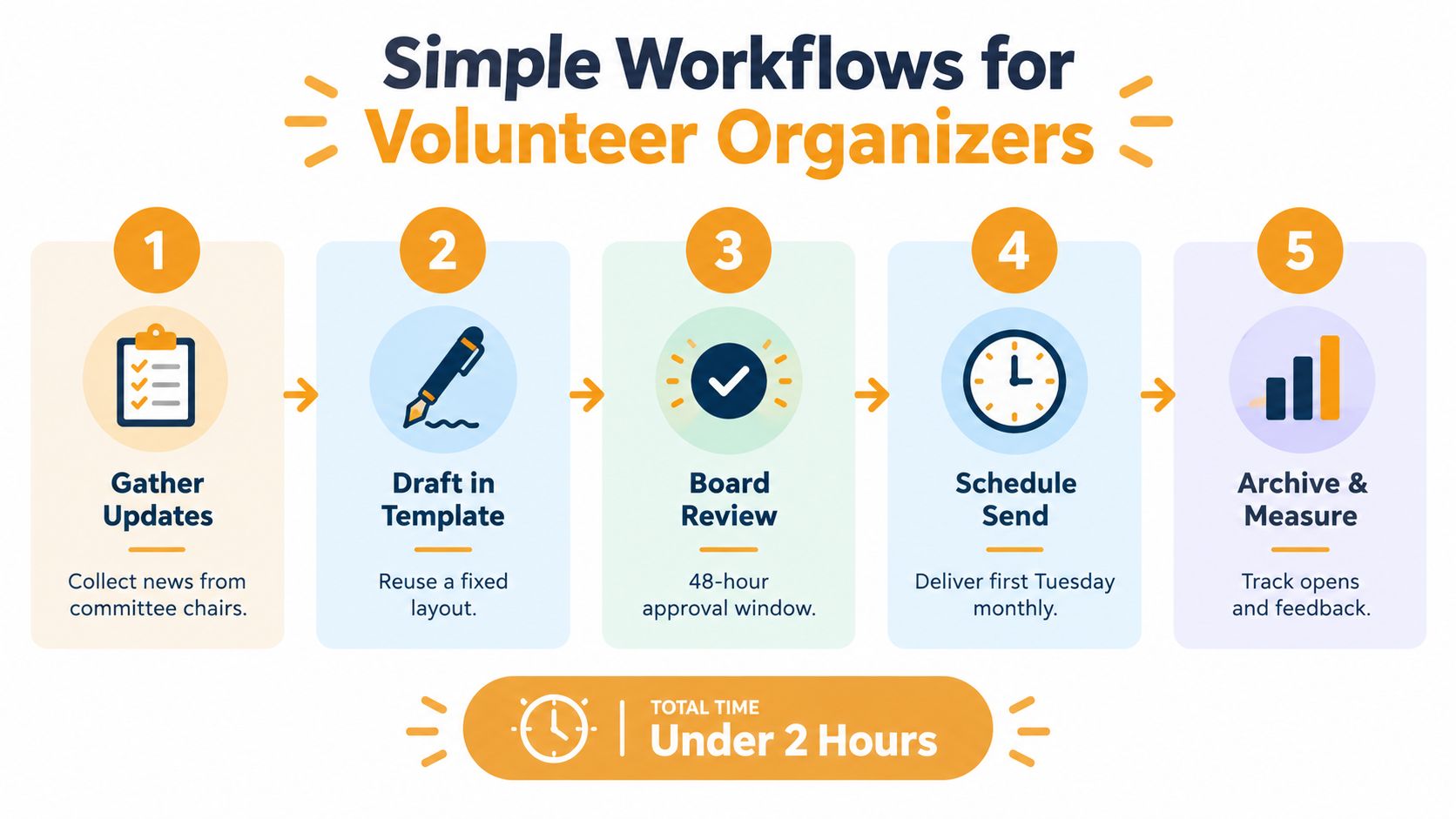
The visual shows a practical sequence, from gathering updates to archiving the finished issue. A documented sequence also helps the next board inherit the system instead of rebuilding it from a volunteer's personal inbox.
Simple Workflows for Volunteer Organizers
Volunteer burnout usually starts with an undefined process. One board member becomes the editor, another remembers maintenance updates at the last minute, and the president approves every sentence because nobody agreed on a review boundary. The result is either an exhausting publication cycle or long periods of silence.
A workable process assigns ownership by task, not personality. Each committee or vendor supplies a short update, one editor assembles the issue, and one designated reviewer checks accuracy, privacy, and tone. The board should agree in advance which information requires a formal decision and which information is a routine reminder.
Use a repeatable production cycle
Set a cadence the board can sustain. Monthly may work for many communities, while a quieter association may choose a different rhythm. Consistency matters more than publishing whenever someone remembers.
A simple operating cycle looks like this:
- Collect updates: Ask committee chairs, management, and vendors for submissions through a shared form or standard email prompt. Require the same fields each time, such as topic, date, resident action, contact, and supporting document.
- Draft in one template: Keep the FAQ, maintenance, contacts, meetings, and reminders in the same order. Reusing a template reduces formatting decisions and helps residents scan.
- Review for substance: The reviewer checks dates, links, names, privacy, and whether the issue promises something the board hasn't approved. Don't use review as an invitation for every director to rewrite the tone.
- Send through the controlled list: Use the approved distribution channel and a recognizable subject line. Keep urgent alerts separate when residents need immediate action.
- Archive and record: Save the final issue in a board-controlled location, note the send date, and record corrections or recurring questions for the next issue.
Make turnover boring
Leadership turnover shouldn't erase the newsletter archive or force a new board to reconstruct the recipient list. Keep the template, editorial checklist, archive, vendor contacts, and membership process in the association's shared records. Add a short handover note that explains who approves content, how addresses are updated, where issues are stored, and how residents request changes.
Use role-based language in the publication. “Contact management about a maintenance request” survives a personnel change better than naming a volunteer who may leave. When a person's name is necessary, pair it with the role and a durable contact method.
A new editor should be able to produce the next issue by following the documents, not by interviewing the former editor. That is the test of a community-owned workflow.
Common Newsletter Mistakes and How to Avoid Them
Many boards assume more content means better communication. It usually means residents have to search harder for the one item that affects them. A newsletter filled with minor complaints, copied policy language, committee history, and unrelated promotions becomes easy to ignore.
The correction is editorial discipline. Publish information that helps residents act, understand a decision, or find the right channel for help. Move background material into an archive, link to the governing document, and write a short explanation instead of reproducing several pages of formal language.
The problems that create the most friction
- Reply-all distribution: A single mistake can expose addresses and generate an unwanted thread. Use a controlled distribution method, and make the reply destination explicit.
- Legalistic warnings: Quoting rules without explaining the practical expectation invites confusion. State the resident action first, then identify the applicable policy or document.
- No archive: New owners and returning residents can't find prior answers when old issues disappear into personal inboxes. Maintain a searchable, board-controlled archive.
- Unclear contact paths: “Email the board” sends every question to everyone. Direct maintenance, accounts, architectural, and governance questions to the appropriate role.
- Photos without permission: A cheerful community image can still reveal a person's identity or private activity. Obtain permission, use a safer alternative, or omit the photo.
- Single-channel dependence: Social media can supplement an official newsletter, but it shouldn't become the only source for important information because not every owner uses the same platform. Community association legal guidance also warns that official social accounts require ongoing monitoring and more than one administrator.
Audit the issue from a resident's perspective
Open the newsletter on a phone, print it, and ask someone who wasn't involved in drafting it to find the next maintenance date. If that person can't locate the answer quickly, redesign the hierarchy rather than adding more explanation.
Also review the archive after a leadership change. Can a new volunteer identify the current contact process, distinguish old information from current information, and understand why a message was sent? If not, the publication is still dependent on individual memory.
Launching Your Improved Community Newsletter
A board doesn't need to rebuild every communication channel before improving its newsletter. Start with the next issue and create the operating rules alongside it. The first version should be useful, accurate, and manageable, not visually ambitious.
A quick launch checklist
Clean the contact list. Remove duplicates, confirm that former residents are no longer included, and establish a documented process for additions and removals. Don't copy a spreadsheet into a CC field.
Choose the official channel. Decide whether the board will use its existing email provider, a newsletter platform, a private group address, or a combination of email and web archive. Check address privacy, reply behavior, administrator access, unsubscribe handling, and continuity before sending.
Create the FAQ template. Put the most repeated questions near the top. Include maintenance timing, resident actions, amenity reminders, contact roles, meeting information, and a link to the archive.
Set privacy rules. Prohibit personal account details, complaint narratives, unnecessary unit information, and unapproved resident photos. Decide who reviews sensitive content before publication.
Test accessibility. Read the issue on a phone, check contrast and font size, inspect links, confirm image descriptions, and make sure the essential message remains understandable without images.
Assign the workflow. Name the update contributors, editor, reviewer, sender, and archive owner. Store those roles in board records rather than relying on one volunteer's memory.
Publish and listen. Invite residents to submit recurring questions through the proper contact route. Track questions that continue to arrive, then answer the most common ones in a future issue.
The strongest homeowner association newsletter is not the one with the most design elements. It's the one residents can trust to answer practical questions, protect their information, and remain available after the current board has moved on. Build it as a shared reference system, and the publication will support both resident confidence and volunteer capacity.
Listava provides a private group email address that can deliver HOA updates to a shared membership while keeping resident addresses hidden and allowing participation through ordinary email clients. If your board is replacing a fragile CC list, visit Listava to review a simpler distribution option for a privacy-safe community newsletter.