How Do I Write a Newsletter That Gets Read
Learn how do i write a newsletter for your club or HOA. Get practical steps for writing, formatting, and sending accessible group emails that members read.
You've just promised the neighborhood association a monthly update. The board has sent you meeting notes, a flyer, three long email threads, and a spreadsheet of dates. If you paste everything into one message, members will miss the one deadline that matters. If you send nothing, someone will ask why nobody knew about the decision.
The practical answer to “how do I write a newsletter?” starts before the writing. A useful newsletter is a reliable coordination tool: it filters information, makes responsibilities visible, and gives readers a clear next step without requiring an app, account, or technical skill.
Table of Contents
- Defining Your Purpose and Cadence
- Structuring the Email for Scannability
- Writing Subject Lines and Clear Calls to Action
- Making Your Newsletter Accessible to Everyone
- Testing and Deliverability Hygiene
- Choosing a Reliable Group Email System
Defining Your Purpose and Cadence
Before opening a blank document, write one sentence that describes the newsletter's job. For example: “This email gives HOA members the decisions, dates, and actions they need for the coming week.” A book club might promise reading reminders and meeting details. A congregation might share upcoming services, volunteer needs, and important notices.
That sentence is your editorial filter. If an item doesn't serve the stated audience or recurring purpose, leave it out, move it to another channel, or save it for a future issue. Readers return when they know what benefit they'll receive, not when an organizer forwards every message that arrives.
Newsletters are best understood as recurring editorial products, not merely promotional emails. Earlier mailing lists and web-era digests established a durable principle: readers choose to receive a predictable benefit, and the writer earns their attention by selecting what matters. The history of newsletters and mailing lists shows how investment commentary, curated online resources, and trade publication updates developed into formats that still shape email communication.
Choose a schedule you can maintain
A dependable schedule matters more than an ambitious one. Choose weekly, biweekly, or monthly based on the amount of useful information your group produces and the time volunteers can give the task. A monthly roundup is appropriate for a family network with occasional updates, while a volunteer team with changing shifts may need a shorter weekly message.
Don't choose a day because it sounds professional. Choose a routine that lets you gather accurate information, check dates, and send without rushing. Listava's guide to the best time to send an email can help you think through timing, but your group's habits and urgency should guide the final decision.
Practical rule: Promise only the schedule you can keep when the organizer is busy, away, or handing the role to someone else.
Create a simple charter before issue one:
- Audience: Who receives this, and what do they already know?
- Purpose: What recurring problem does the email solve?
- Cadence: How often will it arrive?
- Scope: What belongs in it, and what doesn't?
- Action: What should readers understand, decide, or do?
That charter prevents the newsletter from becoming a second CC chain. It also makes leadership changes easier because the next organizer can continue an established communication product instead of rebuilding the process from scratch.
Structuring the Email for Scannability
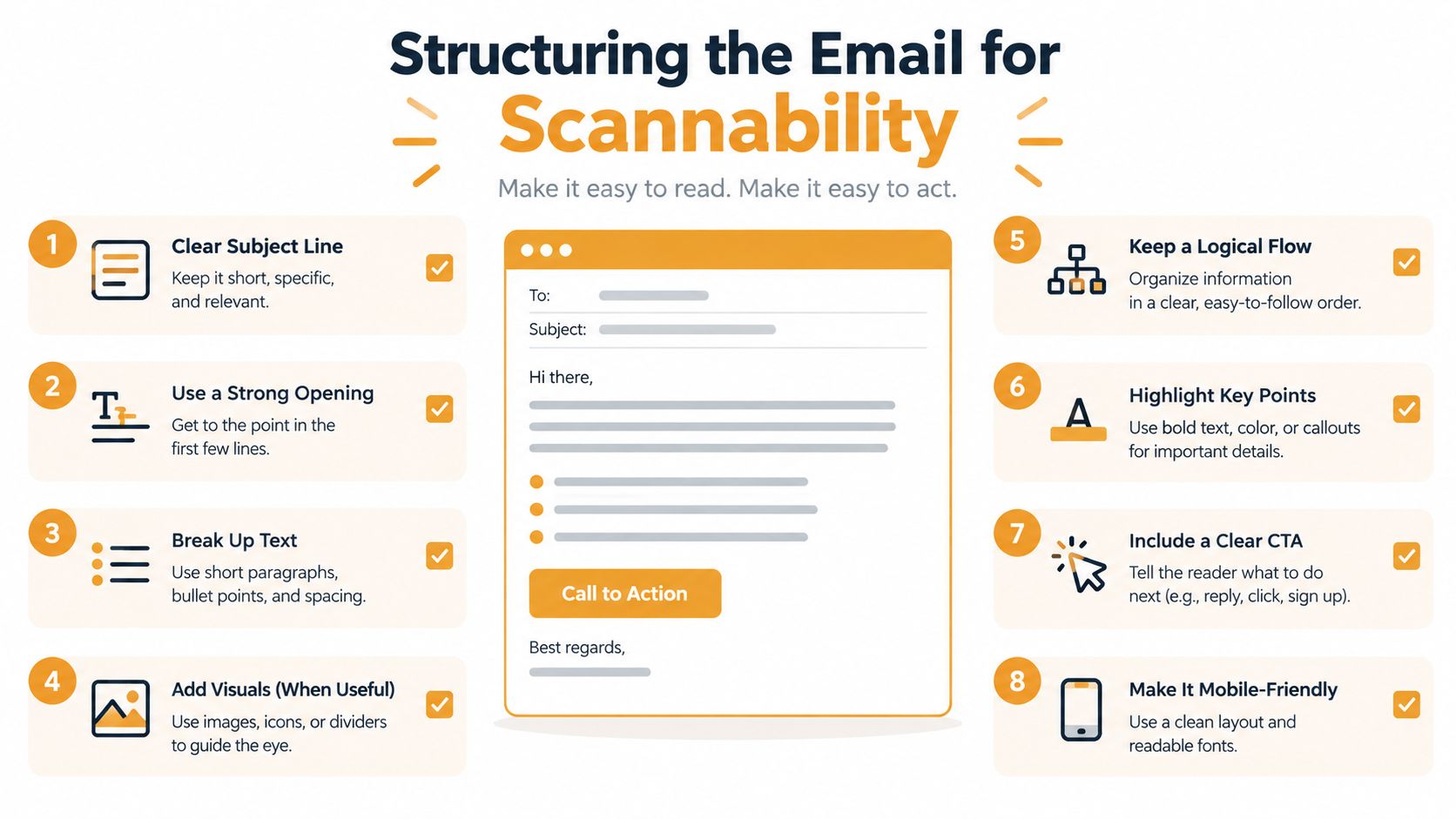
Most members won't read a community newsletter word for word. They'll scan it on a phone between errands, meetings, or household tasks. Write for that reality by putting the most important information first and making the message understandable even when someone reads only the opening and the bullets.
Start with a direct opening sentence that combines the topic and urgency. “Please confirm your attendance at the neighborhood meeting by Thursday” is more useful than “Here are this month's updates.” The first sentence should tell readers why the email matters and, when relevant, what deadline controls their response.
Use a top-down structure:
- Opening purpose and deadline: State the main update or required response immediately.
- Primary action: Give the one task most readers need to complete.
- Supporting details: Explain the decision, event, or change in short paragraphs.
- Related updates: Group information under descriptive headings.
- Closing instruction: Repeat the reply method, registration link, or contact person.
Keep the action list focused. Three to five bullets can communicate dates, owners, and responsibilities without turning the message into a project archive. If you have more material, link to the meeting notes or attach the relevant document rather than burying the action beneath background information.
Make details easy to locate
Write dates consistently, such as “Saturday, May 18, at 10 a.m.” Put the responsibility beside the date: “Volunteers should arrive by 9:30 a.m.” Don't make readers infer the action from a paragraph about the event.
Use headings that describe content rather than decoration:
- Meeting decision
- Upcoming dates
- Volunteer roles
- Documents to review
- Reply needed
Link text should explain the destination. “Read the revised parking policy” helps more than “click here,” especially for screen-reader users who move from link to link. Plain text, short paragraphs, bullets, and descriptive headings often outperform elaborate templates because they keep the message usable in ordinary email clients.
A newsletter can include warmth and personality, but clarity should control the layout. If a member gives the email ten seconds, they should still be able to identify the main update, the deadline, and the next action.
Writing Subject Lines and Clear Calls to Action
Your subject line sets the reader's expectation before they open the message. For volunteer-led groups, clarity usually beats cleverness. “HOA meeting moved to Thursday, reply by Tuesday” gives readers a topic and a deadline. “Important news for everyone” creates uncertainty, while a playful phrase may hide the reason the message deserves attention.
Write the subject line after drafting the email. Once you know the main action, you can state the benefit or urgency accurately. Keep recurring wording consistent enough that members recognize the newsletter, but change the specific topic so each issue remains informative.
The call to action needs the same discipline. Give the email one primary response: confirm attendance, reply with availability, open a document, register for an event, or acknowledge a decision. Secondary information can appear below, but don't give readers several equally prominent requests unless the group genuinely needs all of them at once.
Use evidence without chasing vanity metrics
A 2022 benchmark cited in an academic college-newsletter study reported an average industry open rate of 21.33% and an average click-through rate of 2.62%. The same study described a newsletter revised around its subject line and internal links that reached a 20.8% click-through rate across issues 3–8, nearly eight times the cited benchmark. The academic newsletter study doesn't prove that every group can reproduce that result, but it does demonstrate that copy and layout can materially influence action.
For a community organizer, the meaningful question isn't whether an email looks successful in a dashboard. It's whether members complete the task without a second reminder. Track replies, registrations, document views, link clicks, and completed confirmations. Treat opens cautiously because privacy changes can distort that measurement.
A clear CTA sounds like an instruction, not a slogan: “Reply with your attendance by Thursday” tells the reader exactly how to respond.
Compare these versions:
- Vague: “Don't miss this important update.”
- Clear: “Review the revised bylaws before Friday's vote.”
- Vague: “Let us know what you think.”
- Clear: “Reply with your preferred cleanup shift by Wednesday.”
Avoid stuffing the subject line with exaggerated urgency or promotional language that doesn't match the message. A community newsletter earns trust through accuracy. If every issue claims to be urgent, readers stop treating urgency as useful information.
Making Your Newsletter Accessible to Everyone
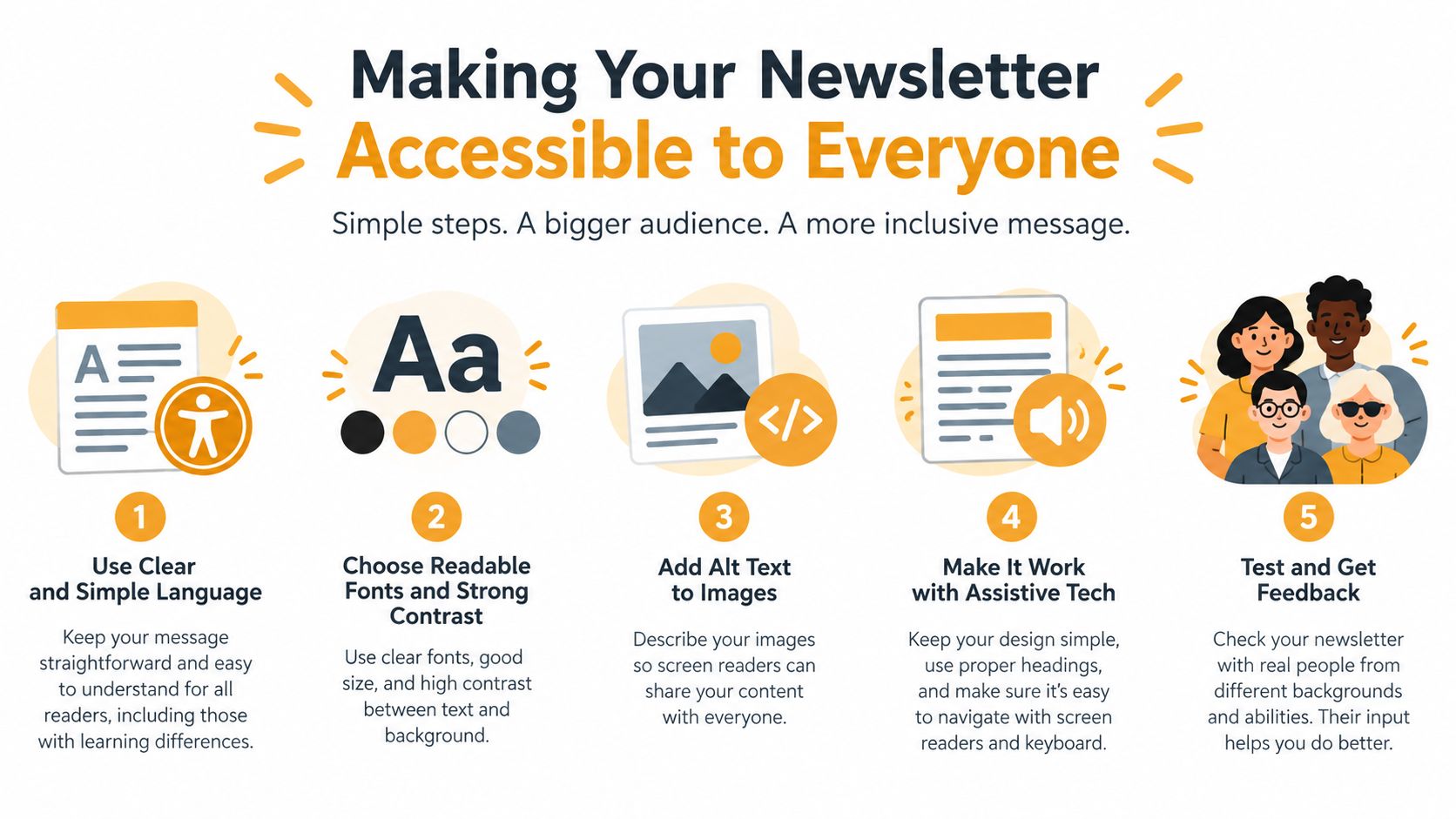
Accessibility isn't a visual polish step. It's part of writing the message. Your recipients may include older adults, people with visual or cognitive disabilities, members using screen readers, and readers checking email on older phones or with images blocked.
A visually elaborate newsletter can be harder to use than a plain message. Text embedded in an image disappears when images are blocked and may be inaccessible to assistive technology. Low-contrast colors, dense columns, decorative headings, and vague links create friction even when the design appears polished.
Use real text for every essential instruction. Preserve a logical heading order, write meaningful link text, and don't rely on color alone to distinguish deadlines or required actions. If an image adds information, provide useful alt text. If it's purely decorative, mark it appropriately so a screen reader doesn't force the reader through irrelevant content.
Run a practical accessibility check
Before sending, ask:
- Text: Can someone understand the entire update without loading images?
- Headings: Do headings describe the sections and follow a sensible order?
- Links: Does each link explain where it goes?
- Contrast: Can readers distinguish text from its background?
- Images: Does every informative image have meaningful alternative text?
- Layout: Does the message remain readable on a narrow phone screen?
- Action: Can a reader identify the required response without relying on color, icons, or visual position?
An accessibility benchmark reported that 83% of messages met basic accessibility standards, leaving 17% with potential barriers. The same 2025 email benchmark report found that only 46% passed subject-line quality checks and 13% contained broken or unreachable links. These findings reinforce a simple editorial point: readability and link accuracy belong in the writing process, not only in a designer's checklist.
For a practical comparison between formats, use this guide to HTML versus text email. A plain-text version is especially valuable when members use older clients, assistive technology, or settings that block visual formatting.
Testing and Deliverability Hygiene
A well-written newsletter can still fail if the list contains invalid addresses, recipients didn't consent, or the message triggers complaints. Start with explicit permission. Maintain a current list, remove invalid addresses, and make the unsubscribe method visible so former members can leave without contacting a volunteer administrator.
Authenticate the sending domain with SPF, DKIM, and DMARC when your sending setup supports them. After each issue, review delivery, hard bounces, complaints, unsubscribes, and clicks. Don't keep resending the same message when results change suddenly. Investigate the list, content, links, or sending setup instead.
Use these operational thresholds as warning signals from email deliverability guidance:
- Bounces: Investigate when the rate rises above 1–2%.
- Spam complaints: Treat 0.05–0.10% as a warning range.
- Unsubscribes: Investigate when they exceed 0.5%.
- Delivery: One benchmark classifies 98% or higher as healthy.
- Complaints: The same benchmark identifies complaints below 0.05% as healthy.
Those figures are monitoring triggers, not promises. A small volunteer list can produce noisy results, so look for patterns and individual causes. Never use purchased or scraped lists. Reported bounce rates are roughly 0.5–2% for verified lists compared with 15–30% for scraped or purchased lists, according to the same deliverability source.
Test before the whole group receives it
Send a short test to Gmail, Outlook, and Yahoo addresses. Check the subject line, line breaks, headings, images, alt text, links, attachments, and reply behavior. Open the message on a phone as well as a computer.
Confirm that replies go to the intended group address, not to one volunteer's private inbox or to every recipient unexpectedly. Use this guide to sending email in bulk as a workflow reference, then document who can add members, remove former members, approve messages, and handle delivery problems.
Inbox placement deserves separate attention. A 2025 Validity benchmark reported that roughly one in six legitimate marketing emails failed to reach the inbox, while Gmail represented nearly half of consumer mailboxes globally and experienced an almost 5% deliverability decline. The report also gave Microsoft an inbox-placement rate of 75.6%. Validity's 2025 benchmark supports a useful conclusion for community groups: better copy can't compensate for poor list hygiene, missing authentication, or confusing reply behavior.
Choosing a Reliable Group Email System
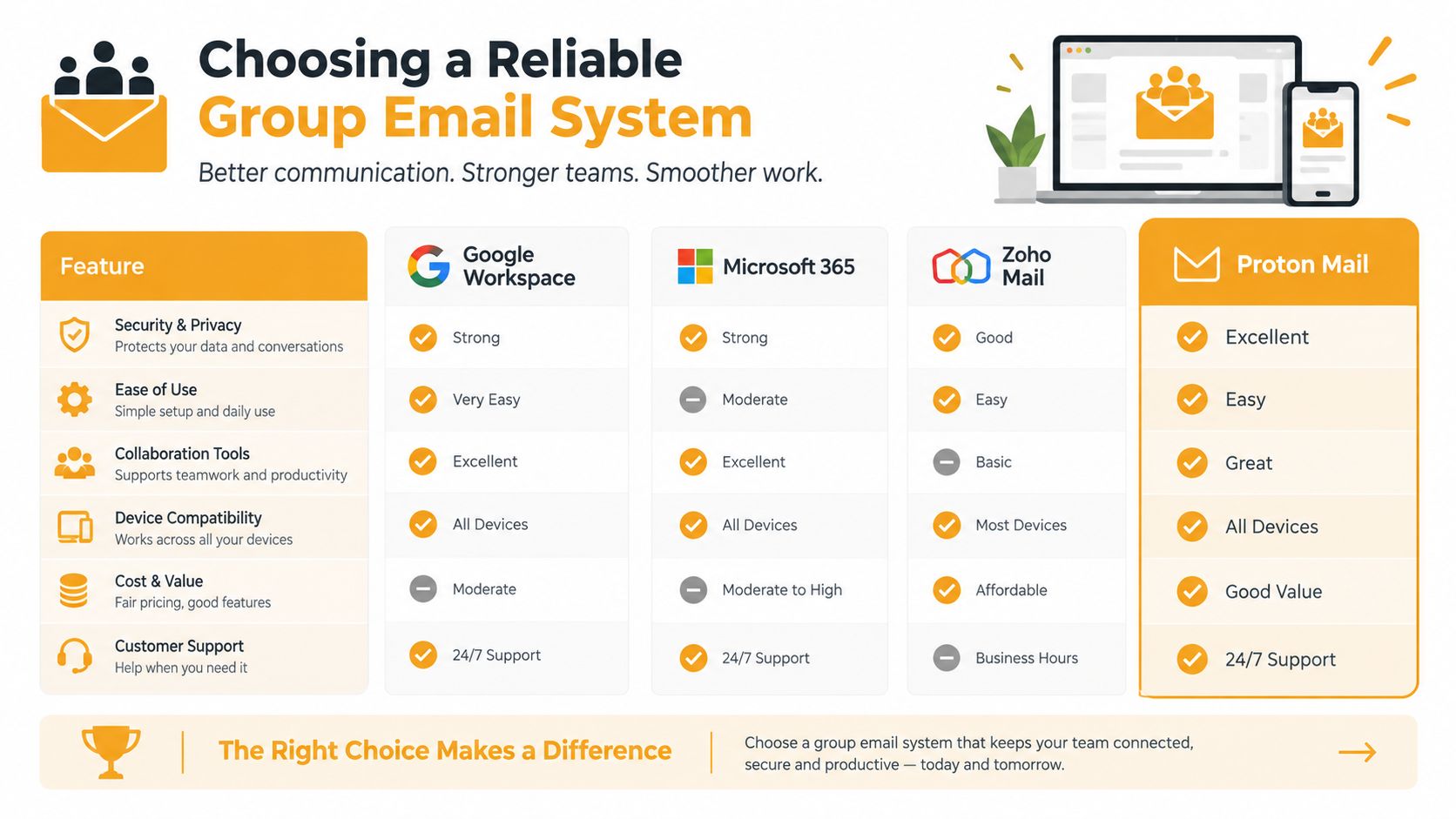
Your newsletter process and your delivery system are inseparable. A perfect message sent through a messy CC chain can expose member addresses, create reply-all cascades, and leave the next organizer with an outdated spreadsheet. BCC protects addresses in the initial send, but it can break group conversation and make it unclear who received or should answer the message.
Heavy marketing software can solve some problems, but it may introduce others for volunteer groups. Organizers might have to maintain dashboards, member accounts, templates, permissions, and automated workflows when the actual need is simpler: one stable address, a private membership list, and predictable replies.
Compare the operational trade-offs
| Approach | Useful for | Common weakness | |---|---|---| | CC | Small conversations where addresses are already shared | Exposes addresses and encourages reply-all cascades | | BCC | One-way announcements where privacy matters | Breaks visible group discussion and can confuse replies | | Marketing platform | Teams needing campaigns, segmentation, and reporting | Adds administrative work and may be excessive for a volunteer group | | Dedicated group address | Recurring announcements and replies for a defined membership | Requires clear moderation and removal procedures |
A dedicated group address can preserve conversation while hiding personal addresses from other members. It also keeps participation inside ordinary email clients, which matters when members use Gmail, Outlook, Yahoo, or Hotmail and don't want another account or app.
Listava provides a group email service where one shared address distributes messages to members, supports member additions through CC or spreadsheet import, and keeps replies directed to the group. It also provides privacy controls, email-only participation, and accessibility features such as large fonts and high-contrast design. Other options, including Google Groups, Microsoft 365, or a carefully managed BCC workflow, may be sufficient depending on the group's needs.
Design for continuity
A group email system should survive the organizer's absence. Store membership and operating instructions somewhere the next coordinator can access. Define who can add members, how former members are removed, which replies require moderation, and where newsletters are archived.
The strongest setup is often the least complex one. A stable address, controlled replies, private recipients, readable messages, and a documented removal process will usually serve a neighborhood board better than an intricate campaign sequence nobody has time to maintain.
Start your next issue with one purpose, one primary action, and a short list of verified recipients. Listava gives volunteer-led groups a shared, privacy-conscious email address for sending readable updates and keeping replies organized without requiring member accounts or an app. Visit Listava to set up a simpler newsletter workflow for your HOA, club, congregation, family, or community group.