How to Write a Message People Actually Read
Learn how to write a message for groups: subject lines, structure, tone, accessible formatting and reply-all etiquette, with examples you can reuse today.
You're staring at a blank email to your HOA board, book club, or family list. You need a decision by Friday, but you know half the group will skim it on a phone, someone will reply all with a private question, and two people will ask what date you meant.
That's the true test for how to write a message. It isn't word count. It's low interpretation effort, how quickly a mixed group can find the action, the deadline, and the way to reply. I would judge every draft by that standard before I worried about making it prettier or shorter.
Table of Contents
- Subject Lines That Show the Action Needed
- How to Write a Group Message in Four Steps
- Tone and Length That Busy Readers Finish
- Formatting for Mixed Abilities and Contrast
- Replies, Reply All and Keeping Threads Useful
- Send, Test and Measure Your First Group Message
Subject Lines That Show the Action Needed
Pick a pattern first. Don't draft the body and hope a subject appears later.
| Message type | Subject line pattern | Example subject | Opening line | |---|---|---|---| | Meeting notice | [Meeting type] on [day, date], [time] | Board meeting on Tuesday, May 12, 7 pm | The meeting is at the clubhouse; the agenda is below. | | Decision request | Decision needed: [topic] by [date] | Decision needed: pool hours change by May 10 | Reply YES or NO; if we hear nothing, the hours stay the same. | | Deadline reminder | Reminder: [action] due [date] | Reminder: dues due Friday, May 10 | Pay online or reply with the date you will pay. | | Announcement | [Topic]: [what changed] | Water shutoff: Thursday, May 9, 9 am to 12 pm | Only Elm Street is affected; plan to fill containers before 9 am. | | Event invite | [Event], [date], RSVP by [date] | Potluck Saturday, May 17, RSVP by May 12 | Reply with the dish you plan to bring so we can avoid duplicates. |
Each pattern puts the action or date in the first six to eight words because phone previews cut off long subjects. A member scanning an inbox in a grocery line should know whether to open now, save it, or ignore it.
Why vague subjects fail
Update and Quick question give no reason to act. Important!! is worse. It borrows urgency once and teaches people to doubt the next message. If everything's urgent, nothing is.
Say your draft subject is "Questions about the pool." That could mean gossip, a complaint, or a vote. Rewrite it as "Decision needed: pool hours change by May 10" and open with the default outcome. "Reply YES or NO; if we hear nothing, the hours stay the same." Now a busy reader doesn't need to decode your intent.
A subject can't carry every detail, so your first line should repeat the key point in plain words. That's not redundancy. It's insurance for previews, forwarded copies, and screen readers. For more ways to make that first line earn the open, see these email subject line best practices and these ideas for interesting subject lines that still stay clear.
Could a member who reads only the subject tell whether they need to act and by when? If not, rewrite it before you write anything else.
How to Write a Group Message in Four Steps
Use the same build every time. Predictability helps volunteers who read between other jobs.
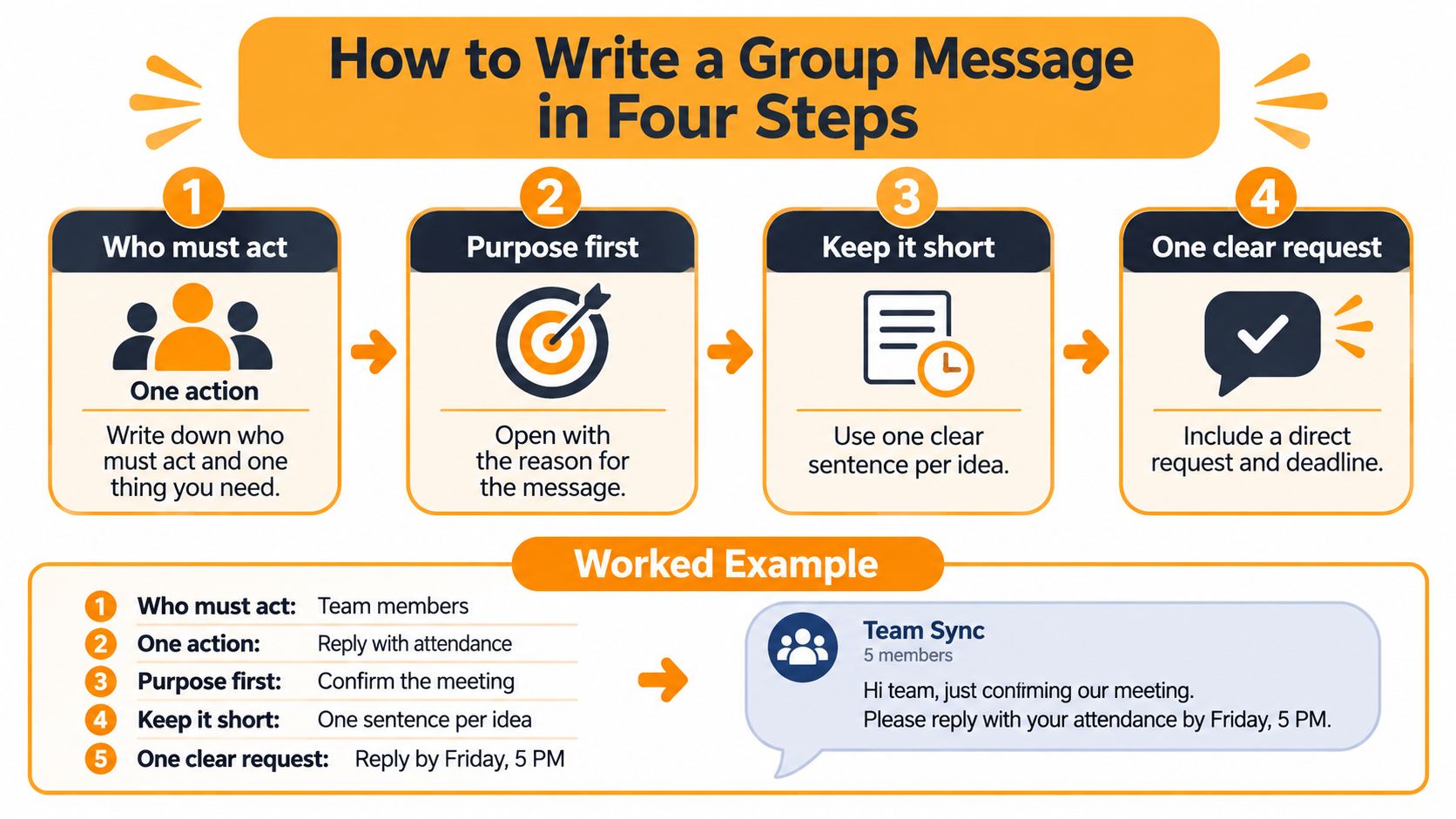
- Define the recipient and one action. Write down who must act and the single thing you need, such as "reply with attendance" or "vote on the date." Two asks split replies. Half the group answers the first, half answers the second, and you chase both.
- Write the subject line. Use a pattern that names the action and date. Don't chase a magic length. The Mixpanel analysis of email subject line open rates notes that in one large analysis of more than 4.6 billion sends, the median open rate was 19.9%, while a field experiment found adding a recipient's name increased opens only from approximately 9% to 11% and a later follow-up did not reproduce that effect. Clarity beats tricks.
- Lead with decision-relevant context. Give two or three sentences on what changed and why it matters now. Skip the history of the issue unless it changes the choice. Put the important information in the first screenful because many people read in a preview pane.
- End with the request, deadline, and reply path. Write the exact reply you want and what happens if nobody responds. "Reply YES or NO by Friday, May 10. If we hear nothing, the hours stay the same." That default outcome stops silent members from becoming a mystery.
A before and after that shows the difference
Before: "Hi everyone, hope you're well. As some of you know, we've had ongoing discussions since March about pool security, the old lock, and several incidents. After talking to the vendor and reviewing options, we're thinking a new gate code might help. Let us know your thoughts when you get a chance."
Nobody knows if the code changed, when, or what to do. "When you get a chance" isn't a deadline.
After: "The pool gate code changes Monday, May 13. The new code is in the attached notice. Please don't share it outside the neighborhood. Reply to me only if your card stops working."
Shorter, yes, but the win is order. Action first, context second, reply path last.
If you draft faster out loud, dictate the four parts in order, then clean up the transcript. The VoiceType speech to text guide is useful if you want to talk through a draft and keep your hands free, as long as you still edit for dates and names afterward.
Finish with a phone test. Open the draft on your phone. If the action and deadline don't appear without scrolling, move them up. Treat opens as a diagnostic only, since privacy features can inflate them. Measure replies, confirmations, or completed sign-ups instead.
Tone and Length That Busy Readers Finish
Routine group mail gets answered fast or not at all. A Government Executive summary of a large-scale study of email behavior reports researchers analyzed approximately 187 million emails exchanged among 2 million unique users and found half of replies contained fewer than 43 words, the modal reply was only 5 words, and only about 30% of emails exceeded 100 words.
That doesn't mean every message must be tiny. It means readers expect to answer in a few words, so your job is to make that possible.
A practical length rule
Keep routine notices under about 100 words when you can, with the ask in the first paragraph. If you need history, put it after the request under a labeled Background line. Members who need it will keep reading. Members who don't can act and move on.
When a message must be longer, every extra sentence should answer a question a reader would otherwise have to ask. Where do I park? What if it rains? Who do I contact if the link fails? If a sentence doesn't prevent a follow-up, cut it or move it to an attachment.
Tone that sounds like a person
Write as you'd speak to a neighbor at the mailbox. Warm, direct, and specific.
- Say the date plainly: "Please reply by Friday, May 10" beats "at your earliest convenience."
- Skip subgroup slang: Acronyms your committee uses may mean nothing to a new member.
- Don't manufacture urgency: Save "urgent" for a burst pipe, not a potluck signup.
- Avoid capitals for emphasis: They read as shouting and they're harder to scan.
- Cut buried apologies: "Sorry for another email, but..." delays the point you need people to see.
Working test: Read it once at normal speed. If you have to reread a sentence to find who should do what, your group will have to reread it too.
Formatting for Mixed Abilities and Contrast
A mixed group includes older readers, people on older phones, members using screen readers, and plenty of skimmers. Format for all of them at once.
The Purdue Daniels School guidance on writing emails that get read recommends a "What? So what? Now what?" structure. It works because it puts purpose first, explains why it matters in a sentence or two, then names the next step.

Don't confuse accessible with shortest. A short, vague note that forces five follow-up questions costs more effort than a slightly longer message with short paragraphs, bullets for three or more items, and background separated from essentials. You're optimizing for understanding on the first pass.
Send a plain-text version alongside formatted mail when your tool allows it, and make sure it still contains the date, action, and deadline in ordinary sentences. Don't hide logistics only in a banner image, a colored box, or an attachment. Members who turn images off or use assistive tools still need the facts.
| Element | Do | Avoid | |---|---|---| | Dates | Write Friday, May 10 in full | 5/10 or next week | | Text contrast | Dark text on a white or plain background | Light grey or pale blue type | | Links | See the parking map | Click here | | Images | One sentence of alt text describing the content | An image-only announcement with no text | | Meaning | Add a word such as overdue beside a color | Red text as the only signal |
Each row solves a different problem. Full dates prevent month and day mix-ups. Descriptive link text tells a screen reader user where the link goes. A word beside a color helps members who can't distinguish that color. Our email accessibility guidelines for group organizers go deeper on these checks.
Read the draft aloud before sending. Then skim it as a stranger would. Can you find the date, action, and deadline in under twenty seconds? If you can't, move them into the opening lines and repeat the deadline once near the request.
Replies, Reply All and Keeping Threads Useful
Most thread chaos isn't bad manners. It's a missing instruction about where replies belong.
| Reply option | Who receives it | Use it when | |---|---|---| | Reply to sender | Only the person who wrote the message | Personal thanks, private questions or a matter to resolve privately | | Reply all | Everyone on the original thread, including people who were only copied | An answer every recipient needs and that you have confirmed | | Reply to group address | Every member of the group list | Shared decisions, RSVPs and updates the whole group should see |
Be honest about the tool you need. Plenty of our own articles tell readers when CC, BCC, Google Groups, or a Facebook group is good enough for their situation. For a one-off note to four people, a simple CC is fine. You don't need a system for that.
A single group address becomes worth it when the same people need ongoing discussion and you don't want dropped recipients every time someone replies. With that setup, members receive emails sent to the group's single address, and replies go back to the group. That helps shared decisions and RSVPs because everyone sees the same answer. It hurts when a reply is personal, which is why your message should say where answers belong.
Three habits that keep threads readable
- Name the reply path: "Reply to the group with your vote. Send payment questions to me only."
- Name one summarizer: One person posts the final outcome so members don't piece it together from twelve fragments.
- Close the thread: End with a line that stops more mail, such as "Thanks everyone, the date is set for May 17; no reply needed."
Say a club is picking a picnic date. Without a closing line, members keep adding "works for me" for two days after the decision. The organizer posts, "The picnic is Saturday, May 17. No reply needed unless you can bring tables." The flood stops because the next action is narrow and the decision is final.
If threads often splinter in your group, this explanation of how an email thread stays together can help you explain the habit to members without sounding scolding.
Send, Test and Measure Your First Group Message
Don't launch with your longest update. Start with a message that's easy to answer and easy to measure.
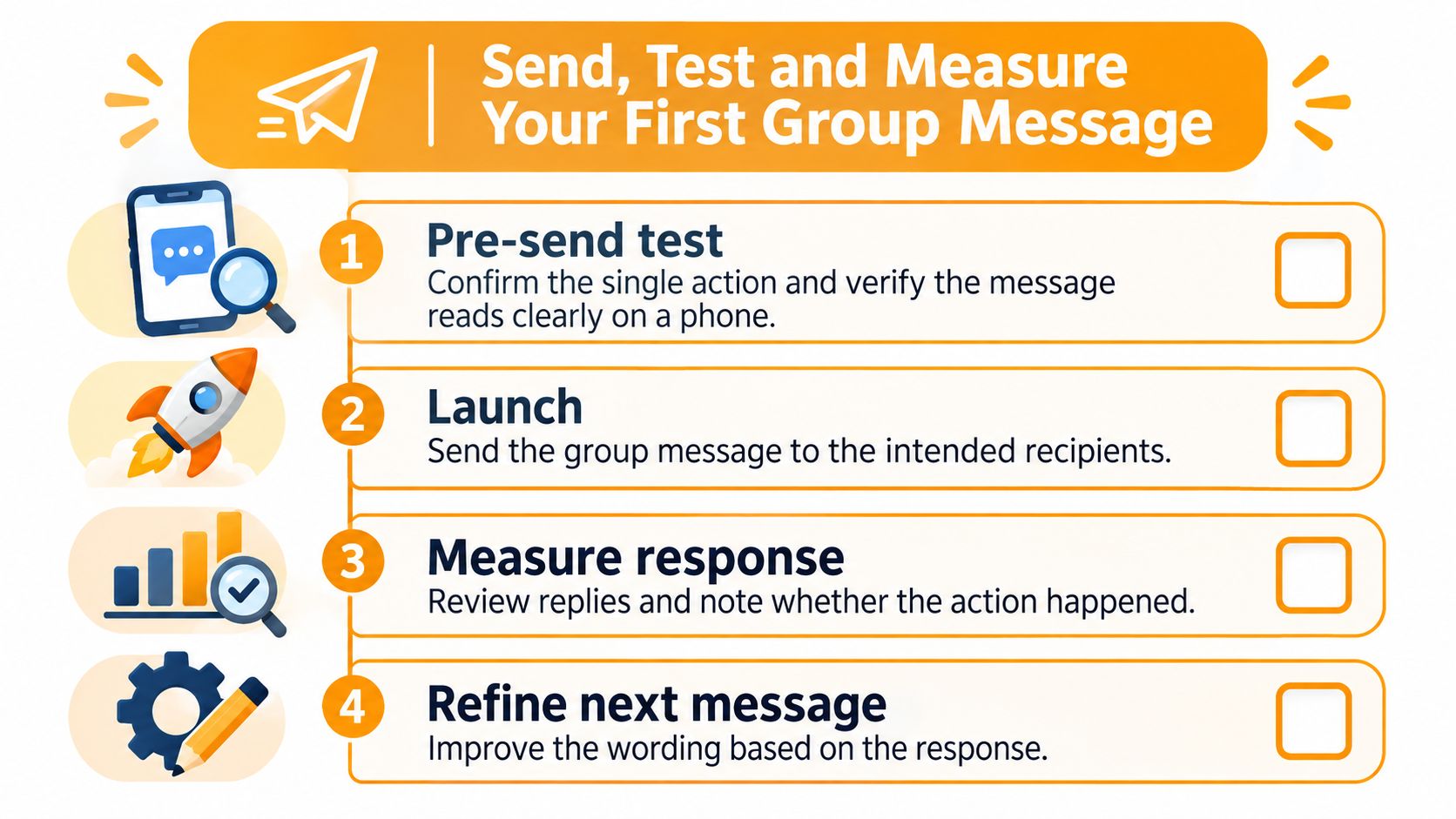
First, confirm the single action, check the subject pattern, and make sure purpose and deadline sit in the first two lines. Second, send the draft to yourself and reply from a second address so you see where the answer lands before members do.
Third, make your first real message ask for a one-word reply, such as YES or NO. You'll learn how the group responds before you rely on it for something complicated. Group members don't need to create an account, and they receive and reply to emails as they normally do, so a simple reply is a fair test.
Fourth, track replies, confirmations, or completed sign-ups, not opens alone. Fifth, if replies are low after the deadline, send one short reminder that repeats the request, deadline, and default outcome. Change only one variable next time, such as subject wording or deadline day, so you can tell what helped.
Creating a group takes about thirty seconds, and members are added by CC'ing them, so your test can start small and stay low risk.
Put these habits to work with one shared address for your board, club, congregation, or family, so members can reply from their normal inbox without learning a new app. Listava gives your group that single address while keeping personal email addresses private. Create your group today and send your first clear, one-action message.