How to Write Announcement Email That Gets Read
Learn how to write announcement email messages for clubs, HOAs and congregations: subject lines, clear structure, accessibility checks and a pre-send test.
You've got forty neighbors to tell about a gate closure, a dues vote, or a moved rehearsal, and you already know how it'll go. You hit send, three people reply asking what time it starts, and someone says they never saw it. That's rarely a writing talent problem. It's usually a missing date, a vague subject, or a broken link. Learning how to write an announcement email means building a plain-text-first message that still works on a phone, an old desktop client, and a screen reader.
Table of Contents
- Decide the Purpose and Reader Before You Write
- Build the Six Parts in Order
- Write a Subject Line Readers Open
- Test and Send Through a Shared List Address
- Fix Problems After Sending
- Measure Whether the Announcement Worked
- Send Your First Announcement This Week
Decide the Purpose and Reader Before You Write
Most weak announcements get drafted before the organizer knows what the message is for. You start typing background, add a second topic, and end with "let me know," which tells no one what to do or by when. Answer three questions in writing first, and the draft gets much shorter.
- What's the one thing: State the single fact or action recipients must take away, not three updates competing for attention.
- Who's affected: A pool gate closure on the north side matters to nearby residents far more than to the whole board list.
- What counts as success: Name the result you'll count, such as an RSVP, a reply, a confirmed attendance, or a link visit.
Turn a vague purpose into a specific one
"Update about the clubhouse" gives you nothing to write toward. Rewrite it as "Clubhouse closes for repainting March 3 to 10; members should reply by February 25 if they need the room for a private event." Now you have an event, dates, an affected group, and a deadline. That sentence alone can become your subject line and your first line.
An announcement that only informs can end once the facts are clear. One that needs a response can't, because it needs a deadline and a way to reply. If you don't set a date, people assume they can decide later, and later usually means never.
The same news also needs different handling for different readers. A book club needs a title and a host address, a congregation needs a service time and a contact for rides, and an HOA needs a vote date and who's eligible. Don't send one version to all three lists and hope people sort it out.
Keep a three-line purpose statement at the top of your draft. Line one is the news, line two is who's affected, line three is the action and deadline. Delete it before sending.
If you can't fill in those three lines, you're not ready to write the body yet. I would stop and call whoever made the decision, because guessing at a date or a deadline creates the follow-up emails you're trying to avoid.
Build the Six Parts in Order
A pool gate closes for repairs, and a volunteer emails forty neighbors. Three people reply to ask when it closes. The message may be clear overall, but if the time is buried or missing, readers have to ask for it. Build the announcement in a predictable order so people can find the facts they need while skimming.
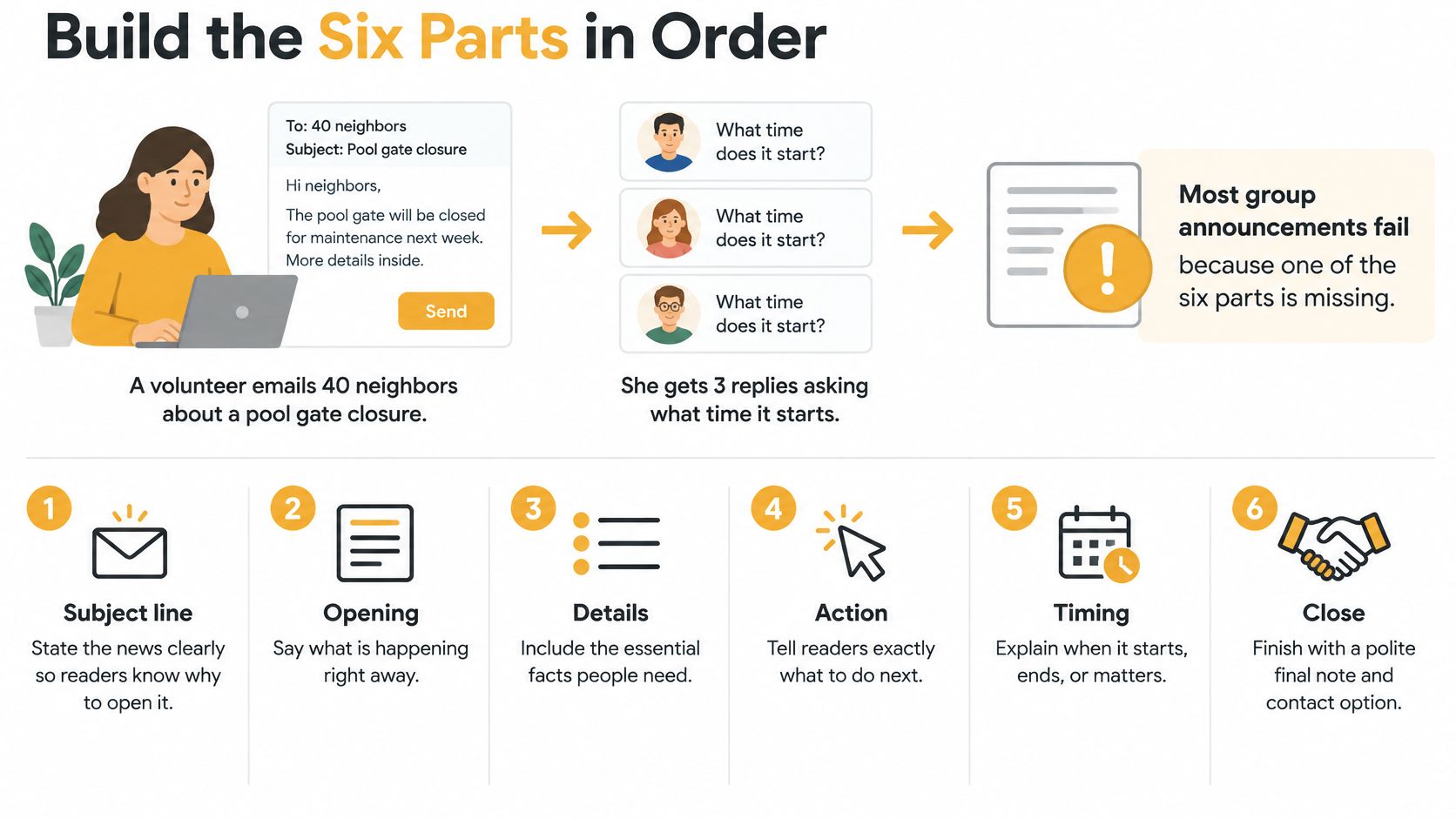
The six parts, in the order readers need them
1. Subject line. Name the event or action, such as “Pool gate closed May 2 to 5.” Keep it specific enough to make sense in the inbox.
2. Essential news first. Put the main fact in the opening sentence: “The pool gate will be closed from May 2 to May 5 for lock replacement.” Don't make readers work through background to find out what changed.
3. Why it matters. Add a sentence or two about the effect on this group. A budget vote may change monthly dues. A rehearsal move may affect people who have arranged transportation. Skip general claims that something is “important.”
4. Logistics in a labelled block. List the date, time and time zone, place, and anything people should bring. Write “Tuesday, May 14, 2026, at 7:00 p.m. ET,” rather than “next Tuesday.” A labelled block makes practical details easy to scan.
5. One action with a deadline. Use a plain heading such as What to do. State one primary action and its deadline. Keep that instruction in text, not only on a coloured button that may be missed or unavailable.
6. One named contact. End with a person and a way to reach them, followed by a short sign-off. Keep other announcements out of the closing so readers don't mistake them for part of the sign-off.
Subject length also matters: Omeda's analysis of more than 1.6 billion emails found that subjects of 1 to 20 characters averaged a 29.9% open rate, while 21 to 124 characters averaged 17.3%. That does not prove shortening alone causes higher opens, so don't cut a clear subject into a cryptic one.
Write it so it survives without formatting
People may read an announcement with a screen reader, enlarged text, high-contrast settings, or images turned off. The Qualibooth email accessibility guide covers logical headings, real lists, sufficient color contrast, descriptive links, alt text, and testing with images disabled.
Use short paragraphs and actual bullet lists. Write descriptive link text such as RSVP form instead of “click here.” Don't use color or an icon as the only signal that something is urgent. Put dates and addresses in the message itself, not only in an attachment. Plain-text-first formatting also keeps the announcement readable in different email clients.
A finished body under 120 words
Subject: HOA meeting, budget vote May 14
The HOA will vote on next year's budget on Tuesday, May 14, 2026, at 7:00 p.m. ET in the clubhouse. The proposal raises monthly dues to cover roof repairs, so every household is affected.
What to do: Reply to this email by May 12 to confirm you can attend, or name a proxy. Bring photo ID for check-in.
Questions go to Dana Lee at [email protected]. Thanks, Marcus
For more guidance on writing a clear email message, adapt the principles to your announcement and group.
Paste-in checklist
- Subject: Does it name the event, date, or action?
- First sentence: Does it state the news without background?
- Logistics: Are the date, time, time zone, and place included?
- Action: Is there one action with a deadline?
- Contact: Is one person named, with a working address?
- Plain text: Does the message still make sense with images off?
Write a Subject Line Readers Open
Start with the scale of the problem. The Mailchimp email marketing benchmarks, based on billions of emails, reported an overall average unique open rate of approximately 34.23%, with government messages at 40.55% and vitamin-supplement messages at 27.34%. Those aren't targets for a neighborhood list, since audience, timing, and list quality differ. They do show that many people never open a given message, so the subject has to carry the central value on its own.

| Weak subject | Stronger subject | Why it works | |---|---|---| | Update | HOA meeting: budget vote on May 14 | Names the event and date | | Important | Water shutoff Monday 9 a.m.; reply if you need access | States the event and the required action | | Newsletter | Choir rehearsal moved to Thursday 7 p.m. | Gives the change and the time | | Reminder | Book club: RSVP by Friday for March pick | Shows the action and deadline | | Hi all | Pool gate closed May 2 to 5; code changes May 6 | Puts the key facts in the subject |
Notice what each replacement does. It names a specific event, adds a date or time, and, where a response is needed, says so. "Important" fails because every sender thinks their message is important. "Water shutoff Monday 9 a.m." works even if the reader never opens it, which is the test.
Use the preview text instead of wasting it
The preview text is the short line that follows the subject in most inboxes. Don't restate the subject there. Use it to repeat the action, such as "Reply by May 12 or name a proxy," so a skimming reader gets the news and the next step together. If you leave it blank, many clients fill it with "View this email in your browser," which helps nobody.
For more patterns worth testing, browse these interesting subject lines for emails and adapt them to your group's actual news.
Shorter subjects have averaged higher opens in large analyses, but that doesn't prove cutting words causes the lift. A short subject that hides the date will cost you replies. I would test two clear versions on a small slice of the list rather than guessing. Also keep one topic per subject. "Meeting, bake sale, and parking" tells readers none of the three is urgent.
The short clip below walks through subject line choices you can compare against your own draft.
Test and Send Through a Shared List Address
Sending to a shared list address is safer than a long CC line. Recipients don't see each other's addresses, and you decide in advance whether replies go to everyone or only to you. It also keeps the thread intact when someone joins or leaves, which a personal address book never does well.
Six pre-send steps, each tied to a risk
- Send a test copy: Send it to yourself and one other member, then read the plain-text view to catch facts hidden in images or buttons.
- Click every link: Open each one and confirm it loads, because a broken RSVP link kills your response count.
- Check the reply-to address: Confirm replies reach the person who should answer, not a former organizer.
- Read it on a phone: Check that the subject and preview text aren't cut off before the date appears.
- Match the details: Confirm the date, time zone, and deadline in the subject match the body exactly.
- Send to the list address: Use the list address rather than individual addresses, and note the send time for your records.
If you're still copying addresses by hand, setting up a proper group email list removes most of these failure points at once.
Pick a send time, then treat it as a starting point
Timing helps, but it isn't a universal rule. Reporting summarized in MailerLite's best time to send email guide describes a study of more than 2 million campaigns across the United States, United Kingdom, Australia, and Canada that found weekday opens were generally highest between 8:00 and 11:00 a.m. local time. The same guide reports another benchmark where sends from 9:00 a.m. to 6:00 p.m. produced the highest unique opens, around 44% to 46%.
For volunteer boards, clubs, and faith communities, start with recipients' local morning. Avoid known meeting or worship periods, when people won't act on the message anyway. Never schedule from one organizer's time zone if your members live in another.
Fix Problems After Sending
Good writing doesn't guarantee delivery. Figures summarized on Indeed's email announcement page include Validity's 2025 benchmark, which reported that one in six legitimate marketing emails did not reach the inbox, and a separate 2025 analysis finding 13% contained broken or unreachable links. Your announcement can fail before anyone reads a word.
| Symptom | Likely cause | Fix | |---|---|---| | Replies go to one person only | Reply-to address points to a personal inbox | Set the list address as reply-to and name a backup contact | | Member says they never got it | Address bounced or landed in spam | Correct or remove the address and send a plain-text copy by a second route | | Link returns an error | Link broken or untested | Click every link in the test copy before sending | | Same question asked many times | Logistics missing from the body | Add the answer to the first paragraph and resend to non-responders only | | Reminder annoys people | Repeated reminder with no new information | Send one reminder with a new detail, only to non-responders | | Address exposed in replies | Recipients copied into CC line | Use a shared list address so member addresses stay hidden |
Handle a bounced address by correcting or removing it. Resending to a dead address doesn't help the member and muddies your count of who received the news. Ask the person for a current address through another channel.
When a member never received the email, send a plain-text copy by a second route, such as a phone call or a posted notice. For misdirected replies, name a backup contact in the body next time so questions don't pile up with someone who's away.
Repeated questions are diagnostic. They mean the logistics weren't in the first paragraph, so add the answer there and resend only to non-responders. If a neighbor's address was exposed, apologize briefly, don't over-explain, and move future messages to the shared list address.
Close with a short post-send check. Count replies, list non-responders by name, and write down one change for next time while you still remember what went wrong.
Measure Whether the Announcement Worked
Sending isn't proof that anyone read or acted. Define the success event before you send, whether that's a reply, an RSVP, an attendance confirmation, or a link visit. Without that definition, you'll judge the announcement by whether your inbox feels busy.
A simple two-version test for a small list
- Split the list: Send two subject line versions, or two send windows, to a representative part of the list, such as one third of members.
- Record the result: Note which version produces more of your success event, not just more opens.
- Send the winner: Send the better version to the remaining members.
- Track three numbers: Follow delivery rate, action rate, and unsubscribe or complaint rate for every announcement.
- Write down one change: Record a single adjustment to try next time.
Use unique opens cautiously. Privacy features in modern mail clients can inflate or hide them, so an open doesn't prove someone understood the message. Action completion is the stronger measure, because an RSVP means the person read enough to respond.
Compare the result with the target in your purpose statement. For example, if you aimed for 18 RSVPs from 25 households by Friday and got 11, you know the reminder needs to go to 14 households, not to everyone again. That kind of arithmetic only works if you set the target in advance.
Practical rule: Change one thing at a time. If you alter the subject, the content, and the send time together, you can't tell which change moved the result.
Be honest about scale, too. A small volunteer list may not support a statistically sound test, and that's fine. You're looking for a practical comparison that beats guessing, not proof you'd publish.
Send Your First Announcement This Week
Pick one real announcement you must send within seven days and draft it with the six parts. Start with something low-stakes, such as a meeting time or a club reading pick, so a clumsy first attempt doesn't carry real consequences.
Your minimum setup is small. Creating a group takes about thirty seconds, and members are added by CC'ing them. Members receive emails sent to the group's single address, replies go back to the group, and members don't need to create an account. They receive and reply to emails as they normally do. If you also publish a newsletter version, it helps to configure your newsletter for email delivery so both channels carry the same facts.
Work the week in three steps. On day one, write the purpose statement and subject line. On day three, send the test copy to two people and click every link yourself. On day five, send to the list, note the time, and start your success count.
Keep the list address with the group's records rather than in one person's inbox, and give a second person admin access. That way the list survives a change in leadership, which is when volunteer groups most often lose their contacts. After the deadline, record the reply count and compare it with your target.
Give your next announcement a single shared address instead of a fragile CC chain, so members get the news in their normal inbox and replies stay with the group. Listava lets you set that up in about thirty seconds, with no accounts or apps for members to learn. Create your group today and send this week's announcement through it.