Neighborhood Email List: How to Set Up and Run One
Learn how to create, manage and hand off a private neighborhood email list without exposing residents' addresses. Step-by-step guide with examples.
You need to send a meeting notice, but the contact spreadsheet doesn't match the last email thread. A neighbor has asked to leave, someone else never received the previous announcement, and the outgoing board president is the only person who knows which list is current.
A neighborhood email list should solve those problems without creating another volunteer job. The important decisions aren't just which service to use. They're who controls membership, who can see residents' addresses, where replies go, and how the next organizer takes over.
Table of Contents
- Choosing Between CC, BCC and a Private List
- Create, Load and Test Your List
- Keeping Replies Together Without Exposing Addresses
- Keeping Mail Arriving and the Roster Current
- Troubleshooting Common List Problems
- Reaching Residents Who Are Not Online
- Handing the List to the Next Organizer
Choosing Between CC, BCC and a Private List
Who needs to see whom? Answer that before choosing a method.
Neighborhood email methods compared
| Method | Hides member addresses | Replies reach whole group | Survives leadership change | Members need an account | |---|---|---|---|---| | Shared CC line | No | Reply-all can create cascades | Not without a manual handover | No additional account | | BCC to all members | Yes | No, recipients drop out of replies | Not without a manual handover | No additional account | | Google Groups | With appropriate privacy settings | Yes, when configured for group replies | Yes, with another owner assigned | Google account for some access settings | | Facebook group | Names appear, not email addresses | Yes, inside the platform | Yes, with another admin assigned | Yes | | Private email list service | Yes, with address-hiding controls | Yes, with group reply routing | Yes, with ownership transferred | No, for email-only services |
A shared CC line can suit a small committee whose members already know one another and agree to share addresses. BCC is more suitable when a volunteer sends a notice and doesn't want recipients seeing the directory.
For a resident who wants searchable conversations, Google Groups can work well, provided the organizer checks membership, visibility and posting settings. A Facebook group suits neighbors who already use Facebook, but someone who doesn't want an account needs another route to receive notices.
A private email list service fits residents who want messages in their existing inbox without joining another platform.
Decision rule: Choose group reply routing for conversation. Choose protected recipient details and organizer-directed replies for announcements.
Say a street association keeps its roster on the president's personal laptop. The simplest method may look adequate until a successor needs to manage removals without inheriting that laptop.
That's close to our starting point: Listava began with a father-in-law volunteering to run his neighborhood HOA email list from Gmail. The administrative problem matters as much as the sending method.
Create, Load and Test Your List
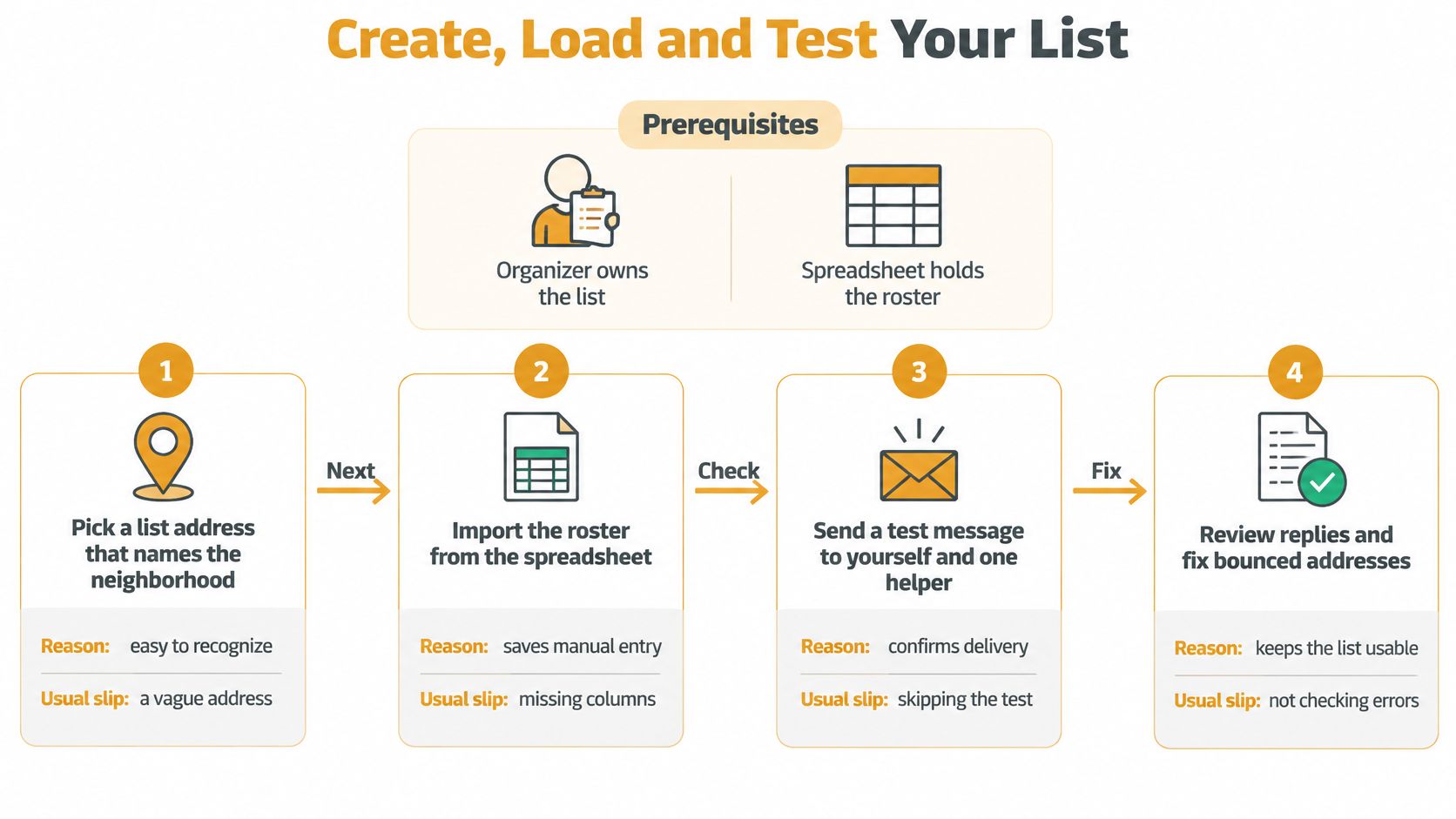
Start with a named organizer responsible for the list and a spreadsheet that serves as the canonical roster. Responsibility belongs to the organizer's role, not to an undocumented collection of contacts in their inbox.
Keep the spreadsheet somewhere authorized volunteers can access it. Don't circulate the complete roster to residents merely because everyone belongs to the same association.
Prepare the address and roster
-
Choose a recognizable list address. Use the neighborhood or association name, with a purpose such as notices if necessary. Check for a confusingly similar existing address before printing it on sign-up sheets.
-
Give each participating member a separate row. Include their name, street or unit, email address, consent status and membership status. Record how consent was collected instead of assuming an old contact list proves permission.
-
Clean the email column. Remove surrounding spaces, trailing commas, duplicates and obvious errors such as missing @ signs. Use consistent casing for comparison, but don't rewrite unfamiliar addresses based on guesswork.
-
Import only approved members. Export a clean copy rather than uploading a workbook containing unrelated resident information. Our Excel bulk-import guide explains the spreadsheet workflow.
If your chosen service supports adding members through CC, use that only for a small, controlled addition and inspect the addressing before sending. Don't confuse an enrollment command with permission to expose the entire roster.
Test before inviting residents
-
Add test accounts you control. Send an announcement and inspect the full recipient fields and message headers. Neither test recipient should see the other's personal address when private delivery is intended.
-
Reply from a receiving account. Confirm the message reaches the intended destination, whether that's the organizer or the discussion list. Check for an accidental personal CC chain.
-
Remove a test member. Record the change, send again and verify the removed account doesn't receive that message. A successful addition doesn't prove removal works.
-
Send the welcome message to organizers first. Check inbox placement, readable formatting and the leave instructions. Then enroll residents in manageable batches so errors can be corrected before they affect everyone.
At Listava, members don't create accounts and receive and reply to messages through their normal email. We offer a free account, with ownership limited to one active list at a time, so choose the initial neighborhood list deliberately.
Don't treat a successful send button as permission to launch. Test the recipient's experience.
Use this acceptance gate before the first resident announcement:
- Privacy passes: Personal recipient addresses stay hidden.
- Routing passes: Replies reach only the intended audience.
- Removal passes: The removed test account receives no subsequent message.
- Reconciliation passes: Active membership matches the approved spreadsheet, and organizers receive the welcome message correctly.
Keep the test results with the operating notes. The next volunteer should be able to repeat them without reconstructing your setup.
Keeping Replies Together Without Exposing Addresses
A BCC announcement can keep neighbors' addresses out of view, but it does not give them a shared place to discuss the message. If someone replies privately with a correction to a garbage-pickup notice, the rest of the street may never see it.
Set the reply contract
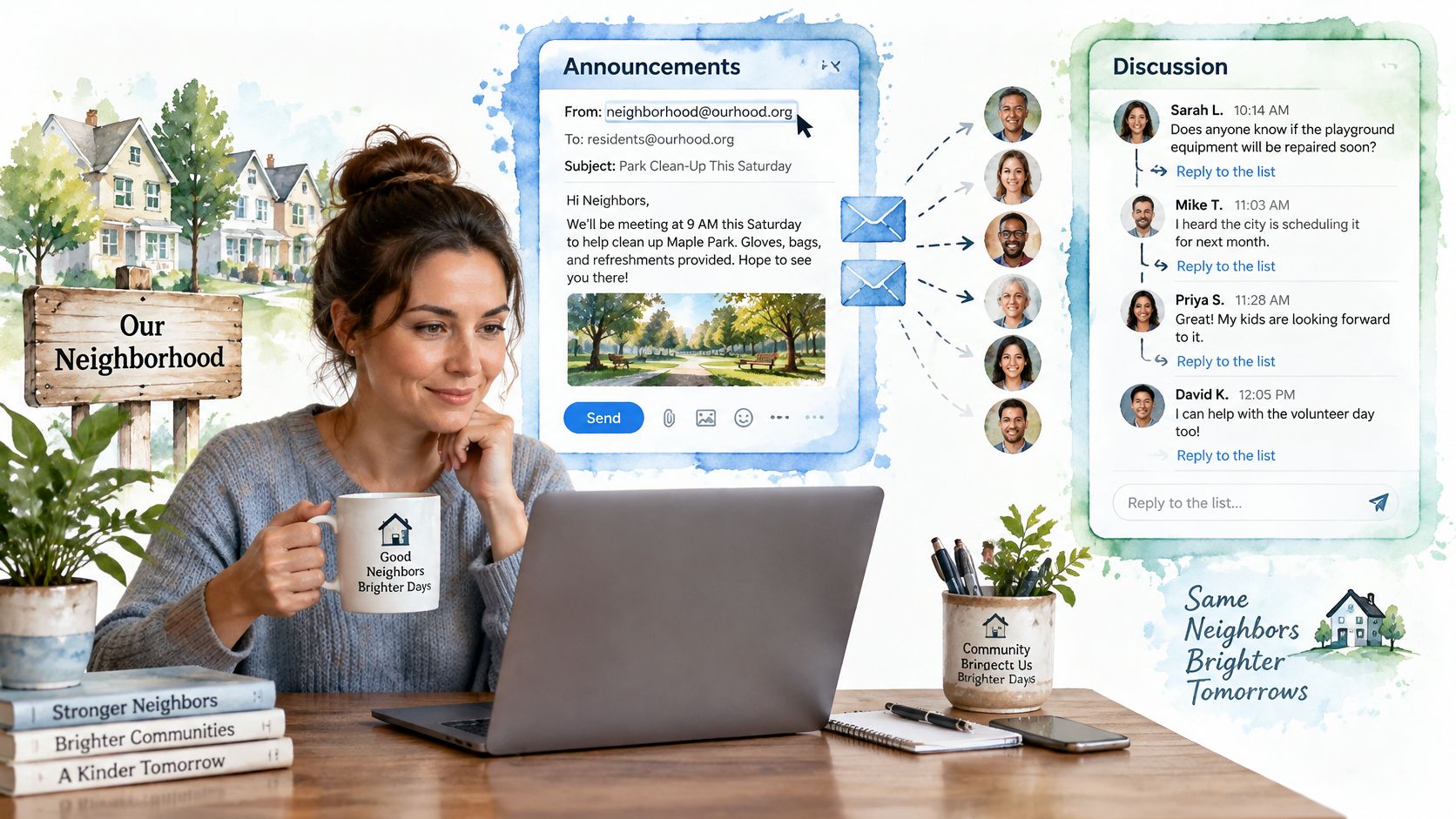
Decide whether each message is an announcement or an invitation to discuss. A water-maintenance notice might direct questions to the organizer. A discussion about a proposed community garden may need replies to reach all participating residents.
With a group email list, members send to one address, and the message goes to the group. Replies go back to the group too, so residents can follow the conversation without rebuilding a recipient list. See how to keep an email thread intact when replies belong in the existing conversation. Start a new subject when the topic changes, such as moving from the garden proposal to parking complaints.
Moderate behavior, not just membership
Set expectations in the welcome message. Explain which messages go to everyone and how residents can contact an organizer privately. A short purpose policy gives moderators a consistent way to redirect unrelated arguments; a brief reminder in routine updates can reinforce it.
Before forwarding an older message, check it for personal addresses, signatures, and information not intended for the new audience. Keep private-list discussions within the list rather than copying them into an exposed CC chain.
Repeated questions, private exchanges containing information the whole group needs, and removal requests sent to the street can signal unclear routing rules. Clarify who should receive each kind of message and what residents should do when they need help. That keeps the discussion useful without asking neighbors to rely on reply-all judgment alone.
Keeping Mail Arriving and the Roster Current
Delivery and roster benchmarks for a neighborhood list
| Metric | Target | Action if it slips | |---|---|---| | Spam complaint rate | Below the recommended complaint level cited below | Pause sending and review the last message | | Hard-bounce rate | No unresolved hard bounces carried into the next send | Correct or suppress failed addresses | | Median time to remove a member | Process requests promptly under a written organizer policy | Review outstanding requests and log completion | | Delivery success | All organizer test accounts receive the message correctly | Inspect headers and check spam placement |
Google's published guidance, summarized in Nonprofit Fundraising's InboxReady guide, recommends spam complaint rates below 0.1% and keeping them below 0.3%. Treat those as sender guidance, not a guarantee that a neighborhood announcement will reach every inbox.
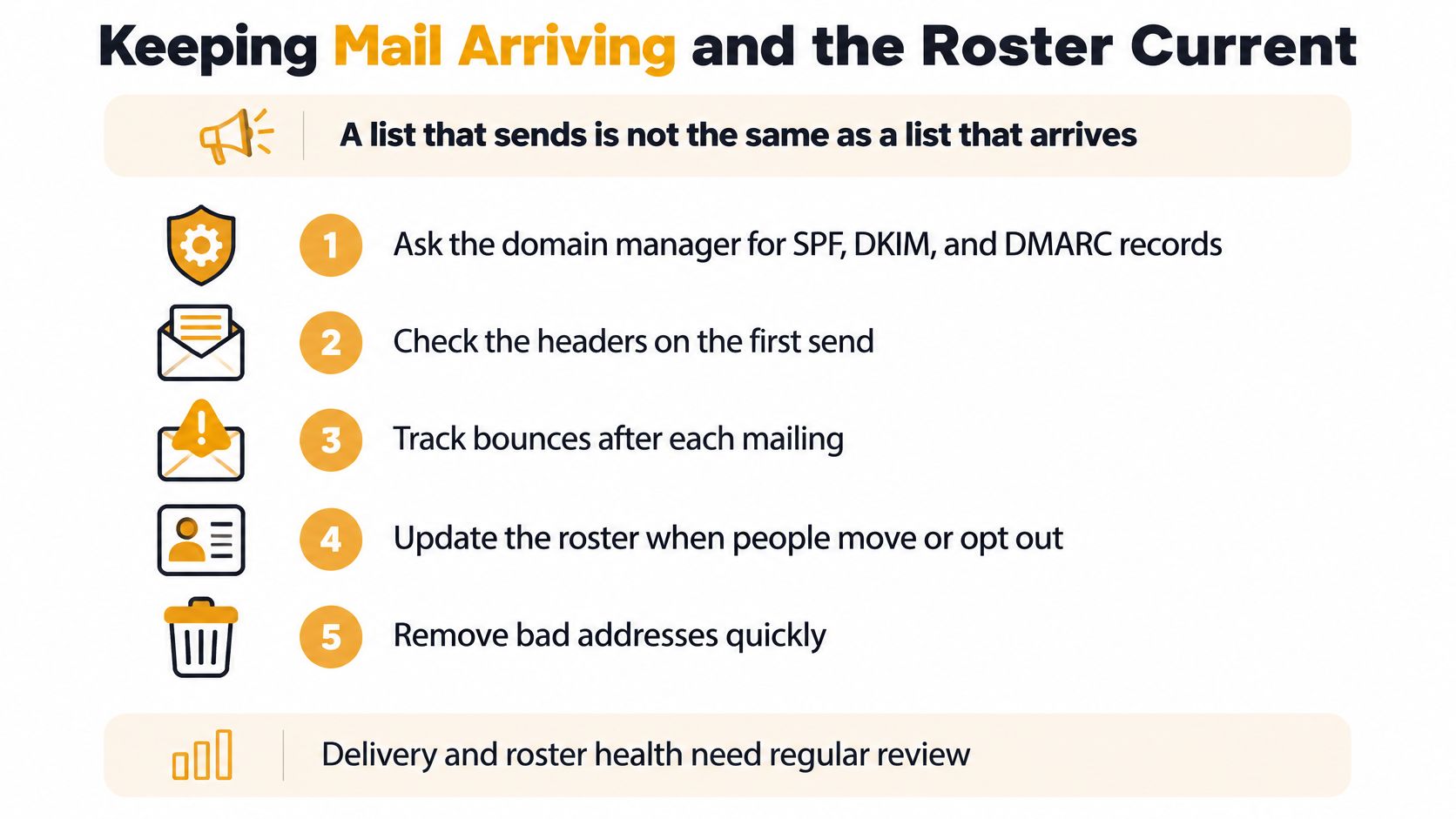
A list that sends isn't necessarily a list that arrives. Delivery reports can confirm acceptance by a receiving mail server without proving that a resident saw the message.
Investigate the cause, not just the count
For a custom sending domain, ask its administrator to configure SPF, DKIM and DMARC, then inspect authentication results in the first organizer test. If the service manages the sending domain, check the received headers rather than changing unrelated settings on the association's website.
Malformed spreadsheet entries cause address failures. Old memberships create unwanted mail. A personal mailbox used for unrelated correspondence makes it harder to separate association sending from the volunteer's other activity.
Ask affected residents to check spam and follow appropriate safe-sender instructions, but don't use that as a substitute for correcting authentication or unwanted sending.
Keep a repeatable maintenance routine
- After each mailing: Review hard bounces and complaint events.
- When someone leaves: Suppress future delivery, record the request and completion, and update the canonical roster.
- During the regular roster review: Compare active membership with consent records and investigate discrepancies.
I would set a removal deadline of the next business day as an internal service standard, not a legal claim. Test the leave mechanism before residents need it.
If a benchmark deteriorates, pause routine announcements, inspect the last message and resolve the roster problem before sending again.
Troubleshooting Common List Problems
Troubleshooting common neighborhood list problems
| Symptom | Likely cause | Fix | |---|---|---| | Announcements land in spam | Authentication failure or rising complaints | Check SPF, DKIM and DMARC, then review the last message | | A resident never got a message | Malformed, inactive or removed address | Inspect the roster entry and bounce notice before resending | | Replies go only to one person | Private reply or organizer-directed reply setting | Check the intended reply mode and restore the conversation appropriately | | Reply-all floods every inbox | Shared CC line used for discussion | Stop the CC exchange and use the controlled group address | | Former member still gets mail | Removal wasn't completed or an old list was reused | Suppress the address and inspect the change log | | Organizer leaves and nobody has access | No backup administrator | Use the provider's recovery process, then establish shared administration | | Residents cannot find how to leave | Instructions missing or untested | Test removal and add visible leave instructions |
Read delivery complaints from the sender outward. Check authentication first, then the member's active roster entry, then any bounce notice. Don't repeatedly resend the same message to an address that the receiving server has rejected.
For reply problems, inspect the actual reply destination before changing settings. A resident may have deliberately answered privately, and moving that answer to the group without permission can expose something personal.
Recovery principle: Fix the underlying setting or record before asking residents to try again.
The table identifies the immediate action; use the setup acceptance gate, reply rules, delivery routine or handover checklist for the complete procedure. Avoid making several undocumented changes at once, because you won't know which change solved the problem.
If several failures appear together, pause routine list traffic. Put a brief notice on the neighborhood's paper board and use the phone contacts for time-sensitive updates while an organizer reconciles membership against the sign-up records.
Don't use a broken list to send repeated apologies to the same uncertain recipients. Restore a known, tested configuration first.
Reaching Residents Who Are Not Online
An email-only list reaches people who read email. It doesn't automatically reach residents who struggle with screens, share a device or have unreliable internet access.
European figures reported by Eurostat's household and individual digital-economy statistics show that 26% of people reported difficulties using the internet in 2025. A familiar communication channel can still present an accessibility barrier.

Make essential notices available without a screen
Say an older resident doesn't check email and learns about a water shutoff only when a neighbor calls. The phone call isn't an informal extra. For that household, it's the working delivery method.
- Build a consent-based phone tree. Record preferred contact methods and assign a named block volunteer to residents who want calls. Restrict access to phone numbers just as you restrict email addresses.
- Maintain a paper notice point. Use an agreed mailbox-area board or another accessible location. Assign someone to post current notices and remove expired ones.
- Write a plain-text version. Put the action, affected location and timing first. Don't make an image, attachment or series of links the only way to understand an urgent announcement.
Reduce reading and phishing barriers
Use descriptive subjects, short paragraphs and readable text that residents can enlarge. If sending HTML email, choose strong contrast and avoid layouts that require horizontal scrolling.
Give residents a clear trust rule: association list messages won't ask for passwords or bank details. If payment matters must be discussed, direct residents to an independently established contact method rather than asking them to trust an unexpected payment link.
Add the phone tree, paper notice point and plain-text notice practice to the organizer's task list this month. Accessibility needs an assigned person and a repeatable action, not just a larger font.
Handing the List to the Next Organizer
Say a neighborhood book club's founder moves away. The incoming coordinator has the meeting calendar but discovers that membership changes and leave requests exist only in the founder's old inbox.
The problem isn't that the founder chose an inexpensive tool. It's that nobody separated personal correspondence from the group's operating records.
Communications is among the areas organizations may need to update in the Center for Effective Philanthropy's 2025 nonprofit technology survey. For a volunteer association, a useful update can be as practical as documenting access and proving that another organizer can send a message.
Make the handover an operational test
- Assign current and backup administrators. Use separate authorized access where the service supports it. Don't make shared personal passwords the succession plan.
- Store the roster and change log in a shared location. Name the owner of that folder and limit access to volunteers who need it.
- Preserve consent records. Keep the method of consent and membership changes alongside the roster, not buried in private correspondence.
- Update public-facing contact details. Change the organizer named in the welcome message, list description and printed sign-up information.
- Have the incoming organizer perform a test. They should send an announcement, inspect delivery and process a test membership change while the outgoing volunteer is still available.
The list should belong to the role, not the person holding it.
Check stored message history for unnecessary personal information before transferring access. Continuity doesn't require keeping every attachment or giving every future volunteer unrestricted access to residents' details.
Our list stays available when a board member moves away because it doesn't live in anyone's inbox. Pair that independence with documented authority and tested access, and the next organizer inherits a working neighborhood communication system rather than a recovery project.
Listava gives your neighborhood a shared email address with private member delivery and replies that return to the group, without requiring residents to create accounts or install an app. Visit Listava to set up your list, then use the privacy, reply and removal tests above before inviting the neighborhood.