Volunteer Communication: Channels and Practices That Work
Plan volunteer communication that reaches every member: pick channels, write clear emails, onboard newcomers and survive leadership changes.
You sent the schedule change on Tuesday. By Saturday, three volunteers show up at the old time, one never saw the message, and the person who ran the list last year is the only one who knows who's missing. The work isn't hard. Keeping everyone informed, without burying them, is.
That's the job of volunteer communication. It's not sending more announcements. It's building a small system that still works when you're busy, when a new person joins, and when you step down. One main channel, one fallback, predictable message types, and a record that doesn't live in your personal inbox will carry most unpaid groups further than any new app.
Table of Contents
- Choose the Right Channel for Each Volunteer
- How to Set Up One Group Address for Your Volunteers
- Message Types and Subject Lines Volunteers Can Filter
- Messages Tailored to Each Volunteer Role
- Welcoming New Volunteers in Their First Two Weeks
- Writing Inclusively for Unequal Access and Literacy
- Keeping Communication Steady Through Leadership Changes
- Confirm Your Channel Plan Before Your Next Announcement
Choose the Right Channel for Each Volunteer
Most groups don't fail because they picked the wrong channel. They fail because they picked four. A schedule goes by email, a reminder lands in a messaging app, someone texts a change, and no one knows which version is current.
I recommend one main channel and one fallback. For most groups, make the main channel a group email address. It reaches people through an inbox they already check, needs no app or account, and leaves a searchable record. Use SMS only for same-day urgent changes, and use a phone call or paper summary for anyone who can't reliably read digital messages.
That restraint matters for inclusion. The digital landscape review for volunteer management identifies limited internet access, differing digital literacy, financial constraints, and local-cultural factors as persistent barriers, and a 2025 comparative study of immigrant-support nonprofits in the United States and Japan found reluctance to adopt newer technologies. Adding channels can scatter information instead of widening access.
Volunteer Communication Channels Compared
| Channel | Reaches | Accessibility | Privacy | Best use | |---|---|---|---|---| | Group email address | Almost everyone with an inbox | Any email client, large fonts possible | Member addresses hidden | Routine updates and records | | Individual CC email | Everyone with an inbox | Easy to set up | All addresses exposed, reply-all risk | Fewer than ten people, one-off notices | | SMS text message | Nearly all phones | Short messages, no app needed | Organizer holds personal numbers | Urgent same-day changes | | Phone call | Everyone with a phone | Works for low literacy and low vision | Private one-to-one | Volunteers who cannot read digital messages | | Paper notice | Members at a shared site | Large print possible | Public if posted | Schedules posted at a physical location | | Messaging app group | Members who already use the app | Needs app and phone skills | Often shares phone numbers | Social groups already on the app |
If you use texts at all, keep them short, specific, and rare. Looking at political text message examples can help you see how concise mobilization messages put the action and time first, though volunteers need a calmer tone than campaigns do. Broader comparisons in this guide to group communication tools can help if you're weighing platforms.
Say a book club has two members who never open email. Don't move the whole club to another app for them. Keep email as the record, and call those two after each schedule change.
Coverage test: List every member and mark the channel they actually answer. Anyone with no working channel needs a named fallback before the next event.
How to Set Up One Group Address for Your Volunteers
Set this up once, test it properly, and you'll stop maintaining private CC lists in your head.
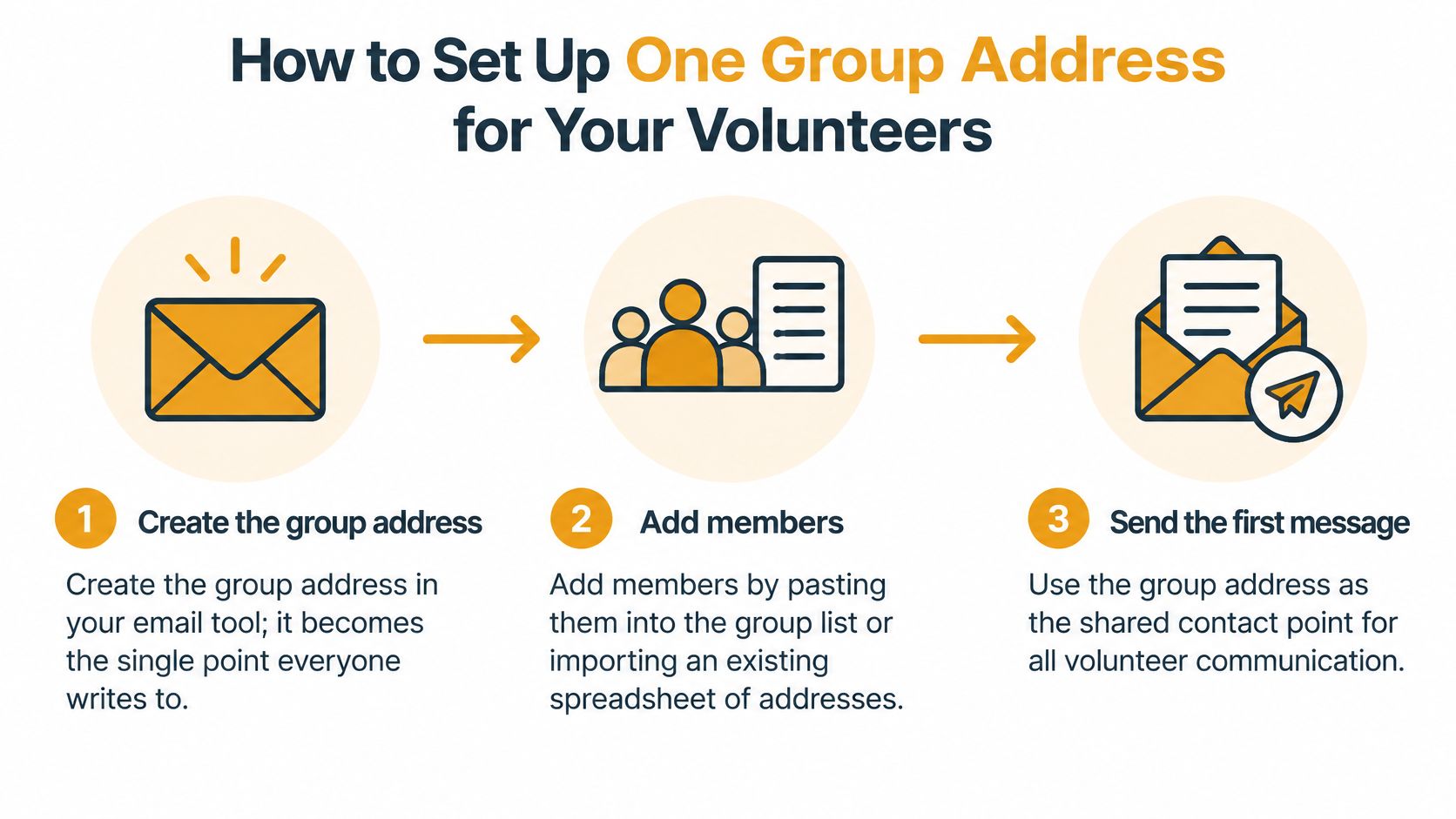
- Create the group address: Create it in your email tool so it becomes the single point everyone writes to. With us, creating a group takes about thirty seconds, and members are added by CC'ing them.
- Add members in bulk: Paste addresses into the group list or import an existing spreadsheet instead of retyping each one. Retyping causes typos that lead to dropped people. An existing member list can be imported from an Excel sheet in under 30 seconds.
- Send a test to the full list: Confirm each member receives it, including people on older phones and different email clients like Gmail, Outlook, or Yahoo. Fix bounces now, not on event day.
- Test replies: Ask three members to reply and check that replies go back to the group rather than to the sender alone. That's how decisions stay visible. Members of a group receive emails sent to the group's single address, and replies go back to the group.
- Set reply-to and privacy: Route conversation through the group address while member addresses stay hidden from one another. You keep shared context without exposing personal addresses.
- Check consent: Confirm each person agreed to receive group email and tell them how to leave. Don't add addresses from an old sign-in sheet on assumption.
The slip that breaks most setups is a list nobody can answer because replies land in one organizer's personal inbox. If only you see questions, only you can answer them, and the group loses the thread when you're away.
Message Types and Subject Lines Volunteers Can Filter
In a peer-reviewed survey of 696 nonprofit leaders, volunteer-communication practices statistically explained 63% of the perceived importance of volunteer retention during the COVID-19 pandemic. That's an association, not proof that messages alone keep people. It still justifies treating communication as an operating system, with trust-building and listening built in, rather than a stream of announcements.
The simplest operating system is five fixed message classes. Give each one a consistent subject prefix so volunteers can filter, search, and find last month's shift list in seconds.
Message Types, Prefixes and Timing
| Message type | Use it for | Subject prefix | Send when | Include | |---|---|---|---|---| | Urgent notice | Cancellations, safety issues, venue changes | [URGENT] | As soon as known, with a phone call to anyone unreachable | What changed, what to do now, who to call | | Routine update | Schedules, reminders, news | [UPDATE] | One fixed weekly or monthly slot | Dates first, one link, one action | | Task request | Shift and job sign-ups | [ACTION NEEDED] | Two weeks before the shift or deadline | Task, time, place, deadline, contact | | Feedback request | Surveys and questions | [FEEDBACK] | Quarterly or after each event | One question, reply deadline, reply route | | Thanks and recognition | Appreciation after events | [THANKS] | Within a week of the event | Named contribution, no request attached |
After the prefix, write the specific subject, not a vague label. "[UPDATE] Saturday food distribution moved to 9 a.m." beats "[UPDATE] News." If you need inspiration for clear, scannable wording, collections of the best internal newsletter subject lines show how much information a short subject can carry.
Every substantive message should state the change or task, the responsible person, the deadline or time, the location or link, and one contact. Keep routine updates to one fixed slot so people learn when to look. Send urgent notices as soon as the change is known, and don't dilute [URGENT] by using it for ordinary reminders.
Thank-you messages deserve their own class because they ask for nothing. Name the contribution, send it within a week, and stop. When every thanks carries a new request, volunteers learn to read appreciation as another task.
Messages Tailored to Each Volunteer Role
One message to everyone is the fastest way to train people to ignore the list. If helpers receive committee debates and board members receive every shift swap, relevance drops and important notices get buried with the rest.
Tailor by role. You don't need separate platforms for this. You need discipline about who gets what, and just as much discipline about what you leave out.
- New volunteers: Send a welcome, their first task, and a named contact. Leave out history, full minutes, and open-ended background for their first month. Too much context at once makes a simple first shift feel complicated.
- Shift leads: Send the roster, changes to their specific shift, and a direct line to the organizer a few days before each event. Leave out general news they can't act on. They need names, gaps, and who to call if someone doesn't arrive.
- Committee chairs: Send decision summaries, deadlines, and open actions weekly or after each meeting. Include the owner for each action. Leave out raw discussion threads once a decision's made, or chairs waste time reconstructing what was settled.
- Event-day helpers: Send one reminder the day before with start time, meeting point, what to bring, and the phone number of the person in charge. Leave out meeting minutes and planning debates. Helpers who only serve on the day need logistics, not governance.
- Records keepers and treasurers: Send dated copies of decisions, approvals, and receipts to file in the group archive. Keep these out of personal folders and personal inboxes. If the only copy lives with one person, the record disappears when that person leaves.
- Board members: Send a monthly digest covering decisions, risks, money, and items needing approval. Don't copy them on every thread. Board members who receive everything eventually read nothing closely.
A useful test before sending is simple. If the recipient can't act on it, decide it, or file it, they probably don't need it.
For small groups, role tailoring can be as light as two lists, one for everyone and one for leads. The point isn't segmentation for its own sake. It's protecting attention, which is the scarcest resource volunteers give you.
Welcoming New Volunteers in Their First Two Weeks
A new volunteer decides quickly whether your group is organized and whether asking a question is safe. Four short touchpoints in the first two weeks answer both points without overwhelming them.
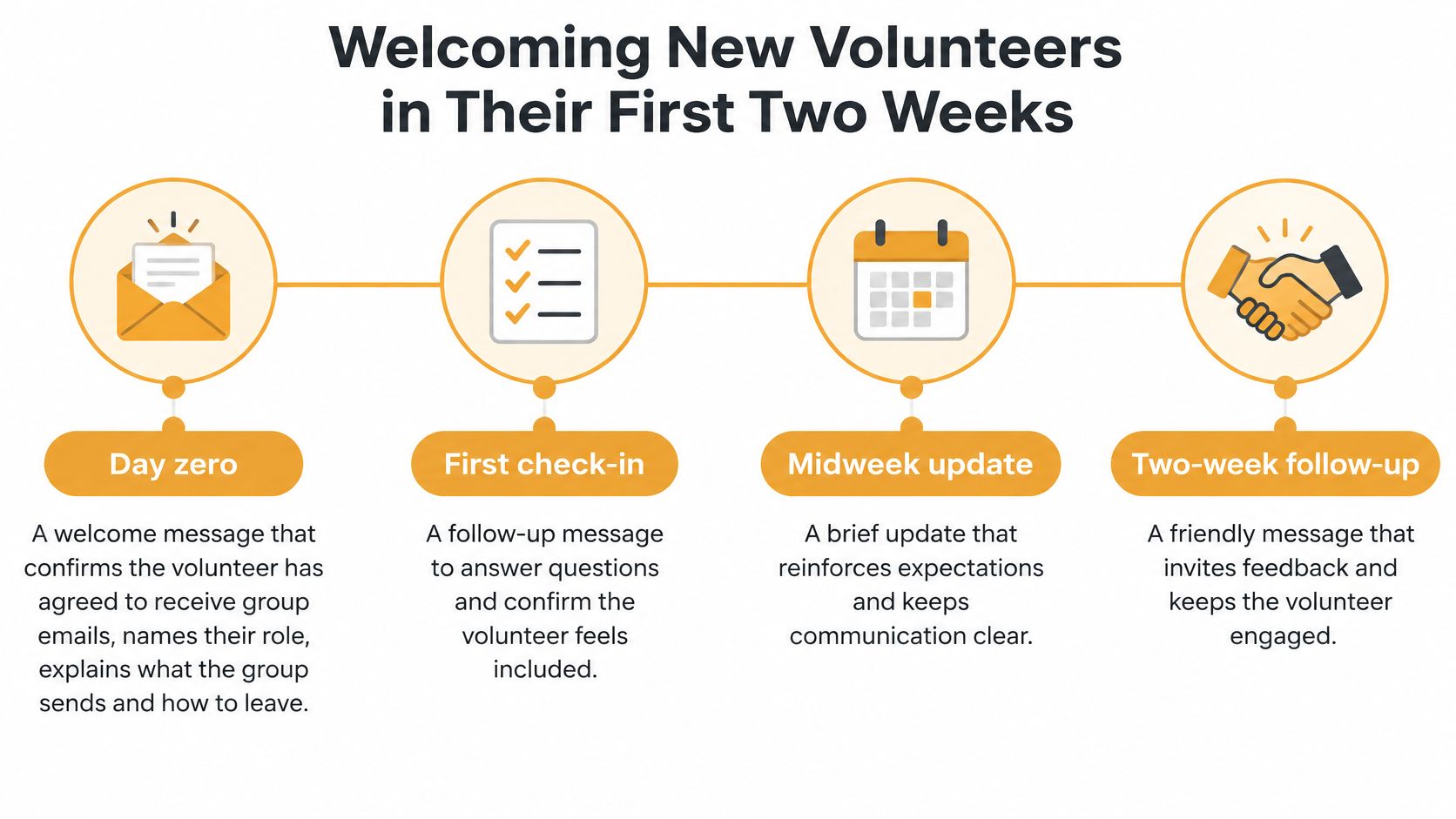
Day zero is the welcome. Confirm the volunteer has agreed to receive group emails, name their role, explain what the group sends and how to leave, and give one contact. With us, all recipients must have explicitly consented to receive emails sent through Listava, and that consent check belongs before the first announcement, not after a complaint.
Day two brings the first task. Keep it to a single action with a clear deadline, location or link, and escalation contact. A small, completed task builds confidence faster than a long orientation document nobody finishes.
Day seven is a buddy check-in. A member who already knows the group asks whether the task made sense and what was unclear. This catches problems while they're still small. Say a neighborhood volunteer joins a paint-day list and never hears back. She isn't sure about the start time, doesn't want to bother anyone, and stays home. A day-seven message would've caught that confusion with one question.
Day fourteen asks for feedback explicitly. One question is enough, such as what was confusing or what they'd change, with a clear reply route and deadline. Our guide to new member onboarding covers the wider welcome sequence, and this overview of how coordinators handle project changes is useful when a new volunteer's first task shifts midstream.
There's a reason to design these steps deliberately. In research on more than 250 volunteers using structural-equation modeling, organizational communication was linked to perceived barriers, job satisfaction, organizational commitment, and intentions to remain and recruit others. Good early messages make obstacles feel manageable, which supports satisfaction and commitment.
Keep full threads available so late joiners can reconstruct decisions, and hide addresses by default for privacy-sensitive groups. Nobody gets added before consent is given. That rule protects trust from the first message.
Writing Inclusively for Unequal Access and Literacy
Inclusion isn't only a channel choice. A message can arrive successfully and still exclude someone because it's long, jargon-heavy, hard to read on a small screen, or locked inside a new app they can't use.
Treat plain writing as access work. Most fixes below take minutes and help every reader, not only those with a stated need.
A Checklist You Can Apply This Week
- Put the key line first: Lead with date, time, place, and action. Put the date and action in the subject line too, so people scanning an inbox get the essentials without opening the message.
- Use short sentences: Keep one action per message where you can. Avoid jargon and abbreviations, or explain them the first time. Plain language helps readers with low literacy and readers using another language.
- Make text readable: Use large fonts and high-contrast layouts so members with low vision can read without zooming. Our email accessibility guidelines give practical formatting detail for organizers.
- Stay in the inbox: Don't add a new app for routine updates. New apps exclude people with older phones, limited data, low storage, or low confidence with technology. Email works across the clients members already have.
- Offer a real fallback: Give anyone who can't participate digitally a phone call or a printed summary at a shared location. Write a short call script covering date, place, change, and contact so any volunteer can make that call consistently.
- Translate the key facts: When members read another language, translate at least the date, place, action, and contact. A short translated block at the top is better than a perfect translation that arrives late.
- Ask once and record it: Ask each member which format works for them and note the answer on the member list. The next organizer shouldn't have to guess who needs large print, a call, or a translated summary.
Don't assume age predicts preference. Some older volunteers manage email confidently, and some younger volunteers have unreliable data or shared devices. Ask the person, record the answer, and honor it. That's more equitable than adding another channel and hoping everyone migrates.
Keeping Communication Steady Through Leadership Changes
A longtime coordinator moves away. Her replacement inherits a personal inbox full of threads, a spreadsheet of addresses last updated two summers ago, and no record of which decisions were final. The group spends a month reconstructing what she carried in her head, and a few members drift away while it does.
Groups rarely collapse because one announcement failed. They unravel at the handoff, when the member list, the history, and the unwritten routines leave with the person who held them. Groups that adopt clear communication protocols, regular feedback, action items, and recognition tend to keep volunteers longer than groups that rely on message volume. Sending more email cannot replace a system a successor can pick up cold.
A Lightweight Operating System
- Keep the address independent: Route everything through one group address that no individual owns. The list stays available when a board member moves away because it does not live in anyone's inbox, so a successor never has to rebuild it from an outdated spreadsheet.
- Keep a decision log: After each meeting or thread, record date, decision, owner, and deadline in the group archive. A short log stops settled questions from being reopened and lets a replacement see what is open without reading months of replies.
- Set reply norms: Reply to the whole group only when the answer helps everyone. Take personal scheduling, corrections, and side questions one-to-one. Shared decisions stay visible while reply-all cascades stay rare.
- Use a transition checklist: Before anyone steps down, transfer list access, open tasks, archive access, saved templates, and fallback contacts. Walk through it together while the outgoing organizer is still reachable, because access gaps discovered after departure can stall a group for weeks.
- Audit twice a year: Remove bounced addresses, confirm every member still consents, update roles, and check fallback preferences. A stale list creates false confidence: messages look sent while several members never receive them.
Volume isn't quality: Excessive reminders burn volunteers out, and too little visible discussion makes them feel excluded. Aim for predictable, searchable communication with clear ownership.
Write the routines down where the next organizer will find them: one page attached to the archive covering subject prefixes, the fixed update slot, who can send urgent notices, and who makes fallback calls. The goal is a group that communicates the same way in month thirteen under a new coordinator as it did in month one. Continuity is a filing and access habit, and a group either builds it before the handoff or learns its cost during one.
Confirm Your Channel Plan Before Your Next Announcement
Before you send anything else, make three moves. They'll take less time than untangling one missed schedule change.
- Pick the main channel and fallback: Use the channel comparison to choose one main channel for routine updates and name one fallback for anyone who can't use it. Write both down, assign who makes fallback calls, and check every member against the plan.
- Set up and test the group address: Follow the setup steps, import members carefully, test replies, and confirm every member has consented and knows how to leave. Don't announce the new address until three members have successfully replied to the group.
- Write five templates: Draft one template for each message type with its subject prefix, required fields, and contact line. Save them in the shared archive so any organizer sends a consistent message, even under time pressure.
Add two calendar reminders now, one for a member-list audit twice a year and one prompt to complete a role-transition checklist before anyone steps down. If you'd like to see the setup before committing, prospective users can schedule a demo of Listava.
Be honest about scale. A spreadsheet and a careful CC line are enough for a stable group of ten. The full system matters most once the group grows, roles multiply, or the organizer changes, which is exactly when informal habits break.
If you're coordinating volunteers through scattered CCs and a list that lives in one inbox, Listava gives your group one shared email address that reaches every member, keeps replies in the group, and hides personal addresses without requiring apps or accounts. Set up your group address, test it with three members, and send your next update through a system that will still work when leadership changes.