Email Alias vs Distribution List: Which Fits
Compare email alias vs distribution list on replies, privacy, and who owns the group when a volunteer leaves.
The pool-gate note is still landing. A neighbor pasted the block into CC, someone hit Reply All with thanks, someone else complained about the latch, and a third person told everyone to stop writing. Your inbox is the meeting, and you didn't call it.
That pile-up is the everyday version of email alias vs distribution list. The first send is the easy part. What lasts is who owns the replies, whose addresses stay hidden, and whether the address still works after the volunteer who set it up moves away.
If the spreadsheet is on your laptop, pick the address for the job you have this month, not for a system you will never maintain.
Table of Contents
- Why Alias and List Get Mixed Up
- Alias and Distribution List Side by Side
- How Replies and Address Privacy Differ
- How Setup and Membership Work Day to Day
- Which Groups Should Use Which Address
- What Happens When the Organizer Leaves
- Pick the Address That Survives the Year
Why Alias and List Get Mixed Up
The labels on the setup screen cause the mix-up. One product calls treasurer@ an alias. Another uses that same word for a forward that reaches every household on the block.
An email alias is a second name for one mailbox. Mail to treasurer@ lands in one inbox, and a reply comes back to that person. A distribution list is one address that expands to many members.
Some tools call a one-to-many forwarder an alias anyway. Several recipients still mean multiple deliveries, separate bounces, and a membership somebody has to maintain. I would not pick the tool by the label on the button. I would ask who still owns the replies, whose addresses stay private, and whether the address keeps working after the volunteer who set it up moves away.
An alias answers which other address reaches this one destination. A list answers which collection of people receives the message.
Many organizations still rely on direct email, according to Exclaimer's State of Business Email 2025 report. A board does the same with a neighborhood note: people answer whoever is already in the header. Call the forward an alias, and that header behavior is easy to miss until someone leaves and the address leaves with them.
Alias and Distribution List Side by Side
Treat the Best fit row as the first cut, then check whether replies, privacy, and ownership match the week you have.
| Criterion | Email alias | Distribution list | | --- | --- | --- | | What the address does | Alternate name for one mailbox | One address expanded to many recipients | | Everyday example | treasurer@ to one person's inbox | neighbors@ to every current member | | Where a reply goes | Back to the sender or that single mailbox | Often back to the list, so the group sees it | | Who sees personal addresses | No member list exists | A private list can hide member addresses | | Changing who receives mail | Repoint the forward to a new person | Add, remove, or audit members | | If the owner leaves | Mail follows that person's inbox | Address can stay with the group if it is not stored in one inbox | | Best fit | One accountable person in a role | Ongoing announcements or discussion for many people |
One name or many inboxes
An alias gives one role a route into one mailbox. Vendors write to treasurer@ and Pat answers from the inbox Pat already uses. A list takes neighbors@ and expands it to every current member, so the same gate note doesn't depend on a fresh paste from a spreadsheet.
Internet mail architecture treats an alias as a forwarding address for one mailbox, assigned to only one user, while a mailing list is a recipient set. That same architecture documents that mailing lists commonly put their own address in the Reply-To header, so responses return to the group rather than only to the person who hit send.
What the quiet rows change
Privacy isn't a mood. An alias has no member list to leak. A private list can show the group address instead of personal ones, which matters when newcomers shouldn't collect the block's emails from a header.
Changing recipients is a different chore. An alias means repointing one forward. A list means adding, removing, and auditing members, or last year's renter still gets the gate code.
Ownership is the row people skip. An alias lives inside one mailbox, so it leaves when that person does. A list should name an administrator and should not sit inside one personal inbox.
A forwarder aimed at several people is the edge case under the table. The Internet Mail Architecture notes that for multiple-recipient delivery, delivery-status parameters may not be propagated identically to every recipient. You can't treat that group address as one mailbox when a bounce comes back. If more than one person must receive the note, call it a list and manage it like one. Replies are the next place that choice shows up.
How Replies and Address Privacy Differ
Send the same pool-gate note four ways and watch two things only. Where does a reply go, and whose address can a neighbor see?
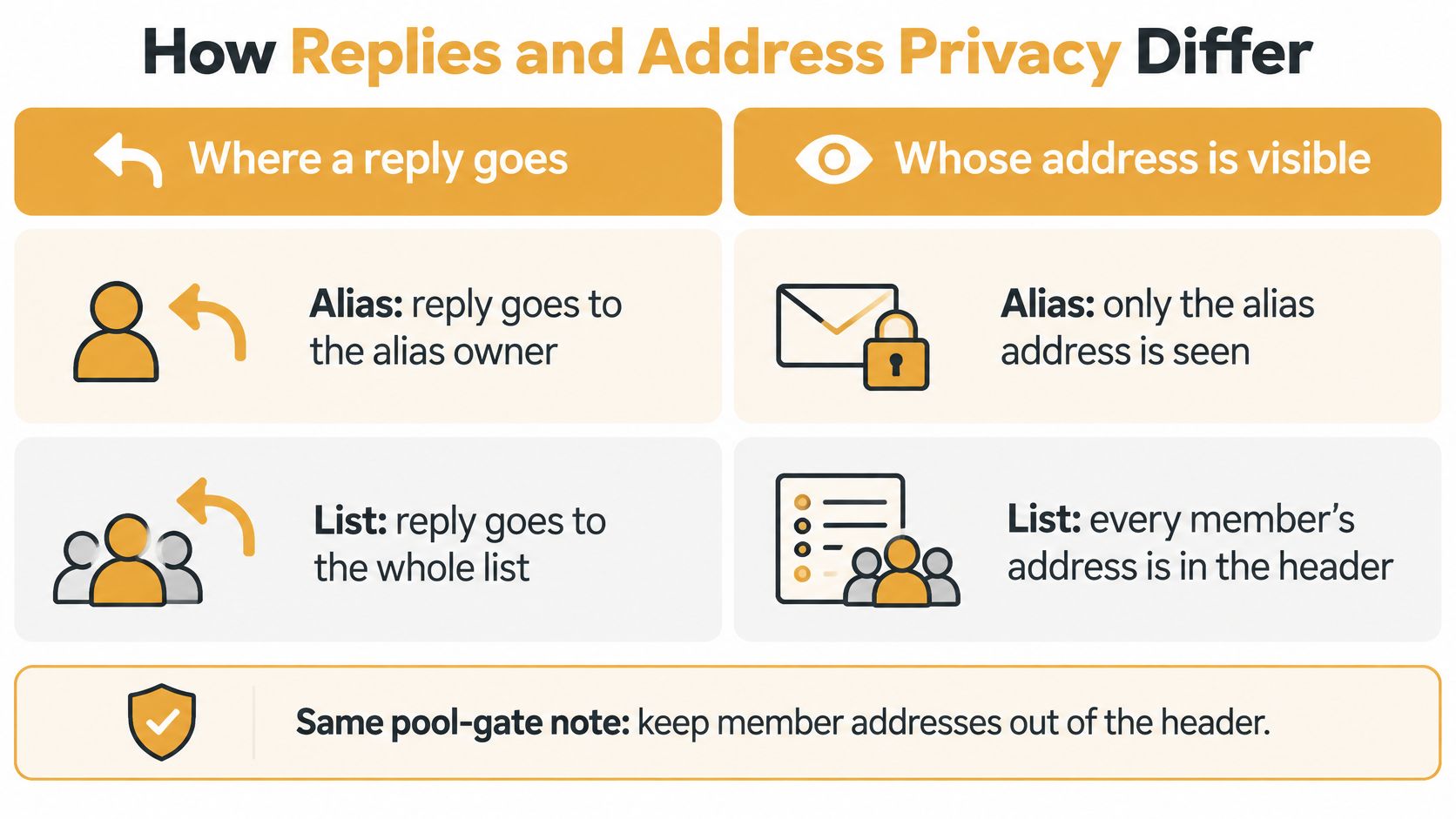
Four paths for one note
CC puts every address in the header. Reply All reaches the whole neighborhood. Any one neighbor can copy the list into the next complaint, the next fundraiser, or a note you never approved. A visible thread and exposed addresses arrive together. That pattern is the start of a Reply All storm.
BCC hides the addresses and breaks the thread. Replies go only to you. A newcomer is easy to drop on the water-shutoff notice, and nobody can see who was supposed to get it. You become the switchboard for every "did everyone get this?"
An alias creates no group conversation. One mailbox receives the note and answers it. That's the right shape for a vendor asking where to send an invoice. It's the wrong shape when twenty households need the same correction.
A distribution list can set the shared address as the reply destination. Responses reach current members, and a private list shows that shared address instead of personal ones. Members receive mail sent to the group's single address, and replies go back to the group. On Listava, members' emails are never shared or sold, and nobody installs an app to stay in the thread.
CC and BCC usually force a choice between a visible conversation and hidden addresses. A list can keep both.
Two limits worth setting early
An announcement list should limit who may post. One open reply becomes the same pile-up you got from CC, only now it looks official.
A discussion list should expect reply volume. Make leaving obvious, in the message people already know how to read, so a neighbor who sold the house isn't still on the thread in March.
The test is small. A member can reply, leave, and still not expose anyone else's address.
How Setup and Membership Work Day to Day
The first afternoon is easy to confuse with the next two years. An alias is a forward. A list is a membership you keep editing after the thank-you notes stop.
An alias is one forward
Create treasurer@, point it at Pat, and tell vendors the new address. Pat reads it in the same inbox as everything else. When the role ends, someone must repoint that forward, or invoices keep arriving in Pat's personal mail after Pat has moved.
There is no member list, no add request, and no shared reply. That's the point, and it's also the trap if you later need the whole board on the same note.
A list is membership, not a nickname
RFC 2142, published in May 1997, established that a mailing list with a submission address such as LIST@DOMAIN must also provide a matching administrative address, LIST-REQUEST@DOMAIN, for add, drop, and other list-management requests. The standard separates the list's identity from whatever software runs it. You don't need a dashboard lecture to use that idea. The group needs a place to send the note and a clear way to join or leave.
Create one group address. Add people by CC, or import the spreadsheet you already maintain. An existing member list can be imported from an Excel sheet in under 30 seconds, and creating a group takes about thirty seconds when members are added by CC. People read and reply from Gmail, Outlook, Yahoo, or Hotmail. They don't create an account, and they don't learn a new login.
Scale is why the extra object is worth it. Microsoft's SMTP submission guidance documents authenticated submission limits of 30 messages per minute and 10,000 recipients per day, and notes that sending to a distribution list instead of individual recipients can avoid throttling. Those ceilings aren't universal, so check your own provider before a large announcement. If the send is a tournament field rather than a block of neighbors, Live Tourney's advice on tournament emails is a practical companion on bulk mail that still has to arrive.
Send a test note to two people before you import the full group. Fix the reply path and the sender name while the audience is still you and a friend. A clear new member onboarding note, with how to reply and how to leave, saves you from answering that question forty times.
Which Groups Should Use Which Address
An HOA week has two jobs that don't belong on one address. Vendors need a person. Neighbors need a notice that doesn't hand strangers a contact list.

The treasurer answers the gardener, the insurance bill, and the one resident who wants a receipt. treasurer@ as an alias fits, because one person pays and one person should reply. residents@ as a list fits the gate notice, because neighbors won't share personal addresses with newcomers and the board turns over every spring.
A book club or car club under about twenty people is different. If they discuss the next meeting by email, use a list so replies stay together and a new member isn't handed a chain of old CC headers. If everyone already knows the addresses, accepts seeing them, and the thread dies after one date change, CC is honest and enough. Don't build a membership object for a conversation that ends Thursday.
Inboxes people already trust
A congregation mixes people who live on a phone with people who trust only webmail, larger type, and a password they already remember. OECD data on digital skills reported internet use of 81% among people aged 55–74 across OECD countries in 2022, versus 98% among ages 16–24, and treats learning email, navigating the internet, and recognizing phishing as distinct challenges rather than one skill level. Judge the address by whether someone can join, reply, and leave from the inbox they have. A new app password fails that test even when the feature list looks generous.
A family coordinator keeping 28 relatives updated fails with an alias. Siblings all need the same reunion note, a few share a device, and one person's inbox can't be the family record. A list matches the shared note. A one-weekend park cleanup does not. Use an alias for the lead who is taking tool questions. Use a list only if that same crew will meet again.
One accountable mailbox means an alias. Many people who must see the same thread means a list.
A short video helps a board that would rather watch the habit than read another policy page.
What Happens When the Organizer Leaves
The board president started the list, then moved. The spreadsheet is in a personal inbox nobody else can open. Gate codes and meeting notes still go out, but only if someone guesses the password.
An alias is generally a routing rule. If that mailbox goes, the address goes with it. A distribution list is a membership object with posting, moderation, and access rules. Those controls reduce risk only when someone uses them.
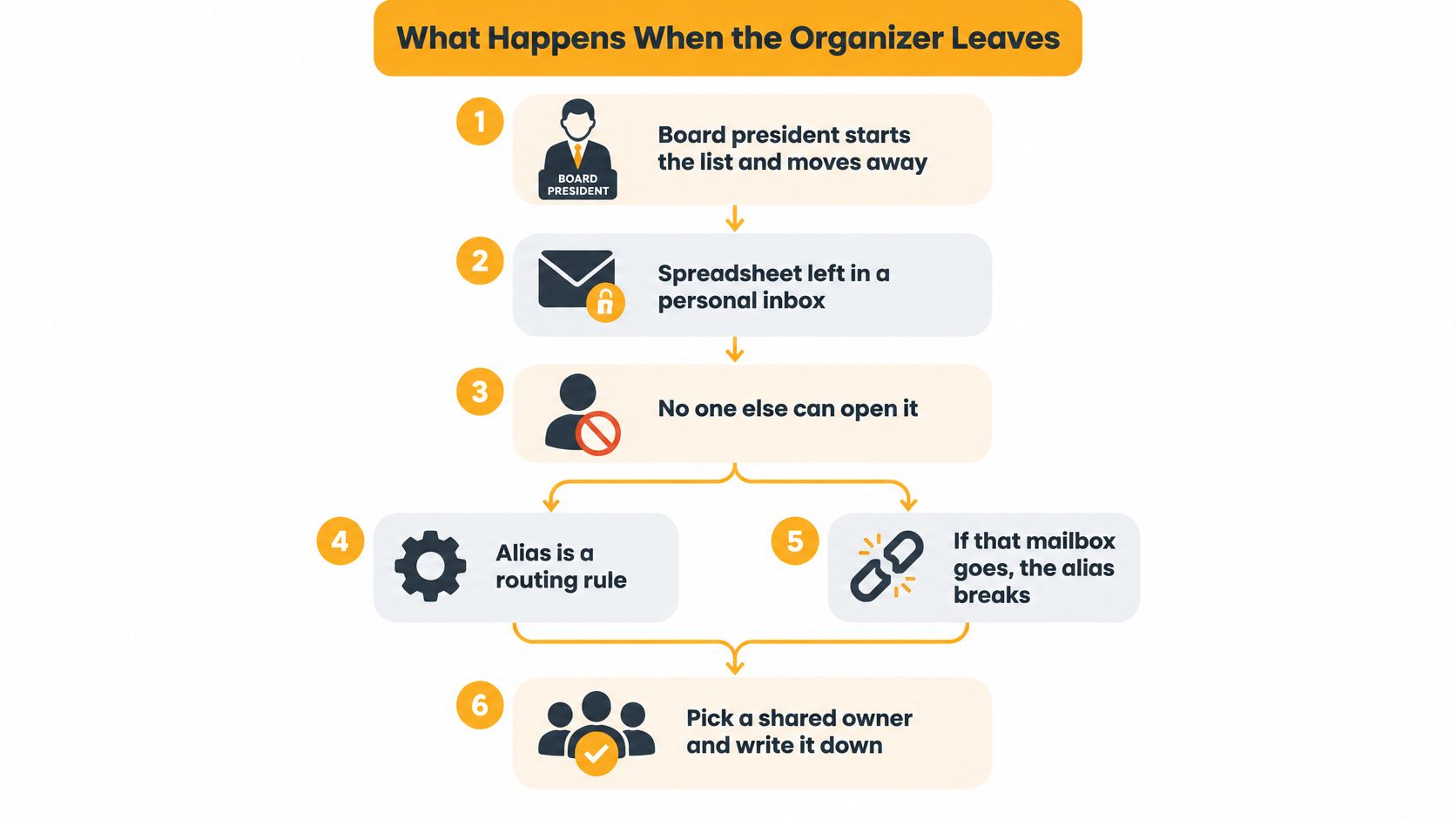
Stale members still receive gate codes after they sell, resign, or stop volunteering. A practical guide to email aliases warns that stale memberships can expose information to people who should no longer receive it, and recommends recurring audits of ownership, membership, external access, and moderation. That warning fits HOAs, clubs, congregations, and family groups, where the roster changes faster than anyone's patience for admin.
- Name a backup owner before the first real send. Two people should know the login path, not one president.
- Keep the group address out of any one person's inbox. On Listava, the list stays available when a board member moves away because it does not live in anyone's inbox.
- Write down who may post. Announcements and open discussion are different jobs.
- Remove people when they leave the group. Do it the week they leave, not at the annual meeting.
- Review ownership and membership a few times a year. A calendar note in March and September is enough for most volunteer groups.
List controls look stronger than an alias on paper. An unaudited enterprise list can be riskier for an HOA than a simple private list with a clear handoff.
Handoffs fail when the next step lives in someone's head. Managing team tasks without follow-ups is a useful parallel for writing down who owns the list, the same way you'd write down who owns a chore. Pair that note with a short guide to volunteer communication so the backup isn't guessing how replies should behave.
This audit isn't the same job as adding a neighbor on Tuesday. The question is whether the group still has a working address next year, not whether today's message sent.
Pick the Address That Survives the Year
Match this month's job. A perfect system that nobody will update is how the spreadsheet ends up locked in a personal inbox again.
| Situation | Choose | Why | | --- | --- | --- | | One person answers a role | Email alias | Mail should land in a single accountable inbox | | The whole group must see replies | Distribution list | Replies stay on the shared address | | Personal addresses must stay hidden | Private distribution list | Members see the group address, not each other | | Tiny thread that ends this month | CC or BCC | Everyone already knows the addresses | | Leaders will change this year | List outside one inbox | The address survives when a volunteer leaves | | People already use another group | Keep Google Groups or Facebook | A new address will not get read |
If one person must receive and answer, create an alias and write down who watches it. If the whole group must reply without a Reply All cascade, and personal addresses must stay hidden, use a private distribution list. If the group is tiny, everyone already has the addresses, and the thread will be over within a month, CC or BCC is enough. We say the same when Google Groups or a Facebook group is already where people read. A new address won't get opened.
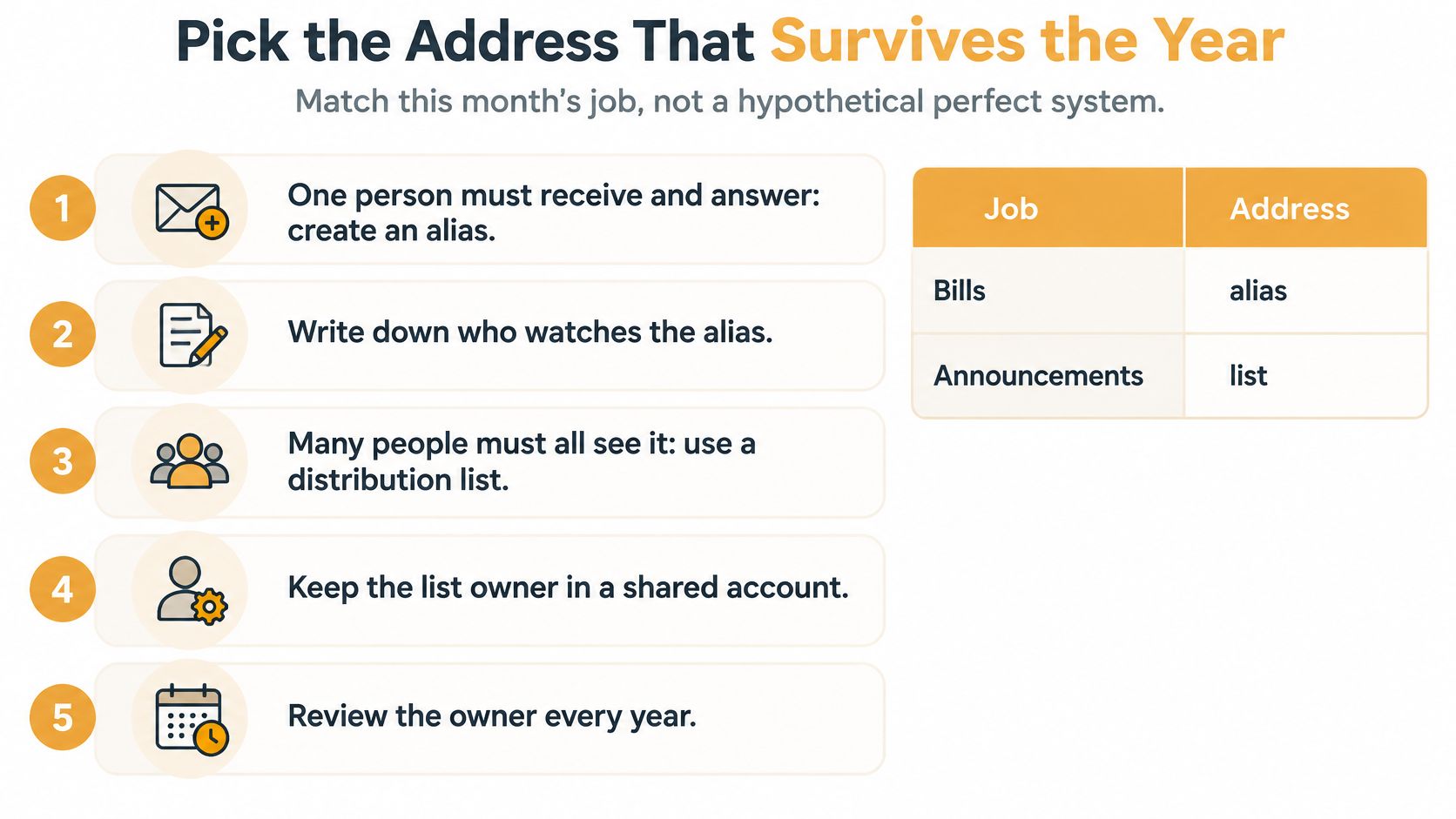
If officers or family coordinators change this year, keep the list out of one personal inbox. I would start with the cheapest fix that still has a named owner. For a non-technical organizer who needs one shared address, members who stay in their normal inbox, and no new app, Listava is a natural fit. Listava offers a free account, and free users can own only one active list at a time.
Do three things before you import anyone.
- Pick the table row that matches this month, not next year's fantasy workflow.
- Name the owner and a backup in a note both of them can open.
- Send one test message to two people before the spreadsheet goes in.
Listava gives a neighborhood, club, congregation, or family one shared email address that reaches members in the inbox they already use, with group replies and personal addresses kept off the header. If you're finished pasting the block into CC, and you need the address to survive the next board change, start with a single list and a test note to two people. Visit Listava when you're ready to put the group on an address that isn't locked inside one volunteer's mail.