Product Announcement Emails: 7 Examples to Adapt
Write product announcement emails that drive clicks with seven annotated examples covering subject lines, openings, and CTAs for community audiences.
You're the volunteer organizer with an announcement to send to fifty people. Say half the group reads email on a decade-old client with images blocked. The new booking tool is ready, the committee wants a polished launch, and someone has suggested an attachment called FINAL-final.
You need members to understand what's new and do something useful. You don't need a miniature advertising campaign.
Good product announcement emails borrow from marketing without inheriting all its machinery. These seven formats are templates to adapt, not case studies to admire. Each includes a subject-line pattern, an opening move, and a single call to action, with notes on what survives an ordinary community inbox.
You can borrow enthusiasm from Kickstarter campaign email templates. Leave behind the countdown theatrics unless there's an actual deadline. Your neighbors already have enough things blinking at them.
Table of Contents
- 1. Plain-Text Personal Announcement
- 2. Hero-Image Product Launch Announcement
- 3. What's New Changelog Digest
- 4. Waitlist or Early-Access Invitation
- 5. Launch-Day Community Announcement
- 6. Step-by-Step How-To Announcement
- 7. Change Notice and Transition Announcement
- The 7 announcement formats at a glance
- Pick One Format and Send It
1. Plain-Text Personal Announcement
For a routine improvement, a recognizable sender beats elaborate artwork. Think of an HOA treasurer announcing a new payment option, not a brand unveiling its next flagship device.
Start with the change, explain the practical benefit, and stop before you reach the committee's entire decision history.
Subject pattern: New payment option for neighborhood dues
Opening move: You can now pay neighborhood dues online instead of dropping off a check. Checks are still welcome if you prefer them.
Single action: Reply to the treasurer if you'd like the payment instructions.
This version deliberately chooses a reply over a link. That works when members need reassurance or individual help. If instructions are already available, make opening those instructions the action instead. Don't ask readers to visit a page, complete a form, and reply with confirmation.
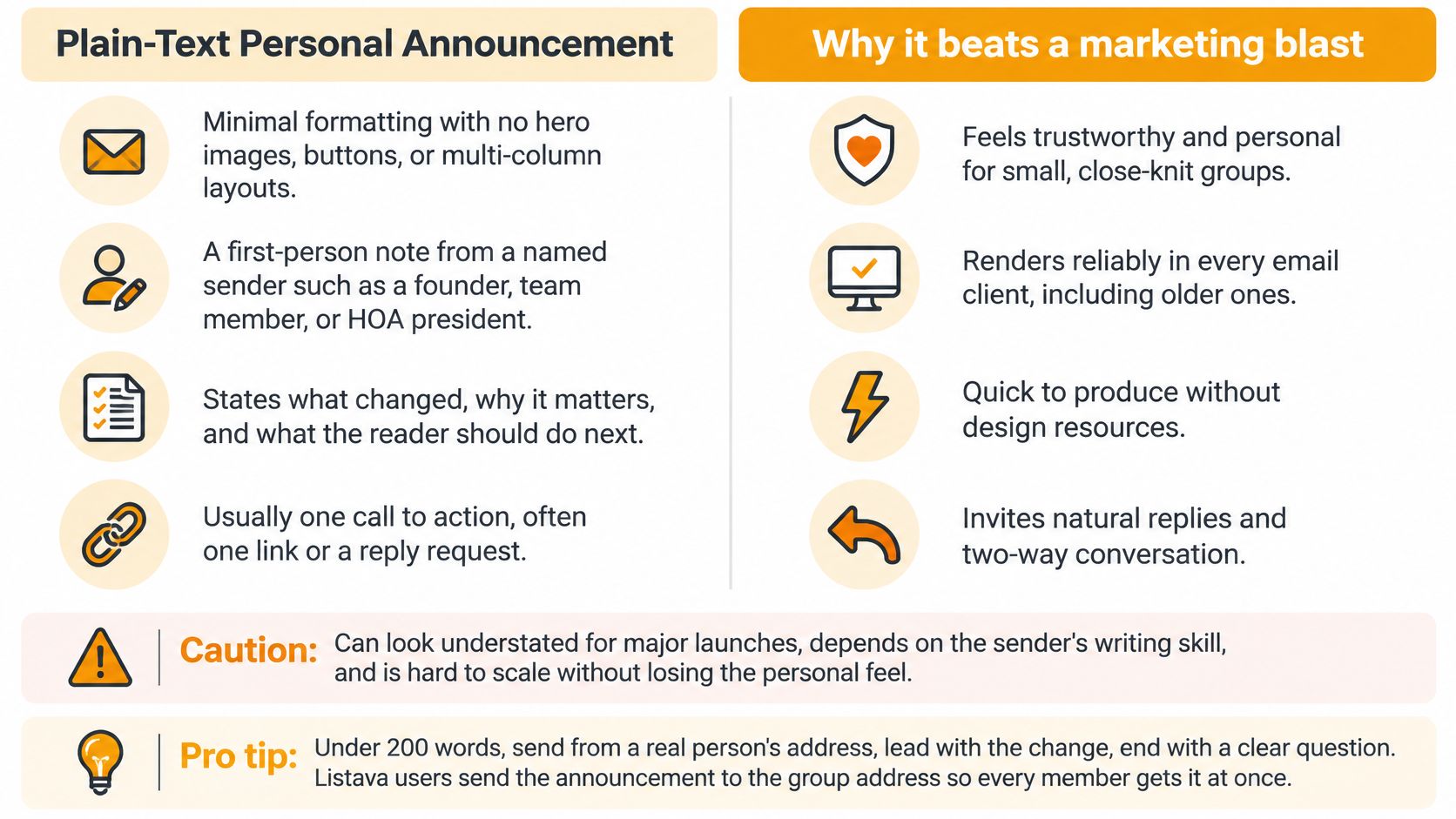
Use a recognizable sender name and a monitored reply address. A personal tone doesn't require storing the organization's communication in somebody's personal Gmail account.
The trade-off is visibility: plain text won't look like a major launch. That's often appropriate. Check the reply destination before inviting questions, especially when payment details or personal circumstances might otherwise reach the whole group.
2. Hero-Image Product Launch Announcement
A striking image can make a new offering feel substantial. It can also leave members staring at a blank rectangle.
The familiar Apple-style approach translates best when appearance helps explain the product: a redesigned clubhouse booking page, a club publication, or a new digital resource. It translates poorly when the news is that a button moved.

Make the Words Work Without the Picture
- Subject pattern: Introducing the club's digital field guide.
- Opening move: Explain what members can now find or do, in live text above the image.
- Single action: Open the field guide, using a descriptive text link or clearly labeled button.
For a downloadable publication, confirm the ebook storefront and delivery process before announcing availability. A handsome cover doesn't help someone retrieve a missing file.
Accessibility deserves attention: Knak's email accessibility analysis cites an assessment of 443,585 emails in which 99.89% contained issues rated serious or critical.
Use readable text, strong contrast, and useful alt text. Compare HTML and plain-text email before choosing the format. If maintaining the layout requires a designer every time, reserve it for news that warrants the work.
3. What's New Changelog Digest
Not every improvement deserves its own interruption. A club that changes its reservation form, updates its equipment guide, and fixes its directory can bundle those changes into a digest.
The important distinction is between information members can browse and action they must take. Don't bury a required registration change beneath cheerful housekeeping.
Subject pattern: What's new for club members this month
Opening move: Start with the update that changes members' next task.
Single action: Review the updated member guide.
Organize Around Member Tasks
- Action needed: Explain any required change first, including who it affects.
- Now available: Name the new capability and the problem it solves.
- Fixed or clarified: Describe the practical improvement without reproducing technical release notes.
For example, a car club's digest might explain a revised event booking process, clearer equipment checkout instructions, and a corrected venue map. Each entry needs a short heading and enough explanation to be useful without another click.
Keep a predictable rhythm, but don't send an empty digest merely because the calendar says so. For recurring structure, use the principles in writing a newsletter members can scan.
The trade-off is urgency. A digest reduces inbox clutter, but members learn to treat it as optional reading. Send consequential deadlines separately rather than hoping bold text will turn a newsletter into an emergency notice.
4. Waitlist or Early-Access Invitation
Early access works when you need to learn before inviting everyone. It falls flat when exclusivity is just decoration.
Say a pickleball league is introducing a booking tool. Invite members who volunteered to test it, explain what's unfinished, and give them a way to complete a real booking. Don't describe unpaid troubleshooting as a prestigious privilege.

Subject pattern: Your invitation to test the new court booking tool
Opening move: You volunteered to help test booking before we invite the rest of the league. The tool is ready for a trial reservation.
Single action: Make a test booking.
High-intent audiences can respond differently from general lists. Benefit Cosmetics' waitlist customers generated a 10.10% average click-through rate in the launch campaign described by Bloomreach.
For an organizer, the useful lesson is readiness, not a promised result. Invite manageable groups so someone can answer questions, and explain how wider access will follow.
Keep feedback requests in the confirmation or follow-up message. The invitation's immediate job is getting the tester through the intended task. Clicking an invitation isn't the same as successfully using the tool.
5. Launch-Day Community Announcement
Subject pattern: The new congregation calendar is live
Opening move: Thank the people who helped, then say what members can now do.
Single action: Open the calendar and find the next gathering.
That's a workable community launch. Asking people to open the calendar, share it, submit feedback, and recruit friends is a committee agenda disguised as an email.
A launch-day message suits a tool that's ready for ordinary use. Name the launch day and clarify whether members should start using it immediately or whether an existing process still applies. Avoid artificial urgency when nothing changes tomorrow.

A congregation administrator could introduce the calendar with a short explanation of which events appear there and who maintains it. That ownership detail matters more than celebratory adjectives. Members need to know whether the calendar is dependable.
Use community announcement examples to match the tone to the occasion. A new reading tracker can sound cheerful; a replacement emergency-notice system needs sober clarity.
The trade-off is support demand. Launch only when someone can handle access problems and corrections. Send a brief thank-you afterward, but don't turn every member into your promotional department.
6. Step-by-Step How-To Announcement
Sometimes the announcement and the instructions should be the same email. This is especially useful when a new feature changes a familiar task, such as reserving a hall or paying club dues.
Subject pattern: How to reserve the hall using the new booking page
Opening move: Explain that reservations now start online, then show the path to completion.
Single action: Submit a reservation request.
Write the Steps From the Member's Side
Use a short numbered sequence for actions that must happen in order:
- Open the hall reservation page.
- Select the room and available time.
- Enter your contact details and submit the request.
Then explain what success looks like. If a request still needs approval, say so. Otherwise, members may mistake submission for a confirmed booking and arrive carrying folding chairs.
Test the instructions while signed out of the administrator account. Use text alongside screenshots, and identify the interface version if the service labels one. Instructions that only work with committee permissions aren't member instructions.
A video can supplement the written path, but it shouldn't be the only way to follow it.
The trade-off is length. Keep the essential steps in the email and move troubleshooting elsewhere. Readers shouldn't need to finish a training course to discover whether their booking worked.
7. Change Notice and Transition Announcement
A transition announcement is a service notice, not a victory lap. Members need to know what changes, when it changes, and what they must do.
Say a neighborhood association is replacing its old mailing address. The opening should name both addresses and explain the handover. Save the history of the mailing-list debate for the minutes.
Subject pattern: New neighborhood email address from [effective date]
Opening move: From [effective date], send neighborhood messages to [new group address] instead of [old address].
Single action: Update the neighborhood address in your contacts.
Replace the placeholders before sending. Dates belong in the subject and body because members may search for the message later.
- Explain the reason: Give a practical explanation, such as preserving the list when volunteer officers change.
- Protect the handover: Keep forwarding active where supported, and test it from an outside account before relying on it.
- Keep a fallback: Identify a monitored contact route for members whose messages bounce or whose address-book changes fail.
Send a reminder before the switch and another notice when it takes effect. Don't promise that forwarding will prevent every lost message.
The trade-off is repetition. Some members will find reminders unnecessary; others will only notice the final one. A mildly repetitive transition is preferable to a silent, broken list.
The 7 announcement formats at a glance
| Format | Best for | Effort to produce | Group-audience fit | |---|---|---|---| | Plain-text personal announcement | A brief, personal update with one clear action | Low; minimal formatting and copy | Strong for small, close-knit groups | | Hero-image product launch announcement | A major launch where visual impact matters | High; requires polished visuals and design | Best for consumer-facing groups; may feel formal for community groups | | What's New changelog digest | Sharing several updates on a regular schedule | Moderate; needs ongoing update tracking and curation | Good for groups that value concise, recurring updates | | Waitlist or early-access invitation | Offering limited access to an engaged subgroup | Moderate; requires waitlist and access management | Good for pilot groups; explain when others will get access | | Launch-day community announcement | Mobilizing an existing audience on launch day | Moderate; requires timely coordination and follow-up | Strong for active communities with engaged supporters | | Step-by-step how-to announcement | Helping members use a new feature or process | Moderate; requires clear, tested instructions | Strong for groups with varied technical experience | | Change notice and transition announcement | Explaining a change and helping users move to a new process | Moderate; requires accurate dates, steps, and reminders | Strong for groups needing clear transition guidance |
Pick One Format and Send It
Match the format to the weight of the news. Use plain text for a routine improvement, a digest for related minor changes, and a how-to announcement when members need instructions. Save the hero image for a launch whose appearance helps explain its value.
Choose early access when you need a supported trial. Use a community launch when the tool is ready for everyone, and a change notice when an existing habit must stop or move elsewhere. Don't dress a transition as a celebration and expect readers to infer the deadline.
Before you compare launch email platforms, settle the communication problem:
- Recognizable sender: Make responsibility clear and ensure someone monitors replies.
- Focused message: Explain the change in the opening, not after the welcome paragraph.
- Clear action: Give members a task they can complete and recognize as finished.
Send yourself a test. Read it on a phone, block the images, and follow the action without using administrator access. Check the destination page as carefully as the email.
For an established group, distribution shouldn't require another dashboard for members to learn. With Listava, we provide a shared group address that distributes messages to members' existing inboxes; replies return to the group, and members don't need accounts or apps. That suits ongoing community communication, not unsolicited launch promotion.
Judge the result by what members do: complete a booking, try the new process, or ask a useful question. A polished announcement that leaves everyone wondering what happens next still needs editing.
Listava gives your group a shared email address for announcements and replies, without asking members to create accounts or download an app. Visit Listava to schedule a demo and see how the setup could work for your HOA, club, congregation, or family group.