What Is an Email Alias? a Plain-English Guide
What is an email alias? Learn how it forwards mail to one or many inboxes, common uses, and how it differs from a group address.
An email alias is an address that passes mail on to one or more existing mailboxes and has no mailbox of its own.
Perhaps you're taking over your neighborhood association's email, and residents still send questions to the former treasurer. Or you want a shopping address without another inbox to check. In either situation, the useful distinction is between the address people use and the mailbox where their messages arrive.
Table of Contents
- What an Email Alias Is and Why It Exists
- How an Alias Routes One Message to Several Inboxes
- Plus Addressing, Domain Aliases and Catch-All Addresses
- Everyday Uses for Email Aliases
- Privacy, Deliverability and Other Limits of Aliases
- Alias, Group List and Forwarding Compared and How to Choose
What an Email Alias Is and Why It Exists
Think of an alias as a front desk. Visitors know where to arrive, but the receptionist directs them to whoever handles their request. The public contact point stays put even when the people behind it change.
An email alias does that job for incoming messages. Instead of storing mail itself, it tells the receiving mail system where to deliver it.
That distinction is easier to picture at an office reception desk.

The address and the destination are different things
The internet mail standard RFC 5321 describes both alias expansion, which replaces a public address with destination addresses, and list expansion, which redistributes a message to list members. These can look identical to the person sending the message, although the receiving system handles them differently.
Say a gardening club publishes [email protected] on its membership forms. The club can route incoming questions to its current committee, then update those destinations after an election. Members keep using the familiar address.
The club doesn't need to ask everyone to replace an old volunteer's personal address in their contacts. It changes the routing rule instead.
What an alias doesn't create
An alias usually isn't a separate login, user account, or inbox. Your provider may offer those features alongside aliases, but they're different tools.
- An address tells senders where to direct mail.
- A mailbox stores delivered messages.
- An account controls access to a service and its settings.
If you're asking “what is an email alias?” because you need another place to store messages separately, you may want another mailbox. If you only need another public address, an alias may be enough.
Practical rule: If the address should stay the same while the person behind it changes, an alias is a good fit.
How an Alias Routes One Message to Several Inboxes
Suppose a resident sends a maintenance question to [email protected]. The resident doesn't need the committee's private addresses because the receiving mail system handles that lookup.
The routing process looks like this.
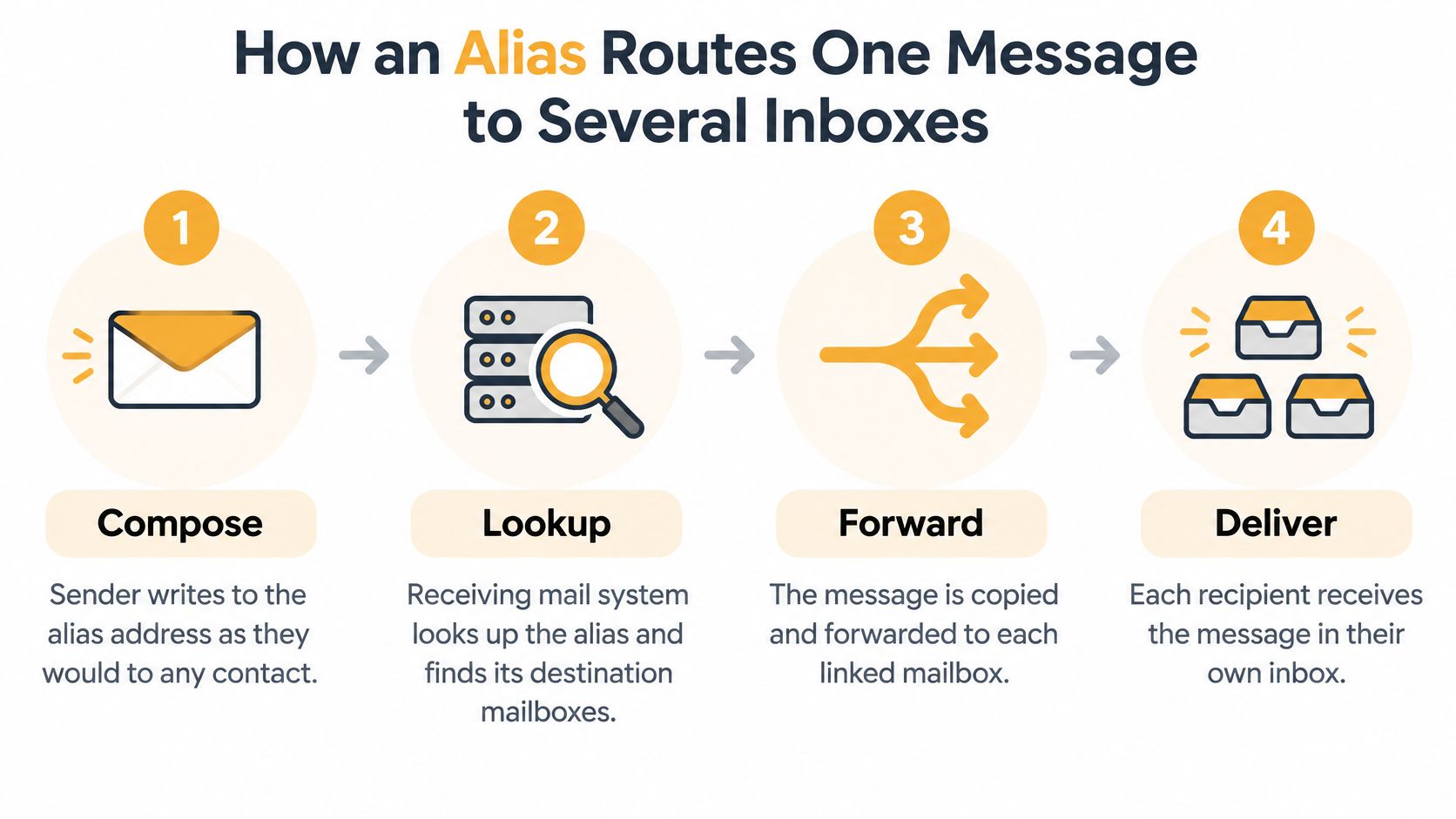
From the Send button to delivery
-
The sender addresses the message. They enter the alias in the To field and press Send, just as they would for any other contact. Their email app doesn't need to know who receives mail behind that address.
-
The receiving system looks up the alias. It checks its saved routing settings and finds the destination mailboxes. The organizer controls those settings, not the sender.
-
The system expands the recipients. Under the alias-expansion model described in RFC 5321's routing rules, the server substitutes each destination address and forwards or delivers the message. The message content remains unchanged during that expansion.
-
Each mailbox receives its delivery. Recipients read the message in their usual email app. The routing destinations aren't automatically added to the visible To field, although addresses already present in the message's headers remain visible.
-
Delivery problems are handled for each destination. An invalid address can fail while other destinations receive their copies. A full mailbox may trigger retries or an eventual failure notice, so a missing message doesn't necessarily mean the entire alias failed.
Routing still needs an owner
Someone must maintain the destination list. When a volunteer leaves, remove their address in the alias settings rather than asking every resident to change how they send messages.
For a practical way to organize the recipients before setup, use this guide to grouping email addresses. Keep the list focused on people who need the incoming mail, and record who's responsible for changes.
This video offers another explanation of email aliases.
Test from an outside address, not just an account within the same mail system. Confirm receipt with every intended recipient, and check spam folders before declaring the setup ready.
Plus Addressing, Domain Aliases and Catch-All Addresses
Providers use the word alias for several related features. Before choosing one, check whether you need easier sorting, a stable public identity, or addresses you can create on demand.
Plus addressing for sorting
With plus addressing, you add a tag to an existing address, such as [email protected] or [email protected]. Supporting providers deliver these messages to the base mailbox, and you can use the full recipient address in a filter.
It's convenient for separating receipts from newsletters without creating individual routing entries. However, the base address is visible: someone can remove +shop and recognize [email protected].
A plus tag is an organizational label, not a strong disguise for your main address.
Custom-domain addresses for a public role
An address such as [email protected] can route mail to an existing mailbox while presenting your own domain to senders. Technically, this is an address alias on a custom domain; some providers use domain alias to mean an additional domain mapped onto an existing domain's addresses.
For a club or association, control of the domain matters as much as control of the forwarding settings. Keep its registration and recovery access under organizational ownership, and follow the mail provider's domain-verification instructions.
Catch-all delivery for unmatched addresses
A catch-all accepts mail sent to otherwise undefined addresses at your domain. You can give a shop a unique address without creating that address beforehand.
The trade-off is unwanted delivery to guessed names and typos. Before enabling it, check these controls:
- Filtering: Can you sort messages by the original recipient address?
- Blocking: Can you reject an individual address after it attracts spam?
- Support: Does your provider offer catch-all delivery and plus addressing?
These features change how mail reaches your inbox. They don't, by themselves, create separate storage or separate access permissions.
Everyday Uses for Email Aliases
Having several email addresses is common, so the useful question is what each address should do.
An alias is a delivery label. Mail sent to that label lands in an inbox you already read. The label does not keep a membership roster, and it does not make the message invisible to the service that handles it. Routing, list management, and privacy are three different jobs. Before you publish an alias, check where it delivers, whether a reply shows the alias or your underlying address, and what happens to mail after you retire the label.
Shopping and applications
A freelancer gives an online stationery shop its own alias. Receipts arrive in her regular inbox, where a filter files them under business purchases. If unwanted messages later target that alias, she can disable it after updating any account-recovery details that rely on it.
The address marks which signup she used. A later flood of junk does not prove the shop shared it on purpose. A breach, a forward, or another exposure can produce the same mail. The provider that routes the alias still processes the message, so the label sorts her mail without turning the purchase into a private channel.

A job seeker might use an applications alias so recruiter replies sit apart from personal correspondence. Before retiring it, they should preserve access to recruitment portals and ongoing conversations. Turning off an alias also turns off legitimate mail sent to it.
Community roles and family updates
A neighborhood treasurer can publish a dues address rather than a personal one. Questions reach the current officeholder, while the association keeps responsibility for the address and its recovery settings. The alias routes correspondence. It does not grant access to bank accounts or financial records, and it does not store a member roster by itself. Someone still has to decide who reads the mail and who answers.
A family coordinator might create an address that reaches the relatives handling travel. Itinerary changes arrive without the sender rebuilding a recipient list each time. That convenience is still a routing choice. Sensitive medical updates need a narrower audience, not automatic delivery to every relative on the trip. If replies should go back to the whole group, and the address should survive when one coordinator moves away, a shared list is the tool to check, not a personal alias that only drops mail into one inbox.
Use a small ownership checklist:
- Per vendor: Record which signup uses the alias.
- Per role: Name the person responsible for answering.
- Per group: Record the intended recipients and who maintains them.
- For every alias: Keep a note of where it routes, how replies appear, and when it should be retired.
The goal is clear routing and correspondence you can still manage after the original owner steps away.
Privacy, Deliverability and Other Limits of Aliases
Address masking isn't message confidentiality. A forwarding service may hide your destination address from the sender while still processing the content, routing details, timestamps, and delivery relationships, a distinction explained in Anoni's email-alias documentation.
Privacy from other members is a separate concern from privacy from the operator. Our policy is never to share or sell members' email addresses, but we collect addresses, list names and descriptions, and messages sent through the service. Those are different questions, and readers should evaluate both.
Check the full delivery path
Forwarding also changes how receiving servers assess a message. As MailPilots' alias deliverability guide explains, authentication problems can affect forwarded mail: SPF may fail after forwarding, and changes to a message can invalidate DKIM signatures, potentially leaving DMARC requirements unmet.
Sender Rewriting Scheme, or SRS, addresses part of the forwarding problem, while ARC can preserve authentication assessments through intermediaries. Neither should be treated as a promise that every receiving system will accept every message.
Alias limits and what to check
| Limit | What it means | What to check | |---|---|---| | Provider access to content | The service can read mail that is not end-to-end encrypted | Whether it reads or stores message content | | Logs and metadata | Routing details, timestamps, and sender pairs may be kept | How long logs and metadata are retained | | Forwarding authentication | Forwarded mail can fail SPF, DKIM, or DMARC checks | Whether it uses Sender Rewriting Scheme or ARC | | Sending as the alias | Outgoing mail from the alias needs separate setup | Whether the sending domain is authenticated | | Service continuity | The alias can stop working if the provider closes | Whether you can export addresses and archives |
Test replies as well as incoming mail
Open a delivered message and inspect both From and Reply-To before replying. An incoming alias doesn't automatically authorize you to send as that address, and an ordinary reply could expose your personal address.
For broader mailbox choices, KeenVerdict lets you compare private email providers. For organizers, this guide to email list privacy addresses the separate issue of protecting participants' addresses.
Keep an alternative route to essential contacts and export important correspondence. If the operator closes, access to its address, routing records, and any hosted archive may end.
Alias, Group List and Forwarding Compared and How to Choose
A forwarding address, an alias, and a group list can all redirect incoming mail. The important difference is who manages the conversation after delivery.
For this comparison, simple forwarding means an address with a single destination. Providers sometimes use “forwarding” more broadly, including delivery to multiple recipients.
Alias, group list and forwarding compared
| Feature | Email alias | Group email list | Simple forwarding address | |---|---|---|---| | Recipients | One or more destination mailboxes | Every current member | Exactly one mailbox | | Member addresses visible to each other | Publishing the alias alone doesn't reveal destinations | Hidden in private list services, visible in CC lists | Not applicable | | Where replies go | Usually to the sender unless configured otherwise | To the group when reply-to-group is configured | Usually to the sender | | How membership changes | Edit destinations in alias settings | Add or remove members through the list manager | Change the single destination | | Needs a separate mailbox | No | No | No | | Best fit | Role address with selected receivers | Clubs, boards, congregations, neighborhoods | A person's personal routing |
Routing versus managing a conversation
An alias can deliver a meeting question to a committee without ensuring that committee members see each other's answers. A managed group list can add reply handling, membership controls, and address privacy to that delivery function.
With our group model, members receive messages sent to the group's address, and replies go back to the group. Members don't need accounts or new apps, and the list stays available when a board member moves away because it doesn't live in anyone's inbox.
If you're comparing list-management options, you can browse the Mailman app listing on Awesome Tools as another starting point. Evaluate the administrative work as well as the address itself: someone still needs responsibility for membership and access.
Choose according to who must act
-
A person handles incoming requests. Choose an alias when mail needs a clear owner, such as the current treasurer. Add backup recipients only when their responsibilities are clear.
-
Several people need to discuss the same messages. Choose a group list with explicit reply-to-group behavior. Confirm that members understand who will receive their replies.
-
The address must survive leadership changes. Put administrative ownership under the organization's control. Document the handover instead of relying on a departing volunteer's personal recovery details.
-
The setup is ready to publish. Run an outside-sender delivery test and a reply test. Confirm recipient coverage, spam placement, and the addresses visible in the resulting conversation.
A shared email address should match the work people do, not merely look tidy on a contact page. Pick the address you publish today and decide whether it needs straightforward routing or a managed group conversation.
Listava gives your group a shared email address that reaches members in their existing inboxes, with group replies and controls that keep personal addresses hidden from other members. Visit Listava to create an address for your club, board, or family, then invite consenting members and test the conversation before publishing it.